Of course! The requests library is the de facto standard for making HTTP requests in Python, and its Session object is a powerful feature for making your code more efficient and robust.
Here’s a comprehensive guide to using requests.Session.
What is a requests.Session?
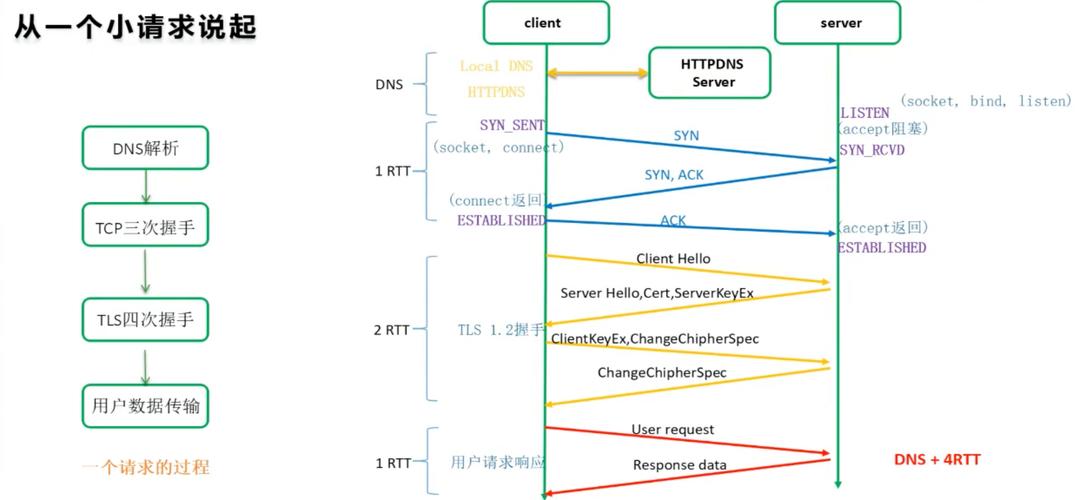
At its core, a Session object is a container that persists certain parameters across requests. Think of it as a "browser tab" or a "connection" that you keep open to interact with a specific website.
The two most important features a Session provides are:
- Connection Pooling: This is the killer feature. When you make a request to the same server (e.g.,
api.example.com) multiple times, aSessionobject will reuse the underlying TCP connection. This avoids the overhead of establishing a new connection for every single request, which significantly improves performance. - Persistence of Parameters: You can set headers, cookies, or other parameters on the
Sessionobject itself, and they will automatically be included in all subsequent requests made with that session.
When Should You Use a Session?
You should strongly consider using a Session object when:
- You are making multiple requests to the same domain. This is the most common and beneficial use case.
- You need to maintain cookies across requests. This is essential for logging into a website and then accessing protected pages.
- You want to apply the same set of headers (like
User-Agent) to all your requests. - You are working with an API that requires authentication tokens.
How to Use a Session: A Practical Guide
Let's break it down with code examples.
Basic Usage
First, you need to import the Session class and create an instance.
import requests
# Create a Session object
session = requests.Session()
# Now, use the session to make requests
# All requests made with this session will share the same connection
response1 = session.get('https://httpbin.org/get')
print(f"Status Code 1: {response1.status_code}")
print(f"Headers 1: {response1.json()['headers']}")
response2 = session.get('https://httpbin.org/headers')
print(f"\nStatus Code 2: {response2.status_code}")
print(f"Headers 2: {response2.json()['headers']}")
# Close the session when you're done to release the connection pool
session.close()
Persistent Headers and Cookies
This is where Session really shines. You can set headers and cookies once on the session object, and they will be sent with every request.
import requests
# Create a session
session = requests.Session()
# Set headers that will be sent with all requests from this session
session.headers.update({
    'User-Agent': 'MyCoolApp/1.0',
    'Accept-Language': 'en-US,en;q=0.9'
})
# Set cookies that will be sent with all requests
session.cookies.set('session_token', 'abc123xyz')
# --- Make requests ---
# This request will automatically include our User-Agent and session_token cookie
response1 = session.get('https://httpbin.org/headers')
print("Request 1 Headers:")
print(response1.json()['headers']) # You will see 'User-Agent' and 'Cookie' here
# This request will also include them!
response2 = session.get('https://httpbin.org/cookies')
print("\nRequest 2 Cookies:")
print(response2.json()['cookies']) # You will see 'session_token'
session.close()
Handling Authentication
Many APIs require authentication. A Session is the perfect place to store your credentials or authentication token.
import requests
# Create a session
session = requests.Session()
# Set the authentication token as a header
# This is a common pattern for REST APIs
session.headers.update({
    'Authorization': 'Bearer YOUR_SECRET_API_TOKEN_HERE'
})
# Now, all requests made with this session are authenticated
try:
    # A hypothetical API endpoint
    response = session.get('https://api.example.com/v1/users/me')
    if response.status_code == 200:
        user_data = response.json()
        print(f"Welcome, {user_data['name']}!")
    else:
        print(f"Error: {response.status_code} - {response.text}")
except requests.exceptions.RequestException as e:
    print(f"An error occurred: {e}")
session.close()
Overriding Session Parameters Per Request
What if you need to send a different header for just one request, without changing the session's default? You can pass it directly to the request method, and it will override the session's default for that specific call.
import requests
session = requests.Session()
session.headers.update({'X-API-Key': 'default-key-123'})
# This request will use the default X-API-Key
response1 = session.get('https://httpbin.org/headers')
print("Request 1 Headers:")
print(response1.json()['headers']['X-Api-Key'])
# This request will OVERRIDE the session's X-API-Key for this call only
response2 = session.get('https://httpbin.org/headers', headers={'X-API-Key': 'special-key-for-this-request'})
print("\nRequest 2 Headers (overridden):")
print(response2.json()['headers']['X-Api-Key'])
# The next request will go back to using the session's default key
response3 = session.get('https://httpbin.org/headers')
print("\nRequest 3 Headers (back to default):")
print(response3.json()['headers']['X-Api-Key'])
session.close()
Best Practices: The with Statement
Manually calling session.close() is good practice, but it's easy to forget, especially if an error occurs. The best practice is to use a with statement, which ensures the session is properly closed even if exceptions are raised.
import requests
# The 'with' statement handles closing the session automatically
with requests.Session() as session:
    # Set up the session
    session.headers.update({'User-Agent': 'MyApp/2.0'})
    # Make all your requests here
    response = session.get('https://httpbin.org/get')
    # The session is automatically closed when the 'with' block exits
    print(f"Request successful: {response.status_code}")
# You can't use the session here, it's already closed
# session.get('...') # This would raise an error
Session vs. requests.get(): The Key Differences
| Feature | requests.get() (or post, put, etc.) |
requests.Session() |
|---|---|---|
| Connection | Creates a new connection for every request. | Reuses connections (connection pooling). |
| Scope | Stateless. Each request is independent. | Stateful. Maintains parameters (headers, cookies) across requests. |
| Performance | Slower for multiple requests to the same host. | Faster for multiple requests to the same host. |
| Use Case | Quick, one-off scripts or requests to different servers. | Long-running scripts, web scraping, API interaction. |
Summary
- Use
requests.Session()when you interact with the same server multiple times. - It gives you connection pooling for speed and persistent parameters for convenience.
- Set headers, cookies, and auth tokens on the session object to apply them to all requests.
- You can override these parameters for individual requests if needed.
- Always use a
with requests.Session() as session:block for clean, safe resource management.