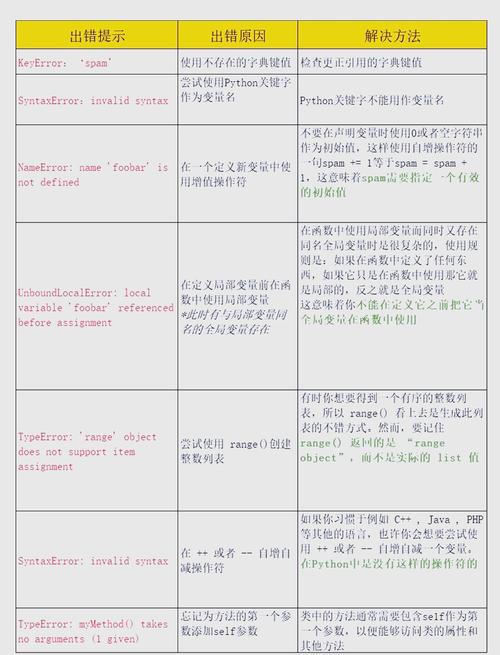
Of course! A "Syntax Error" in Python is one of the most common errors you'll encounter, especially when you're starting out.
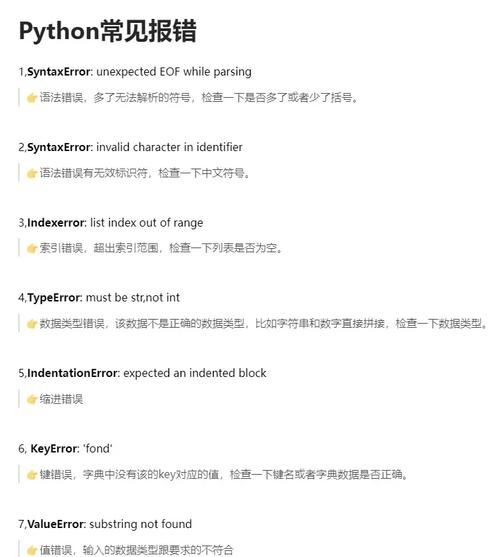
The good news is that it's also one of the easiest to fix because Python tells you exactly where the problem is.
What is a Syntax Error?
Think of it like the grammar rules of a language. If you say "I to went store," your brain immediately flags "to went" as incorrect grammar. A computer does the same thing with code.
A SyntaxError means you've broken Python's rules for how code must be written. The Python interpreter reads your code line by line, and as soon as it hits something it doesn't understand, it stops and raises a SyntaxError.
The Anatomy of a Syntax Error Message
When you get a syntax error, Python gives you a very helpful message. Let's break it down with an example.
Code with an error:
print("Hello, world!"
name = "Alice"
Error message you'll see:
File "my_script.py", line 1
    print("Hello, world"
                      ^
SyntaxError: EOL while scanning string literal
Let's dissect this message:
-
File "my_script.py", line 1: This tells you the file and the specific line number where the error was found. This is your first clue. (图片来源网络,侵删)
 -
print("Hello, world": This is the line of code that caused the problem. Python even prints a^(a "caret") to point to the exact character where it got confused. -
SyntaxError: This is the type of error. -
EOL while scanning string literal: This is the most important part. It's Python's best guess at why the code is wrong. "EOL" means "End of Line." It's telling you that it saw the beginning of a string () but never found the end of it () before the line ended.
Common Causes of Syntax Errors (and How to Fix Them)
Here are the most frequent culprits, with examples.
Missing Colons
Colons are required to start a new block of code, like in if, for, def, class, and while statements.
❌ Wrong:
if x > 5
    print("x is greater than 5")
✅ Right:
if x > 5:  # <-- Add the colon!
    print("x is greater than 5")
Mismatched Parentheses, Brackets, or Braces , [],
Every opening bracket must have a corresponding closing bracket. This is a very common error, especially with nested functions or lists.
❌ Wrong:
my_list = [1, 2, 3, (4, 5]
print(my_list)
✅ Right:
my_list = [1, 2, 3, (4, 5)]  # <-- Add the closing parenthesis
print(my_list)
Missing or Incorrect Quotes or
Strings must be enclosed in matching quotes (either double or single, but not mixed on the same string).
❌ Wrong:
message = 'Hello world" # Mismatched quotes
✅ Right:
message = 'Hello world'   # Use matching single quotes
# or
message = "Hello world"   # Use matching double quotes
Incorrect Indentation
Python uses indentation (spaces or tabs) to define code blocks. It's not just for readability—it's mandatory. A common mistake is mixing tabs and spaces, which can also cause an IndentationError (a subclass of SyntaxError).
❌ Wrong:
def my_function():
print("This line is not indented correctly")
✅ Right:
def my_function():
    print("This line is indented with 4 spaces") # <-- Use 4 spaces (standard)
Misspelled Keywords or Function Names
If you misspell a Python keyword like for, while, def, import, etc., Python won't recognize it.
❌ Wrong:
fore i in range(10): # 'fore' is not a keyword
    print(i)
✅ Right:
for i in range(10): # <-- Correct spelling is 'for'
    print(i)
Using Instead of in an if Statement
A single equals sign () is for assignment (giving a variable a value). A double equals sign () is for comparison (checking if two values are equal).
❌ Wrong:
x = 10
if x = 5:  # This tries to assign 5 to x, which is not a valid comparison
    print("x is 5")
✅ Right:
x = 10
if x == 5:  # <-- Use == for comparison
    print("x is 5")
How to Debug a Syntax Error: A Step-by--Step Guide
- Read the Error Message Carefully: Look at the
Fileandlinenumber. Go directly to that line in your code. - Look at the Caret
^: The^points to the location of the error. The mistake is often right before the caret. - Check the Common Causes: Run through the list above. Is there a missing colon? Are my parentheses balanced? Are my quotes correct?
- Check the Line Above: Sometimes the error is actually on the previous line. For example, if you forget a closing parenthesis, the error might be reported on the next line.
- Use an IDE or Editor: Modern code editors like VS Code, PyCharm, or even a simple one like IDLE will often highlight syntax errors for you in real-time with red squiggly lines. This is a huge help.
By following these steps, you'll be able to find and fix almost any SyntaxError in no time. Happy coding