Of course! Here is a comprehensive guide to using a List<Integer> in Java, covering everything from basic creation to common operations and best practices.
What is a List<Integer>?
A List<Integer> is an interface in Java that represents an ordered collection (also known as a sequence). It allows you to store a dynamic number of integer values. The key features of a List are:
- Ordered: Elements are stored in the order they are added.
- Allows Duplicates: You can add the same integer value multiple times.
- Allows Nulls: You can add
nullvalues to the list.
Since List is an interface, you cannot create an instance of it directly. You must use one of its concrete implementations. The most common ones are:
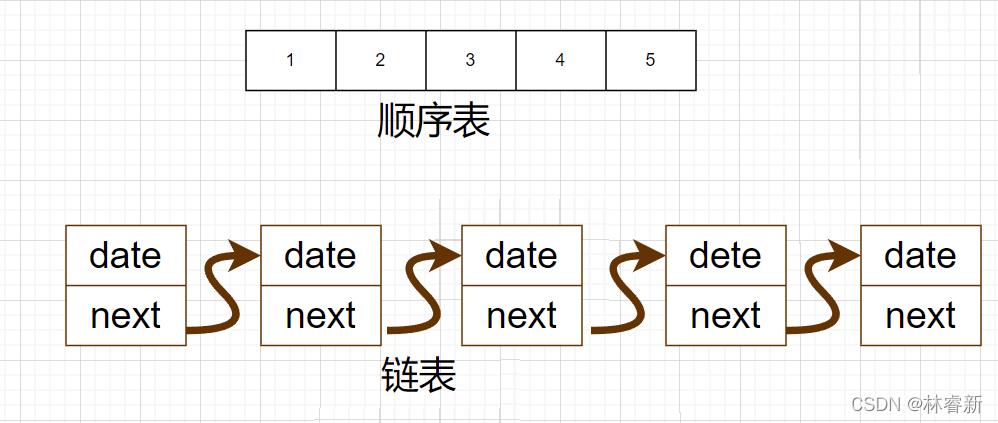
ArrayList: The most popular choice. It's like a resizable array. It provides fast random access (get/set) but can be slower when adding or removing elements from the middle of the list.LinkedList: Implemented as a doubly-linked list. It's faster for adding or removing elements from the beginning or middle of the list but slower for random access.
How to Create a List<Integer>
You typically create a list using the ArrayList or LinkedList class and assign it to a List reference variable.
Before Java 8 (The Classic Way)
This is the traditional way to create a list. It's still widely used.
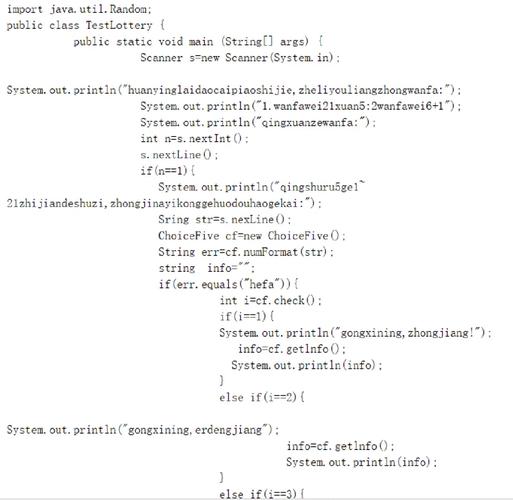
import java.util.ArrayList;
import java.util.List;
public class CreateListExample {
    public static void main(String[] args) {
        // Create an ArrayList of Integers
        List<Integer> numbers = new ArrayList<>();
        // Create a LinkedList of Integers
        List<Integer> linkedNumbers = new LinkedList<>();
    }
}
Modern Way (Java 9+ - List.of())
Since Java 9, you can use the List.of() factory method to create an immutable list (a list whose contents cannot be changed after creation). This is great for defining fixed collections of constants.
import java.util.List;
public class CreateImmutableListExample {
    public static void main(String[] args) {
        // Create an immutable list of integers
        List<Integer> immutableNumbers = List.of(10, 20, 30, 40, 50);
        // This will cause an UnsupportedOperationException at runtime
        // immutableNumbers.add(60);
    }
}
Common Operations
Here are the most frequent operations you'll perform on a List<Integer>.
Adding Elements
add(E element): Appends an element to the end of the list.add(int index, E element): Inserts an element at a specific position.
List<Integer> numbers = new ArrayList<>();
numbers.add(10);          // Add 10 to the end
numbers.add(20);          // Add 20 to the end
numbers.add(1, 15);       // Insert 15 at index 1
System.out.println(numbers); // Output: [10, 15, 20]
Accessing Elements
get(int index): Retrieves the element at a specific index.size(): Returns the number of elements in the list.
List<Integer> numbers = List.of(10, 20, 30);
int firstElement = numbers.get(0); // firstElement is 10
int listSize = numbers.size();    // listSize is 3
System.out.println("First element: " + firstElement);
System.out.println("List size: " + listSize);
Updating Elements
set(int index, E element): Replaces the element at the specified index with a new element.
List<Integer> numbers = new ArrayList<>(List.of(10, 20, 30));
System.out.println("Original: " + numbers); // [10, 20, 30]
numbers.set(1, 25); // Replace the element at index 1 (which is 20) with 25
System.out.println("Updated:  " + numbers); // [10, 25, 30]
Removing Elements
remove(int index): Removes the element at the specified index.remove(Object o): Removes the first occurrence of the specified element.
List<Integer> numbers = new ArrayList<>(List.of(10, 20, 20, 30, 40));
numbers.remove(1);             // Removes the element at index 1 (value 20)
System.out.println("After removing index 1: " + numbers); // [10, 20, 30, 40]
numbers.remove(Integer.valueOf(20)); // Removes the first occurrence of the element 20
System.out.println("After removing value 20: " + numbers); // [10, 30, 40]
// Note: Using numbers.remove(20) would try to remove the element AT INDEX 20,
// which would likely throw an IndexOutOfBoundsException.
Checking for an Element
contains(Object o): Returnstrueif the list contains the specified element.
List<Integer> numbers = List.of(10, 20, 30);
boolean hasTwenty = numbers.contains(20); // true
boolean hasFifty = numbers.contains(50);  // false
System.out.println("Contains 20? " + hasTwenty);
System.out.println("Contains 50? " + hasFifty);
Iterating Over a List<Integer>
There are several ways to loop through the elements of a list.
Enhanced For-Loop (For-Each)
This is the most common and readable way to iterate.
List<Integer> numbers = List.of(10, 20, 30, 40);
System.out.println("Using for-each loop:");
for (Integer number : numbers) {
    System.out.println(number);
}
Using an Iterator
The Iterator is a safe way to modify a list while iterating (e.g., removing elements).
List<Integer> numbers = new ArrayList<>(List.of(10, 20, 30, 40));
System.out.println("\nUsing an Iterator:");
for (Integer number : numbers) {
    System.out.println(number);
}
Using Java 8 Streams (forEach)
This is a modern, functional approach.
List<Integer> numbers = List.of(10, 20, 30, 40);
System.out.println("\nUsing Java 8 Stream forEach:");
numbers.forEach(System.out::println); // Method reference
// Or: numbers.forEach(number -> System.out.println(number));
Classic For-Loop with Index
Use this when you need the index of the element.
List<Integer> numbers = List.of(10, 20, 30, 40);
System.out.println("\nUsing classic for-loop with index:");
for (int i = 0; i < numbers.size(); i++) {
    System.out.println("Index " + i + ": " + numbers.get(i));
}
Complete Example
Here is a full, runnable example that demonstrates the concepts above.
import java.util.ArrayList;
import java.util.Arrays;
import java.util.Iterator;
import java.util.List;
public class ListIntegerExample {
    public static void main(String[] args) {
        // 1. Create a new ArrayList
        List<Integer> scores = new ArrayList<>();
        // 2. Add elements
        scores.add(95);
        scores.add(88);
        scores.add(100);
        scores.add(75);
        scores.add(88); // Duplicate is allowed
        System.out.println("Initial list: " + scores);
        System.out.println("------------------------------------");
        // 3. Access elements
        System.out.println("First score: " + scores.get(0));
        System.out.println("Number of scores: " + scores.size());
        System.out.println("------------------------------------");
        // 4. Update an element
        scores.set(1, 90); // Change the score at index 1 from 88 to 90
        System.out.println("After updating index 1: " + scores);
        System.out.println("------------------------------------");
        // 5. Iterate using an enhanced for-loop
        System.out.println("Iterating with for-each:");
        for (Integer score : scores) {
            System.out.println(score);
        }
        System.out.println("------------------------------------");
        // 6. Remove an element by value (first occurrence)
        scores.remove(Integer.valueOf(88)); // Note: Use Integer.valueOf() to avoid confusion with remove(index)
        System.out.println("After removing the value 88: " + scores);
        System.out.println("------------------------------------");
        // 7. Check for an element
        if (scores.contains(100)) {
            System.out.println("The list contains the score 100.");
        }
        System.out.println("------------------------------------");
        // 8. Remove an element by index
        scores.remove(0); // Remove the first element
        System.out.println("After removing the element at index 0: " + scores);
        System.out.println("------------------------------------");
        // 9. Clear the list
        scores.clear();
        System.out.println("After clearing the list: " + scores);
        System.out.println("Is the list empty? " + scores.isEmpty());
    }
}
Key Takeaways
- Use
List<Integer>when you need an ordered collection of integers that can change in size. - Prefer
ArrayListfor most use cases due to its excellent performance for reading and iterating. - Use
List.of()for creating small, fixed-size, immutable lists (since Java 9). - Remember that
list.remove(10)removes the element at index10, whilelist.remove(Integer.valueOf(10))removes the element with the value10. This is a common source of bugs.