Of course! The java.util.Set.contains() method is a fundamental operation when working with the Set interface in Java. Here's a comprehensive breakdown of what it does, how it works, its performance, and examples.
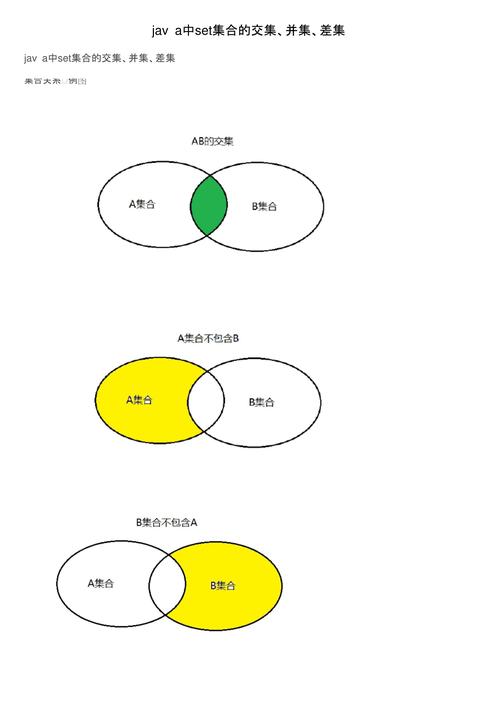
What is Set.contains()?
The contains(Object o) method is used to check if a specified element exists within a Set. It returns:
trueif the set contains the specified element.falseotherwise.
Method Signature:
boolean contains(Object o)
How It Works: The "Magic" Behind the Scenes
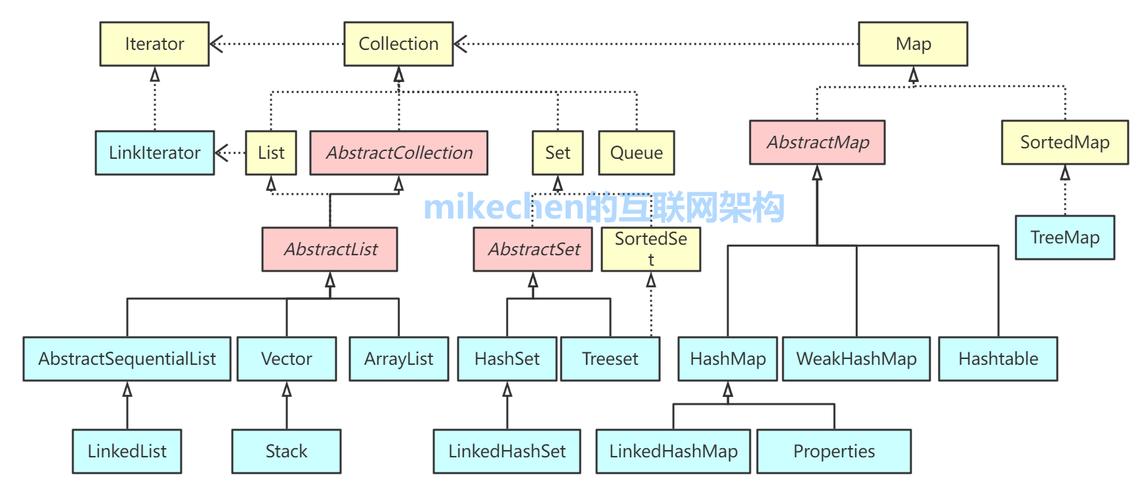
The performance and behavior of contains() depend entirely on the specific implementation of the Set you are using. The two most common implementations are HashSet and TreeSet.
A. HashSet.contains() (The Fastest)
A HashSet is implemented using a hash table. This is why its contains() operation is so fast.
-
Calculate Hash Code: When you call
mySet.contains("apple"), Java first calculates the hash code of the object"apple". A hash code is an integer that represents the object. ForString, this is computed from the characters of the string. -
Find the Bucket: The hash code is used to determine the "bucket" (or index) in the internal array where this element should be stored. This is done very quickly using a modulo operation (
hashCode % array_size). -
Compare within the Bucket: Once the correct bucket is found, Java performs a search within that bucket.
- Best Case: The bucket is empty. The search is instant.
- Worst Case: Multiple different objects have the same hash code (a "hash collision"). They all get stored in the same bucket. In this case, Java must iterate through the objects in that bucket and compare them one by one using the
equals()method to find a match.
Performance: On average, HashSet.contains() has an O(1) time complexity, meaning its execution time is constant and does not depend on the number of elements in the set. In the rare worst-case scenario of many hash collisions, it can degrade to O(n).
B. TreeSet.contains() (Sorted and Slower)
A TreeSet is implemented using a TreeMap (which is a Red-Black Tree, a type of self-balancing binary search tree).
-
Traverse the Tree: When you call
myTreeSet.contains("apple"), Java doesn't use a hash code. Instead, it starts at the root of the tree and compares the target element ("apple") with the element at the current node. -
Navigate: Based on the comparison (using the
Comparatoror the element's naturalcompareTo()method), it navigates left (if the target is smaller) or right (if the target is larger) down the tree. -
Find or Reach a Leaf: It continues this process until it finds the element (return
true) or reaches a point where the element cannot be in the tree (returnfalse).
Performance: Because it has to potentially traverse the height of the tree, TreeSet.contains() has a time complexity of O(log n), where 'n' is the number of elements. While slower than HashSet, it's still very efficient and provides the added benefit of keeping elements in sorted order.
Key Requirement: equals() and hashCode() Contract
For contains() to work correctly with objects you create, you must properly implement the equals() and hashCode() methods.
equals(Object o): This method defines what it means for two objects to be logically equal.contains()uses it to compare an element you're looking for with an element already in the set to see if they are the same.hashCode(): This method must return the same integer for two objects that are equal according to theequals()method. This is crucial forHashSetandHashMapto find the correct bucket.
Golden Rule: If two objects are equal (a.equals(b) is true), they must have the same hash code (a.hashCode() == b.hashCode()).
Code Examples
Example 1: HashSet with Strings
String already has correct equals() and hashCode() implementations, so it works out of the box.
import java.util.HashSet;
import java.util.Set;
public class HashSetContainsExample {
    public static void main(String[] args) {
        Set<String> fruits = new HashSet<>();
        fruits.add("Apple");
        fruits.add("Banana");
        fruits.add("Orange");
        fruits.add("Grape");
        System.out.println("Initial Set: " + fruits);
        // Check for elements that exist
        System.out.println("Set contains 'Apple'? " + fruits.contains("Apple")); // true
        System.out.println("Set contains 'Banana'? " + fruits.contains("Banana")); // true
        // Check for an element that does not exist
        System.out.println("Set contains 'Mango'? " + fruits.contains("Mango")); // false
        // Note: Sets are case-sensitive
        System.out.println("Set contains 'apple'? " + fruits.contains("apple")); // false
    }
}
Example 2: HashSet with Custom Objects (The Pitfall)
If you forget to implement equals() and hashCode(), contains() will not work as you expect.
import java.util.HashSet;
import java.util.Set;
// A simple Product class
class Product {
    private int id;
    private String name;
    public Product(int id, String name) {
        this.id = id;
        this.name = name;
    }
    // Getters
    public int getId() { return id; }
    public String getName() { return name; }
    // NOTE: We are NOT overriding equals() or hashCode() here!
    // Let's see what happens.
}
public class CustomObjectContainsPitfall {
    public static void main(String[] args) {
        Set<Product> products = new HashSet<>();
        Product p1 = new Product(101, "Laptop");
        products.add(p1);
        System.out.println("Set contains the exact object p1? " + products.contains(p1)); // true
        // Now, let's create a new object with the same data
        Product p2 = new Product(101, "Laptop");
        // This will be false because the default Object.equals() checks for reference equality,
        // not logical equality. p1 and p2 are two different objects in memory.
        System.out.println("Set contains a new object with same data? " + products.contains(p2)); // false
    }
}
Example 3: HashSet with Custom Objects (The Fix)
Now, let's fix the Product class by correctly implementing equals() and hashCode().
import java.util.HashSet;
import java.util.Objects;
import java.util.Set;
// The FIXED Product class
class ProductFixed {
    private int id;
    private String name;
    public ProductFixed(int id, String name) {
        this.id = id;
        this.name = name;
    }
    public int getId() { return id; }
    public String getName() { return name; }
    @Override
    public boolean equals(Object o) {
        // 1. Check if it's the same object
        if (this == o) return true;
        // 2. Check if the other object is null or of a different class
        if (o == null || getClass() != o.getClass()) return false;
        // 3. Cast and compare fields
        ProductFixed that = (ProductFixed) o;
        return id == that.id && Objects.equals(name, that.name);
    }
    @Override
    public int hashCode() {
        // Use a utility class to combine hash codes of fields
        return Objects.hash(id, name);
    }
    @Override
    public String toString() {
        return "ProductFixed{id=" + id + ", name='" + name + "'}";
    }
}
public class CustomObjectContainsFixed {
    public static void main(String[] args) {
        Set<ProductFixed> products = new HashSet<>();
        ProductFixed p1 = new ProductFixed(101, "Laptop");
        products.add(p1);
        System.out.println("Set contains the exact object p1? " + products.contains(p1)); // true
        // Create a new object with the same data
        ProductFixed p2 = new ProductFixed(101, "Laptop");
        // Now this will be true because our equals() method correctly identifies
        // them as logically equal, and hashCode() ensures they land in the same bucket.
        System.out.println("Set contains a new object with same data? " + products.contains(p2)); // true
    }
}
Example 4: TreeSet with a Custom Comparator
TreeSet uses comparison, not equality. You can provide a Comparator to define the sort order.
import java.util.Comparator;
import java.util.TreeSet;
import java.util.Set;
class Person {
    String name;
    int age;
    public Person(String name, int age) {
        this.name = name;
        this.age = age;
    }
    @Override
    public String toString() {
        return name + " (" + age + ")";
    }
}
public class TreeSetComparatorExample {
    public static void main(String[] args) {
        // Create a TreeSet that sorts people by age
        Comparator<Person> ageComparator = Comparator.comparingInt(p -> p.age);
        Set<Person> people = new TreeSet<>(ageComparator);
        people.add(new Person("Alice", 30));
        people.add(new Person("Bob", 25));
        people.add(new Person("Charlie", 35));
        System.out.println("People in the set (sorted by age): " + people);
        // Check for a person who exists
        Person bob = new Person("Bob", 25);
        System.out.println("Set contains Bob (age 25)? " + people.contains(bob)); // true
        // Check for a person with the same age but different name
        Person another25YearOld = new Person("David", 25);
        System.out.println("Set contains David (age 25)? " + people.contains(another25YearOld)); // true
        // Because the comparator only looks at age, they are considered "equal" for the tree's ordering.
    }
}
Summary Table
| Implementation | Data Structure | contains() Performance |
How it Works | Order of Elements |
|---|---|---|---|---|
HashSet |
Hash Table | O(1) average | Uses hashCode() to find a bucket, then equals() to search within it. |
Unordered |
TreeSet |
Red-Black Tree | O(log n) | Uses compareTo() or a Comparator to traverse the binary tree. |
Sorted (natural or custom) |
LinkedHashSet |
Hash Table + Linked List | O(1) average | Same as HashSet, but maintains insertion order. |
Insertion Order |