Of course! Here is a comprehensive guide to using the HBase Java client, covering everything from setup and basic CRUD operations to best practices and advanced topics.
What is the HBase Java Client?
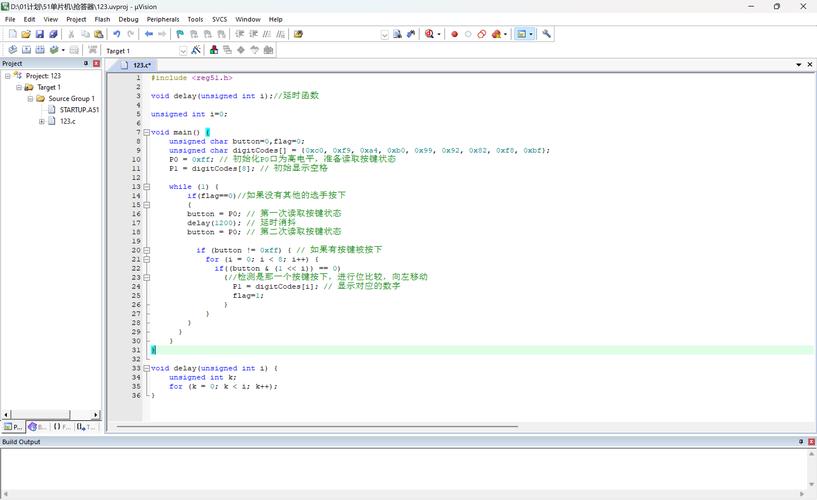
The HBase Java client is a library that allows Java applications to interact with an HBase cluster. It provides an API to perform all essential database operations like creating, reading, updating, and deleting (CRUD) data, as well as managing tables (creating, disabling, deleting, etc.).
There are two primary versions of the HBase client API:
- The "Classic" (or Synchronous) API: This is the original, blocking API. Operations are sent to the server, and the client thread waits (blocks) until it receives a response. This is simpler to understand but can be inefficient for high-throughput applications.
- The Asynchronous API (Recommended for new applications): Introduced in HBase 2.0, this API is non-blocking. You submit an operation and provide a
CompletionHandler(a callback) that gets executed when the operation completes. This is much more performant as it allows a single thread to manage many concurrent operations, leading to much higher throughput.
Prerequisites & Setup
Before you start, you need:
- A running HBase cluster (standalone or distributed mode).
- Java Development Kit (JDK) 8 or newer.
- A build tool like Maven or Gradle.
Maven Dependency
Add the HBase client dependency to your pom.xml. It's crucial to use a version that matches your HBase server version.
<dependencies>
    <!-- Use the version that matches your HBase cluster -->
    <dependency>
        <groupId>org.apache.hbase</groupId>
        <artifactId>hbase-client</artifactId>
        <version>2.5.0</version> <!-- Example version, check yours! -->
    </dependency>
    <!-- For HBase 2.x, you also need the Shaded protocol buffer dependency -->
    <dependency>
        <groupId>org.apache.hbase</groupId>
        <artifactId>hbase-shaded-protobuf</artifactId>
        <version>2.5.0</version> <!-- Must match hbase-client version -->
    </dependency>
</dependencies>
Connecting to HBase
First, you need a Connection object. This is a heavyweight object that manages the connection to the HBase cluster. You should create a single Connection instance for your entire application and share it.
import org.apache.hadoop.conf.Configuration;
import org.apache.hadoop.hbase.HBaseConfiguration;
import org.apache.hadoop.hbase.client.Connection;
import org.apache.hadoop.hbase.client.ConnectionFactory;
public class HBaseConnectionManager {
    private static Connection connection = null;
    private HBaseConnectionManager() {} // Private constructor to prevent instantiation
    public static Connection getConnection() throws IOException {
        if (connection == null || connection.isClosed()) {
            // 1. Create a configuration object
            // It will automatically load hbase-site.xml from the classpath
            Configuration config = HBaseConfiguration.create();
            // Optional: Explicitly set the Zookeeper quorum if not in hbase-site.xml
            // config.set("hbase.zookeeper.quorum", "localhost");
            // config.set("hbase.zookeeper.property.clientPort", "2181");
            // 2. Create a connection
            connection = ConnectionFactory.createConnection(config);
        }
        return connection;
    }
    public static void closeConnection() throws IOException {
        if (connection != null && !connection.isClosed()) {
            connection.close();
        }
    }
}
Basic CRUD Operations (Classic API)
These operations are performed using a Table object, which you get from the Connection. The Table object is lightweight and can be used per-thread or per-operation.
Let's assume we have a table named users with the following structure:
- Rowkey:
user_id(e.g.,user1) - Column Family:
cf - Columns:
name,email,age
a. Put (Insert/Update Data)
To insert a new row or update an existing one, you use a Put object.
import org.apache.hadoop.hbase.TableName;
import org.apache.hadoop.hbase.client.Table;
import org.apache.hadoop.hbase.client.Put;
import org.apache.hadoop.hbase.client.Get;
import org.apache.hadoop.hbase.client.Result;
import org.apache.hadoop.hbase.util.Bytes;
// ... inside a method where you have a 'Connection' object
try (Table table = connection.getTable(TableName.valueOf("users"))) {
    // Create a Put object for the row with key "user1"
    Put put = new Put(Bytes.toBytes("user1"));
    // Add columns to the Put object
    // Column format: family, qualifier, value
    put.addColumn(Bytes.toBytes("cf"), Bytes.toBytes("name"), Bytes.toBytes("Alice Smith"));
    put.addColumn(Bytes.toBytes("cf"), Bytes.toBytes("email"), Bytes.toBytes("alice@example.com"));
    put.addColumn(Bytes.toBytes("cf"), Bytes.toBytes("age"), Bytes.toBytes("30"));
    // Execute the put operation
    table.put(put);
    System.out.println("Row 'user1' inserted/updated successfully.");
}
b. Get (Read a Single Row)
To retrieve a single row by its key, you use a Get object.
try (Table table = connection.getTable(TableName.valueOf("users"))) {
    // Create a Get object for the row with key "user1"
    Get get = new Get(Bytes.toBytes("user1"));
    // To get specific columns (optional)
    // get.addColumn(Bytes.toBytes("cf"), Bytes.toBytes("name"));
    // get.addFamily(Bytes.toBytes("cf"));
    // Execute the get operation
    Result result = table.get(get);
    // Check if the row exists
    if (!result.isEmpty()) {
        // Retrieve values by column family and qualifier
        String name = Bytes.toString(result.getValue(Bytes.toBytes("cf"), Bytes.toBytes("name")));
        String email = Bytes.toString(result.getValue(Bytes.toBytes("cf"), Bytes.toBytes("email")));
        int age = Bytes.toInt(result.getValue(Bytes.toBytes("cf"), Bytes.toBytes("age")));
        System.out.println("Found user: " + name + ", Email: " + email + ", Age: " + age);
    } else {
        System.out.println("Row 'user1' not found.");
    }
}
c. Scan (Read Multiple Rows)
To retrieve multiple rows that match a certain criteria, you use a Scan object.
import org.apache.hadoop.hbase.client.Scan;
import org.apache.hadoop.hbase.client.ResultScanner;
import org.apache.hadoop.hbase.filter.SingleColumnValueFilter;
import org.apache.hadoop.hbase.filter.CompareOperator;
import org.apache.hadoop.hbase.filter.FilterList;
try (Table table = connection.getTable(TableName.valueOf("users"));
     // ResultScanner is AutoCloseable, so it can be in the try-with-resources block
     ResultScanner scanner = table.getScanner(new Scan())) {
    // You can add filters to the scan
    // Scan scan = new Scan();
    // scan.setFilter(new SingleColumnValueFilter(
    //     Bytes.toBytes("cf"), Bytes.toBytes("age"),
    //     CompareOperator.GREATER, Bytes.toBytes(25)
    // ));
    for (Result result : scanner) {
        String rowKey = Bytes.toString(result.getRow());
        String name = Bytes.toString(result.getValue(Bytes.toBytes("cf"), Bytes.toBytes("name")));
        System.out.println("RowKey: " + rowKey + ", Name: " + name);
    }
}
d. Delete (Remove Data)
To delete data, you use a Delete object. You can delete a specific column, an entire column family, or an entire row.
try (Table table = connection.getTable(TableName.valueOf("users"))) {
    // Create a Delete object for the row with key "user1"
    Delete delete = new Delete(Bytes.toBytes("user1"));
    // Option 1: Delete a specific column
    // delete.addColumn(Bytes.toBytes("cf"), Bytes.toBytes("email"));
    // Option 2: Delete an entire column family (all its columns)
    // delete.addFamily(Bytes.toBytes("cf"));
    // Option 3: Delete the entire row (default if you just pass the rowkey)
    // The delete object above is already for the whole row.
    // Execute the delete operation
    table.delete(delete);
    System.out.println("Row 'user1' deleted successfully.");
}
Best Practices
-
Manage
ConnectionandTableObjects:Connection: Create one per application lifecycle. It's thread-safe and expensive to create.Table: Create and close (usingtry-with-resources) for each operation or batch of operations. It's lightweight and not thread-safe.
-
Use Batch Operations: For better performance, use
put(List<Put>),delete(List<Delete>), etc. This reduces network round trips.List<Put> puts = new ArrayList<>(); puts.add(new Put(Bytes.toBytes("user2")).addColumn(...)); puts.add(new Put(Bytes.toBytes("user3")).addColumn(...)); table.put(puts); // Single RPC to send all puts -
Use Buffered Mutator for Writes: For high-throughput, asynchronous-like writes from a single thread, use
BufferedMutator. It batches puts automatically and sends them when the buffer is full or a timeout occurs.BufferedMutatorParams params = new BufferedMutatorParams(TableName.valueOf("users")); params.writeBufferSize(4 * 1024 * 1024); // 4MB buffer try (BufferedMutator mutator = connection.getBufferedMutator(params)) { Put p = new Put(...); mutator.mutate(p); // Mutator batches this } -
Use Asynchronous API for High Throughput: For applications that need to handle thousands of concurrent operations, the Asynchronous API is the way to go. It uses an
AsyncTableobject.// Get an AsyncTable instance AsyncTable<AdvancedScanResultConsumer> asyncTable = connection.getTable(TableName.valueOf("users")).toAsyncTable(); // Define a callback AdvancedScanResultConsumer scanner = new AdvancedScanResultConsumer() { @Override public void onNext(Result result, ScanController controller) { // Process each result as it arrives System.out.println("Async Got: " + Bytes.toString(result.getRow())); } @Override public void onError(Throwable error) { System.err.println("Scan failed: " + error.getMessage()); } @Override public void onComplete() { System.out.println("Scan completed."); } }; // Start the scan asyncTable.scan(new Scan(), scanner); // Your program can continue doing other work here without blocking. -
Correctly Handle Rowkeys: Design your rowkeys wisely. They are the primary indexing mechanism in HBase. Poorly designed rowkeys can lead to hot-spotting (where one region server gets overloaded).
-
Handle Exceptions: Always handle
IOExceptionandRetriesExhaustedException, which indicate network or server issues. Implement retry logic if necessary.