Of course. The error number 10022 in Python's socket module corresponds to the system error WSAEINVAL on Windows. This is one of the most common socket errors, and it's crucial to understand.

What Error 10022 (WSAEINVAL) Means
WSAEINVAL stands for "Windows Sockets Error: Invalid Argument".
This error means you are trying to use a socket function with an invalid parameter. The "argument" in question could be a value you're passing to the function, a flag you're setting, or the state the socket is in.
The socket library receives this error from the underlying operating system (Windows), which has determined that the request is malformed or nonsensical.
Common Causes and How to Fix Them
Here are the most frequent reasons you'll encounter a 10022 error, with code examples and solutions.
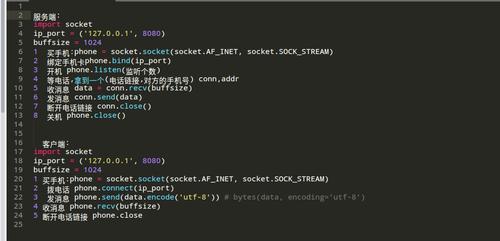
Incorrect Protocol Family, Socket Type, or Address Family Mismatch
This is the most common cause. You are trying to create a socket with incompatible parameters.
- Mismatched Family and Type: Trying to create a
SOCK_STREAM(TCP) socket withAF_INET(IPv4) is fine. But trying to create aSOCK_STREAMsocket withAF_INET6(IPv6) is also fine. The real mismatch happens when you use an address family that doesn't support the socket type. - Mismatched Family and Address: When you call
socket.bind(), the address you provide (e.g., a tuple('192.168.1.1', 80)) must match the address family of the socket (AF_INETfor IPv4,AF_INET6for IPv6).
Incorrect Code Example:
import socket
# Mismatch: Using an IPv4 address with an IPv6 socket family
s = socket.socket(socket.AF_INET6, socket.SOCK_STREAM)
# This will raise an error because '127.0.0.1' is not a valid IPv6 address
s.bind(('127.0.0.1', 8080))
Corrected Code Example:
import socket
# Solution 1: Use the correct address family for the address
s = socket.socket(socket.AF_INET, socket.SOCK_STREAM)
s.bind(('127.0.0.1', 8080))
print("Successfully bound to 127.0.0.1:8080")
# Solution 2: Use the correct address format for the socket family
s_v6 = socket.socket(socket.AF_INET6, socket.SOCK_STREAM)
# IPv6 addresses need to be enclosed in square brackets
s_v6.bind(('::1', 8080))
print("Successfully bound to ::1:8080")
Invalid Argument to a Socket Function
You are passing a value that the function doesn't expect or that is out of range.

- Invalid Port Number: Port numbers must be between 0 and 65535.
- Invalid Flag: Passing an incorrect flag to a function like
setsockopt().
Incorrect Code Example:
import socket
s = socket.socket(socket.AF_INET, socket.SOCK_STREAM)
# Port number is out of the valid range (0-65535)
try:
    s.bind(('127.0.0.1', 80000)) # 80000 is invalid
except OSError as e:
    print(f"Error: {e}") # Will likely raise WSAEINVAL (10022)
Corrected Code Example:
import socket
s = socket.socket(socket.AF_INET, socket.SOCK_STREAM)
# Use a valid port number
s.bind(('127.0.0.1', 8080))
print("Successfully bound with a valid port.")
Calling a Function on a Socket in the Wrong State
You cannot call certain functions on a socket if it's not in the correct state.
- You cannot
send()data on a socket that has not yet beenconnect()ed (for a client) oraccept()ed (for a server). - You cannot
bind()a socket that has already beenconnect()ed.
Incorrect Code Example:
import socket
# Client socket
s = socket.socket(socket.AF_INET, socket.SOCK_STREAM)
# Trying to send data before connecting
try:
    s.sendall(b"Hello, server!")
except OSError as e:
    print(f"Error: {e}") # Will raise WSAEINVAL (10022)
Corrected Code Example:
import socket
s = socket.socket(socket.AF_INET, socket.SOCK_STREAM)
# Connect to a server first
s.connect(('127.0.0.1', 8080)) # Make sure a server is listening on this port
s.sendall(b"Hello, server!")
Invalid Buffer or Pointer
This is a lower-level issue, but it can happen if you pass an improperly structured object where a buffer is expected (though less common in high-level Python code).
How to Debug Error 10022
When you see this error, follow these steps:
-
Read the Error Message Carefully: Python's error message usually tells you which function caused the problem.
Traceback (most recent call last):
  File "your_script.py", line 10, in <module>
    s.bind(('127.0.0.1', 80000))
OSError: [WinError 10022] An invalid argument was provided
Here, the problem is in the
s.bind()call. -
Check the Function's Signature: Look up the documentation for the function that failed (e.g.,
socket.bind()). What arguments does it expect?socket.bind(address): ForAF_INET, the address is a(host, port)tuple.
-
Verify Your Inputs:
- Address Family: Is it
AF_INET,AF_INET6, orAF_UNIX? Does it match your address string? - Socket Type: Is it
SOCK_STREAM(TCP) orSOCK_DGRAM(UDP)? - Values: Are your port numbers in the valid range (0-65535)? Is your IP address correctly formatted?
- Socket State: Is the socket in the right state to perform this operation? (e.g., connected before sending).
- Address Family: Is it
Summary Table
| Common Cause | Example of Invalid Code | The Fix |
|---|---|---|
| Address Family Mismatch | AF_INET6 socket with IPv4 address ('127.0.0.1', 80) |
Use AF_INET with the IPv4 address, or AF_INET6 with :1. |
| Invalid Port Number | bind(('127.0.0.1', 99999)) |
Use a port between 0 and 65535. |
| Wrong Socket State | send() on a socket that hasn't been connect()ed. |
Call connect() (for clients) or accept() (for servers) first. |
Invalid setsockopt Flag or Value |
s.setsockopt(100, 1, "hello") (level 100 is likely invalid) |
Use a valid socket constant for the level and value. |
By systematically checking these points, you can almost always find the source of a 10022 error.