Of course! It looks like you're asking about Python's string data type. Let's break it down from the basics to more advanced topics.
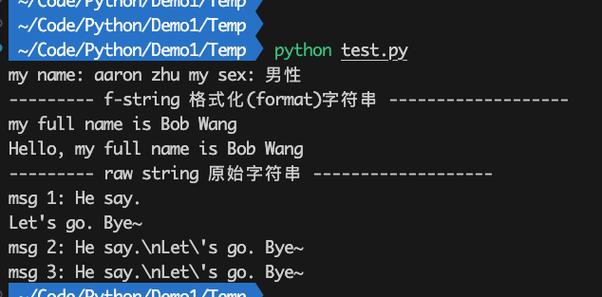
In Python, a string is a sequence of characters. Think of it as a piece of text, like a word, a sentence, or an entire paragraph. It's one of the most common and fundamental data types you'll use.
Creating a String
You can create a string by enclosing characters in either single quotes (), double quotes (), or triple quotes ( or ).
# Using single quotes
name = 'Alice'
print(name)
# Using double quotes
message = "Hello, world!"
print(message)
# Triple quotes are used for multi-line strings
bio = """My name is Bob.
I am a software developer.
I love Python."""
print(bio)
Key Point: You can use single quotes inside a double-quoted string (and vice versa) without any issues.
# This works perfectly
sentence = "The teacher said, 'Python is fun!'"
print(sentence)
Accessing Characters (Indexing)
Since a string is a sequence, you can access individual characters using their index. Indexing in Python starts at 0.
language = "Python"
# Indexes:   0  1  2  3  4  5
# Get the first character
print(language[0])  # Output: P
# Get the third character
print(language[2])  # Output: t
You can also use negative indexing, where -1 refers to the last character, -2 to the second-to-last, and so on.
language = "Python"
# Negative Indexes: -6 -5 -4 -3 -2 -1
# Get the last character
print(language[-1])  # Output: n
# Get the second-to-last character
print(language[-2])  # Output: o
Slicing Strings
Slicing allows you to get a substring (a portion of the string). The syntax is [start:end:step].
start: The index where the slice begins (inclusive).end: The index where the slice ends (exclusive).step: The interval between characters (optional, defaults to 1).
text = "Hello, World!"
# Get characters from index 0 up to (but not including) index 5
print(text[0:5])   # Output: Hello
# Get characters from the beginning up to index 5
print(text[:5])    # Output: Hello
# Get characters from index 7 to the end
print(text[7:])    # Output: World!
# Get every second character
print(text[::2])   # Output: HloWrd
# Reverse the string using a step of -1
print(text[::-1])  # Output: !dlroW ,olleH
Common String Methods
Python provides a rich set of built-in methods for manipulating strings. Here are the most common ones:
| Method | Description | Example |
|---|---|---|
.lower() |
Converts the string to lowercase. | "HELLO".lower() -> "hello" |
.upper() |
Converts the string to uppercase. | "hello".upper() -> "HELLO" |
.capitalize() |
Capitalizes the first character. | "hello world".capitalize() -> "Hello world" |
.title() |
Capitalizes the first character of each word. | "hello world".title() -> "Hello World" |
.strip() |
Removes leading and trailing whitespace. | " hello ".strip() -> "hello" |
.replace() |
Replaces a substring with another. | "hello world".replace("world", "Python") -> "hello Python" |
.find() |
Returns the index of the first occurrence of a substring. Returns -1 if not found. | "hello".find("e") -> 1 |
.index() |
Similar to .find(), but raises an error if the substring is not found. |
"hello".index("e") -> 1 |
.split() |
Splits the string into a list of substrings based on a delimiter. | "a,b,c".split(",") -> ['a', 'b', 'c'] |
.join() |
Joins a list of strings into one string, using the string as a separator. | ",".join(['a', 'b', 'c']) -> "a,b,c" |
.startswith() |
Checks if the string starts with a specific substring. | "hello".startswith("he") -> True |
.endswith() |
Checks if the string ends with a specific substring. | "hello".endswith("lo") -> True |
.isalpha() |
Checks if all characters are alphabetic. | "hello".isalpha() -> True |
.isdigit() |
Checks if all characters are digits. | "123".isdigit() -> True |
.isalnum() |
Checks if all characters are alphanumeric (letters or numbers). | "hello123".isalnum() -> True |
String Immutability
This is a very important concept in Python: strings are immutable. This means you cannot change a string after it has been created.
If you try to change a character directly, you will get an error.
my_string = "hello"
# This will raise a TypeError!
my_string[0] = "H"
How to "change" a string: Since you can't modify it, you create a new string based on the old one.
my_string = "hello"
# Create a new string with the first character capitalized
new_string = "H" + my_string[1:]
print(my_string)   # Output: hello (original is unchanged)
print(new_string)  # Output: Hello (new string)
F-Strings (Formatted String Literals)
F-strings are the modern, recommended way to format strings in Python (since Python 3.6). They are concise and easy to read.
You prefix the string with an f and place variables or expressions inside curly braces .
name = "Alice"
age = 30
city = "New York"
# Using an f-string
message = f"My name is {name}, I am {age} years old and I live in {city}."
print(message)
# Output: My name is Alice, I am 30 years old and I live in New York.
# You can also put expressions inside the braces
print(f"Next year, {name} will be {age + 1}.")
# Output: Next year, Alice will be 31.
Summary
| Concept | Description | Example |
|---|---|---|
| Creation | Use , , or . | text = "Hello" |
| Indexing | Access characters by position [i]. |
text[0] -> 'H' |
| Slicing | Get a substring [start:end:step]. |
text[1:4] -> 'ell' |
| Immutability | Strings cannot be changed after creation. | text[0] = 'h' -> Error |
| Methods | Built-in functions for manipulation. | text.upper() -> 'HELLO' |
| Formatting | Embed variables in strings (f-strings are best). | f"Value: {10}" -> 'Value: 10' |