Of course! Let's dive deep into defaultdict() in Python.
What is defaultdict()?
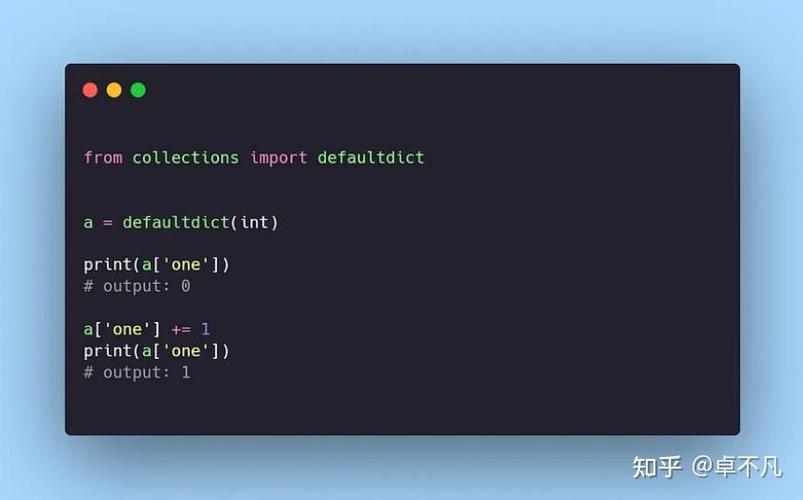
A defaultdict is a subclass of the built-in dict class. It's part of the collections module. Its main advantage over a regular dictionary is that it never raises a KeyError.
Instead, if you try to access or modify a key that doesn't exist, it automatically creates a default value for that key. This is incredibly useful when you're working with data that has a predictable default structure, like a list or a counter.
The Problem: KeyError with Regular Dictionaries
Imagine you want to create a dictionary where you group words by their first letter. A common pattern is to use a dictionary of lists.
# The "manual" way with a regular dict
groups = {}
# Try to add a word to the 'a' group
if 'a' not in groups:
    groups['a'] = []  # Manually create the list if it doesn't exist
groups['a'].append('apple')
# Try to add another word to the 'a' group
if 'b' not in groups:
    groups['b'] = []
groups['b'].append('banana')
# Try to add a word to a new group 'c'
if 'c' not in groups:
    groups['c'] = []
groups['c'].append('cherry')
print(groups)
# Output: {'a': ['apple'], 'b': ['banana'], 'c': ['cherry']}
This works, but it's repetitive and verbose. You always have to check if the key exists before you can append to its value. If you forget, you get a KeyError:

# This will cause an error!
# groups['d'].append('date')  # KeyError: 'd'
The Solution: defaultdict()
defaultdict solves this elegantly. You provide it a "factory" function (like list, int, set, or even a custom function) that it will call to create a default value whenever a new key is accessed.
Let's rewrite the previous example using defaultdict:
from collections import defaultdict
# The "easy" way with defaultdict
# We tell defaultdict to use the list() function as the default factory
groups = defaultdict(list)
# Now we can just append directly! No need to check for the key's existence.
groups['a'].append('apple')
groups['a'].append('ant')
groups['b'].append('banana')
groups['c'].append('cherry')
# What happens if we access a key that doesn't exist?
# It automatically creates an empty list for that key!
print(groups['d']) # Output: []
print(groups)
# Output: defaultdict(<class 'list'>, {'a': ['apple', 'ant'], 'b': ['banana'], 'c': ['cherry'], 'd': []})
Key Takeaway: defaultdict simplifies the code for grouping, counting, or accumulating data, eliminating the need for manual if key in dict: checks.
How to Use defaultdict
Basic Syntax
from collections import defaultdict
# Syntax: defaultdict(default_factory)
# The default_factory is a callable that returns the default value.
Common Default Factories
The power of defaultdict lies in choosing the right default factory.
| Default Factory | Use Case | Example Default Value |
|---|---|---|
list |
Grouping items into a list. | defaultdict(list) -> [] (empty list) |
int |
Counting occurrences of items. | defaultdict(int) -> 0 (zero) |
set |
Storing unique items for a key. | defaultdict(set) -> set() (empty set) |
dict |
Creating a nested dictionary. | defaultdict(dict) -> (empty dict) |
lambda x=0: x |
Using a custom default value. | defaultdict(lambda x=0: x) -> 0 |
Practical Examples
Example 1: Counting Word Frequencies
This is a classic use case. You want to count how many times each word appears in a text.
from collections import defaultdict
text = "the quick brown fox jumps over the lazy dog the fox is quick"
# Use int() as the factory. It will default new keys to 0.
word_counts = defaultdict(int)
for word in text.split():
    word_counts[word] += 1
print(word_counts)
# Output: defaultdict(<class 'int'>, {'the': 3, 'quick': 2, 'brown': 1, 'fox': 2, 'jumps': 1, 'over': 1, 'lazy': 1, 'dog': 1, 'is': 1})
Example 2: Grouping a List of Tuples
Imagine you have a list of (fruit, color) pairs and you want to group them by color.
from collections import defaultdict
fruits = [
    ('apple', 'red'),
    ('banana', 'yellow'),
    ('cherry', 'red'),
    ('lemon', 'yellow'),
    ('grape', 'purple')
]
# Use list() as the factory to create a list for each color.
fruits_by_color = defaultdict(list)
for fruit, color in fruits:
    fruits_by_color[color].append(fruit)
print(fruits_by_color)
# Output:
# defaultdict(<class 'list'>,
#             {'red': ['apple', 'cherry'],
#              'yellow': ['banana', 'lemon'],
#              'purple': ['grape']})
Example 3: Creating a Nested Dictionary
You want to create a dictionary of dictionaries, for example, to store a student's grades in different subjects.
from collections import defaultdict
# Use dict() as the factory to create a nested dictionary.
student_grades = defaultdict(dict)
# Add grades
student_grades['Alice']['Math'] = 95
student_grades['Alice']['Science'] = 88
student_grades['Bob']['History'] = 76
print(student_grades)
# Output:
# defaultdict(<class 'dict'>,
#             {'Alice': {'Math': 95, 'Science': 88},
#              'Bob': {'History': 76}})
# Accessing a non-existent student creates an empty dict for them
print(student_grades['Charlie']) # Output: {}
Example 4: Using a Custom Default Value
What if you want your dictionary to default to an empty string () instead of a list or an integer?
from collections import defaultdict
# Use a lambda function for a custom default value.
# The lambda is a simple way to call the function without arguments.
my_dict = defaultdict(lambda: "")
my_dict['name'] = 'Alice'
my_dict['age'] = 30
print(my_dict['name'])      # Output: Alice
print(my_dict['city'])      # Output: "" (the default value)
print(my_dict)
# Output: defaultdict(<function <lambda> at 0x...>, {'name': 'Alice', 'age': 30, 'city': ''})
defaultdict vs. dict.get() vs. dict.setdefault()
It's useful to know how defaultdict compares to other dictionary methods for handling missing keys.
| Method | How it Works | Pros | Cons |
|---|---|---|---|
defaultdict |
Automatically creates a default value on key access. | Cleanest, most readable, and efficient for repeated access/modification. | Requires importing from collections. |
dict.get(key, default) |
Returns the value for key if it exists, otherwise returns default. |
Built-in, no import needed. Good for retrieving a value. | Doesn't modify the dictionary. The key-value pair is not added. |
dict.setdefault(key, default) |
Returns the value for key if it exists. If not, it inserts key with a value of default and returns default. |
Built-in, modifies the dictionary in one step. | Less efficient than defaultdict if you're accessing the key multiple times, as it checks the key's existence every time. |
Comparison Example:
Let's go back to the grouping example.
# Using defaultdict (Cleanest)
from collections import defaultdict
groups_dd = defaultdict(list)
groups_dd['a'].append('apple')
print(groups_dd) # defaultdict(<class 'list'>, {'a': ['apple']})
# Using setdefault (More verbose)
groups_sd = {}
groups_sd.setdefault('a', []).append('apple')
print(groups_sd) # {'a': ['apple']}
# Using get (Doesn't work for modification)
groups_get = {}
# This line just gets the list and appends to it, but doesn't save it back to the dict!
# groups_get.get('a', []).append('apple')
# The correct, verbose way:
if 'a' not in groups_get:
    groups_get['a'] = []
groups_get['a'].append('apple')
print(groups_get) # {'a':