Of course! Let's dive deep into Java TCP Sockets. This is a fundamental topic for network programming in Java.
We'll cover:
- Core Concepts: What are TCP and Sockets?
- Key Classes: The main Java classes you'll use.
- Server-Side Programming: The classic
ServerSocketandSocketflow. - Client-Side Programming: Connecting to the server.
- Complete Code Example: A working "Echo Server" and client.
- Best Practices: Handling threads, I/O, and closing resources.
- Advanced Topics: NIO for non-blocking sockets.
Core Concepts
What is TCP?
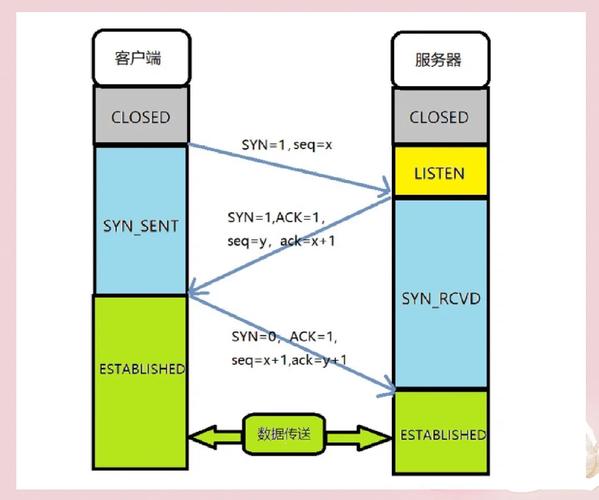
TCP (Transmission Control Protocol) is a connection-oriented protocol. Think of it like a phone call.
- Connection-Oriented: Before you can send data, you must first establish a connection (a "handshake" between client and server). This ensures both ends are ready.
- Reliable: TCP guarantees that data will arrive in the correct order without errors or loss. It uses acknowledgments (ACKs) and retransmissions to achieve this.
- Stream-Oriented: Data is sent as a continuous stream of bytes. It's up to the application to define message boundaries (e.g., using a delimiter or prefixing messages with their length).
- Full-Duplex: Both the client and server can send and receive data simultaneously over the same connection.
What is a Socket?
A Socket is the endpoint of a two-way communication link between two programs running on the network. In Java, a Socket represents one side of the connection.
- Server Socket (
ServerSocket): The server uses aServerSocketto "listen" for incoming connection requests from clients. It acts like a receptionist at a hotel. - Client Socket (
Socket): The client uses aSocketto initiate a connection to a specific server address and port. It's like making a phone call to a specific number.
When a client successfully connects to the server's ServerSocket, the server creates a new Socket to handle the communication with that specific client. This allows the ServerSocket to go back to listening for new clients while the new Socket manages the active conversation.
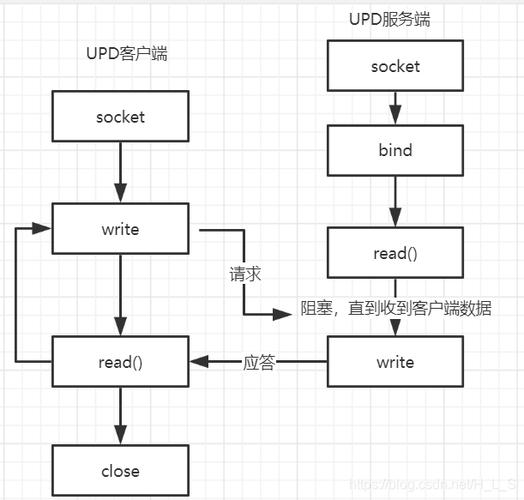
Key Java Classes
| Class | Description |
|---|---|
java.net.ServerSocket |
Used by the server to listen for and accept incoming client connections. |
java.net.Socket |
Represents both the client-side connection and the server-side connection after a client has connected. It's the channel for communication. |
java.net.InetAddress |
Represents an IP address. You use it to specify the host you want to connect to. |
java.io.InputStream |
An abstract class for reading bytes from a source (like a socket). |
java.io.OutputStream |
An abstract class for writing bytes to a destination (like a socket). |
java.io.BufferedReader / java.io.InputStreamReader |
Wraps an InputStream to read text data line by line. |
java.io.PrintWriter |
Wraps an OutputStream to write text data, with convenient methods like println(). |
Server-Side Programming (The Echo Server Logic)
A typical TCP server follows these steps:
- Create a
ServerSocket: Bind it to a specific port on the server machine. This port is where the server will listen. - Listen for Connections: Call
serverSocket.accept(). This is a blocking call, meaning the program will pause here and wait until a client attempts to connect. - Accept the Connection: When a client connects,
accept()returns a newSocketobject that represents the connection to that specific client. - Communicate: Get the
InputStreamandOutputStreamfrom the newSocketto read data from and write data to the client. - Handle Multiple Clients: A single-threaded server can only handle one client at a time. To handle multiple clients concurrently, you must spawn a new thread for each client connection returned by
accept(). - Close the Connection: When the communication is finished, close the client
Socketand its associated I/O streams.
Client-Side Programming
A typical TCP client follows these steps:
- Create a
Socket: Specify the server's IP address (or hostname) and the port number to connect to. - Connect: The constructor of the
Socketobject will attempt to establish a connection to the server. This is also a blocking call. - Communicate: If the connection is successful, get the
InputStreamandOutputStreamfrom theSocketto send and receive data. - Close the Connection: When done, close the
Socketand its I/O streams.
Complete Code Example: Echo Server and Client
This is the classic "Hello, World!" of socket programming. The server receives a message from the client and sends it back (echoes it).
Server Code (EchoServer.java)
import java.io.*;
import java.net.*;
public class EchoServer {
    public static void main(String[] args) {
        int port = 6789; // The port the server will listen on
        try (ServerSocket serverSocket = new ServerSocket(port)) {
            System.out.println("Server is listening on port " + port);
            // The accept() method blocks until a client connects
            Socket clientSocket = serverSocket.accept();
            System.out.println("Client connected: " + clientSocket.getInetAddress().getHostAddress());
            // Create input and output streams for the client
            BufferedReader in = new BufferedReader(new InputStreamReader(clientSocket.getInputStream()));
            PrintWriter out = new PrintWriter(clientSocket.getOutputStream(), true); // Auto-flush
            String inputLine;
            // Read from the client until "exit" is sent
            while ((inputLine = in.readLine()) != null) {
                System.out.println("Received from client: " + inputLine);
                if ("exit".equalsIgnoreCase(inputLine)) {
                    System.out.println("Client requested to close the connection.");
                    break;
                }
                // Echo the message back to the client
                out.println("Server Echo: " + inputLine);
            }
        } catch (IOException e) {
            System.out.println("Server exception: " + e.getMessage());
            e.printStackTrace();
        }
    }
}
Client Code (EchoClient.java)
import java.io.*;
import java.net.*;
public class EchoClient {
    public static void main(String[] args) {
        String hostname = "localhost"; // or the server's IP address
        int port = 6789;
        try (Socket socket = new Socket(hostname, port)) {
            System.out.println("Connected to the server.");
            // Create input and output streams
            PrintWriter out = new PrintWriter(socket.getOutputStream(), true);
            BufferedReader in = new BufferedReader(new InputStreamReader(socket.getInputStream()));
            BufferedReader stdIn = new BufferedReader(new InputStreamReader(System.in));
            String userInput;
            // Read from the user's console
            while ((userInput = stdIn.readLine()) != null) {
                // Send the user's input to the server
                out.println(userInput);
                // Read the server's response
                String response = in.readLine();
                System.out.println("Server response: " + response);
                if ("exit".equalsIgnoreCase(userInput)) {
                    break;
                }
            }
        } catch (UnknownHostException e) {
            System.err.println("Don't know about host " + hostname);
            e.printStackTrace();
        } catch (IOException e) {
            System.err.println("Couldn't get I/O for the connection to " +
                    hostname);
            e.printStackTrace();
        }
    }
}
How to Run It:
- Save the two files as
EchoServer.javaandEchoClient.java. - Compile them:
javac EchoServer.java EchoClient.java - First, run the server in a terminal:
java EchoServer- You will see:
Server is listening on port 6789
- You will see:
- Second, run the client in another terminal:
java EchoClient- You will see:
Connected to the server.
- You will see:
- Now, type messages in the client terminal and press Enter. You will see the echoed message from the server. Type
exitin either terminal to shut down the connection.
Best Practices
Handling Multiple Clients (Crucial!)
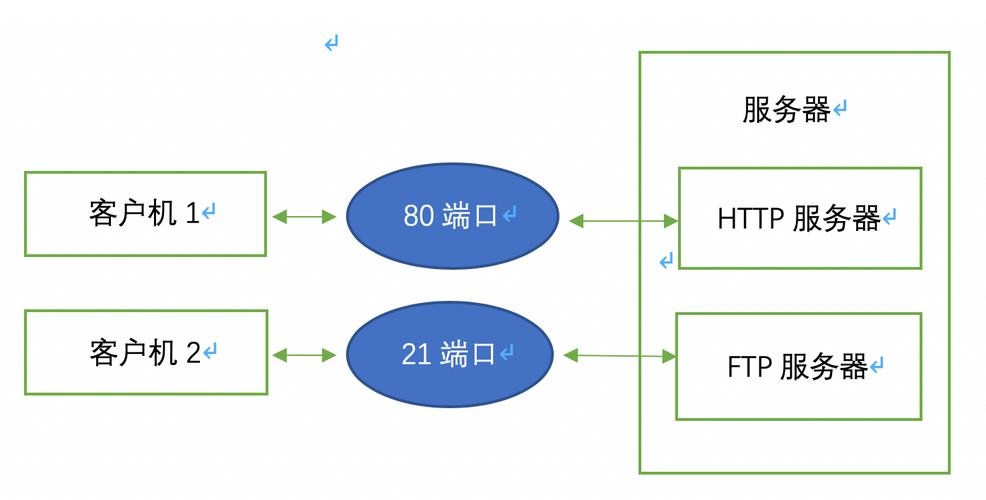
The single-threaded server above can only handle one client. To make it multi-threaded, you need to move the communication logic into a Runnable and pass it to a new Thread inside the accept() loop.
Improved EchoServer.java (Multi-threaded):
// ... (main method starts here)
try (ServerSocket serverSocket = new ServerSocket(port)) {
    System.out.println("Server is listening on port " + port);
    while (true) { // Loop to accept multiple clients
        Socket clientSocket = serverSocket.accept();
        System.out.println("New client connected: " + clientSocket.getInetAddress().getHostAddress());
        // Create a new thread for each client
        new Thread(new ClientHandler(clientSocket)).start();
    }
} catch (IOException e) {
    // ... (error handling)
}
// A class to handle a single client
private static class ClientHandler implements Runnable {
    private final Socket clientSocket;
    public ClientHandler(Socket socket) {
        this.clientSocket = socket;
    }
    @Override
    public void run() {
        // The same communication logic from the original server
        try (BufferedReader in = new BufferedReader(new InputStreamReader(clientSocket.getInputStream()));
             PrintWriter out = new PrintWriter(clientSocket.getOutputStream(), true)) {
            String inputLine;
            while ((inputLine = in.readLine()) != null) {
                System.out.println("Received from " + clientSocket.getInetAddress() + ": " + inputLine);
                if ("exit".equalsIgnoreCase(inputLine)) {
                    break;
                }
                out.println("Server Echo: " + inputLine);
            }
        } catch (IOException e) {
            System.out.println("Error handling client: " + e.getMessage());
        } finally {
            try {
                clientSocket.close();
            } catch (IOException e) {
                e.printStackTrace();
            }
        }
    }
}
Resource Management (try-with-resources)
The try-with-resources statement is the best way to handle sockets and streams. It automatically closes them when the try block is exited, even if an exception occurs. This prevents resource leaks.
I/O Efficiency
For high-performance applications, using BufferedReader and BufferedWriter (or PrintWriter with auto-flush) is much more efficient than reading/writing one byte at a time.
Advanced Topics: NIO (New I/O)
For high-performance, scalable servers, the traditional blocking I/O model can be inefficient because each thread is blocked waiting for I/O. This doesn't scale well with thousands of clients.
Java NIO (New I/O) provides a non-blocking, event-driven alternative.
Selector: A single thread can monitor multipleChannels(the NIO equivalent ofSocket) for I/O events (like "connection ready," "data ready to be read").- **
Channel``: ReplacesSocket`. It can be used for both reading and writing and can be set to non-blocking mode. - **`ByteBuffer``: A more flexible and powerful buffer for reading and writing raw bytes.
NIO is more complex to set up but is essential for building high-concurrency servers like chat rooms or game servers. The java.nio.channels package contains the relevant classes.