Of course! In Java, sleep() and wait() are both used to pause the execution of a thread, but they are fundamentally different in purpose, behavior, and how they are used.
Here’s a detailed breakdown, starting with a quick summary and then diving into each method with examples.
At a Glance: sleep() vs. wait()
| Feature | sleep(long millis) |
wait() |
|---|---|---|
| Class | java.lang.Thread |
java.lang.Object |
| Locking | Does not release any locks. | Releases the lock on the object it's called on. |
| Usage | Pauses the current thread for a specified time. | Used for inter-thread communication. A thread waits for a condition to become true. |
| Wakeup | Wakes up after the specified time, or if interrupted. | Wakes up when another thread calls notify() or notifyAll() on the same object. |
| Context | Called directly on a Thread object or Thread.sleep(). |
Called only from within a synchronized method or block. |
| Analogy | A person taking a scheduled nap. | A person waiting in a checkout line, waiting for the cashier (another thread) to call their name. |
Thread.sleep()
sleep() is a static method of the Thread class. It's used to introduce a simple, timed delay in the execution of the current thread.
Key Characteristics:
- Static Method: You call it as
Thread.sleep(milliseconds), not on an instance of a thread. - Does Not Release Locks: If a thread is holding a lock on an object's monitor (i.e., it's inside a
synchronizedblock) and callssleep(), it does not release the lock. The lock remains held, and no other thread can enter that synchronized block. - Throws
InterruptedException: If another thread interrupts the sleeping thread,sleep()throws anInterruptedException. This is a checked exception, so you must handle it (either with atry-catchblock or by declaring it in your method'sthrowsclause).
Example:
public class SleepExample implements Runnable {
    @Override
    public void run() {
        try {
            System.out.println("Thread " + Thread.currentThread().getName() + " is going to sleep for 2 seconds.");
            // Pause the current thread for 2000 milliseconds (2 seconds)
            Thread.sleep(2000);
            System.out.println("Thread " + Thread.currentThread().getName() + " has woken up.");
        } catch (InterruptedException e) {
            System.out.println("Thread " + Thread.currentThread().getName() + " was interrupted.");
            // Restore the interrupted status
            Thread.currentThread().interrupt();
        }
    }
    public static void main(String[] args) {
        Thread thread = new Thread(new SleepExample(), "My-Sleeping-Thread");
        thread.start();
    }
}
Output:
Thread My-Sleeping-Thread is going to sleep for 2 seconds.
// (2 seconds of pause)
Thread My-Sleeping-Thread has woken up.
Object.wait()
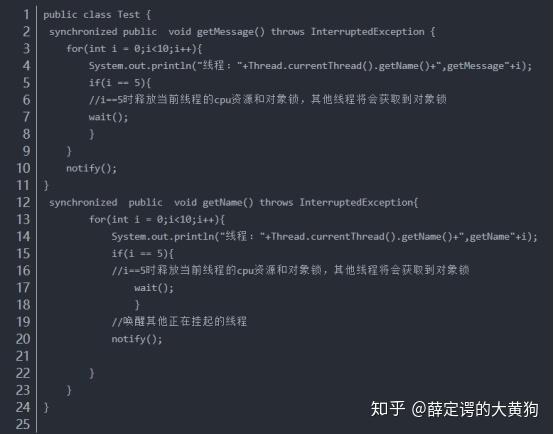
wait() is an instance method of the Object class. It's a much more powerful mechanism used for inter-thread communication and synchronization. A thread calls wait() when it needs to wait for a particular condition to be met by another thread.
Key Characteristics:
- Instance Method: You call it on a specific object, e.g.,
myObject.wait(). - Releases Locks: This is the most critical difference. When a thread calls
wait(), it immediately releases the lock on the object's monitor. This allows other threads to enter synchronized blocks on that same object. - Requires a Synchronized Context:
wait()can only be called from within a synchronized method or synchronized block. If you try to call it without a lock, you will get anIllegalMonitorStateException. - Wakeup Condition: The thread remains in the waiting state until one of three things happens:
- Another thread calls
notify()ornotifyAll()on the same object. - Another thread interrupts the waiting thread.
- (Spurious wakeup) The thread wakes up for no apparent reason (this is rare, so you should always wait in a loop).
- Another thread calls
- Throws
InterruptedException: Similar tosleep, it can be interrupted.
The Producer-Consumer Pattern (Classic wait()/notify() Example)
This is the perfect use case for wait() and notify(). One thread (Producer) adds items to a shared queue, and another (Consumer) removes them. The Consumer should only try to remove items when the queue is not empty.
import java.util.LinkedList;
import java.util.Queue;
// Shared object that will be used for communication
class SharedQueue {
    private final Queue<Integer> queue = new LinkedList<>();
    private final int CAPACITY = 2; // Small capacity to demonstrate waiting
    // Producer calls this method
    public synchronized void produce(int item) throws InterruptedException {
        // Wait if the queue is full
        while (queue.size() == CAPACITY) {
            System.out.println("Queue is full. Producer is waiting...");
            wait(); // Releases the lock and waits
        }
        queue.add(item);
        System.out.println("Produced: " + item);
        // Notify the consumer that a new item is available
        notify(); // Wakes up one waiting thread (the consumer)
    }
    // Consumer calls this method
    public synchronized int consume() throws InterruptedException {
        // Wait if the queue is empty
        while (queue.isEmpty()) {
            System.out.println("Queue is empty. Consumer is waiting...");
            wait(); // Releases the lock and waits
        }
        int item = queue.remove();
        System.out.println("Consumed: " + item);
        // Notify the producer that there is space in the queue
        notify(); // Wakes up one waiting thread (the producer)
        return item;
    }
}
public class WaitNotifyExample {
    public static void main(String[] args) {
        SharedQueue queue = new SharedQueue();
        // Producer Thread
        Thread producerThread = new Thread(() -> {
            for (int i = 1; i <= 5; i++) {
                try {
                    queue.produce(i);
                    Thread.sleep(500); // Simulate some production time
                } catch (InterruptedException e) {
                    Thread.currentThread().interrupt();
                }
            }
        });
        // Consumer Thread
        Thread consumerThread = new Thread(() -> {
            for (int i = 1; i <= 5; i++) {
                try {
                    queue.consume();
                    Thread.sleep(1000); // Simulate some consumption time
                } catch (InterruptedException e) {
                    Thread.currentThread().interrupt();
                }
            }
        });
        producerThread.start();
        consumerThread.start();
    }
}
Possible Output:
Produced: 1
Produced: 2
Queue is full. Producer is waiting...
Consumed: 1
Produced: 3
Queue is full. Producer is waiting...
Consumed: 2
Produced: 4
Queue is full. Producer is waiting...
Consumed: 3
Produced: 5
Queue is full. Producer is waiting...
Consumed: 4
Consumed: 5
In this output, you can see the producer stops and waits when the queue is full, and the consumer stops and waits when it's empty. notify() is used to signal when it's safe for the other thread to proceed.
Summary: When to Use Which?
-
Use
Thread.sleep()when: (图片来源网络,侵删)
- You need a simple, fixed delay.
- You want to pause a thread for a specific amount of time, regardless of what other threads are doing.
- You are performing a polling task where you check a condition at regular intervals.
-
Use
Object.wait()andnotify()when:- You need to coordinate the activities of multiple threads.
- One thread must wait for another thread to complete a task or provide data.
- You are implementing classic concurrency patterns like Producer-Consumer, Bounded Buffer, or Readers-Writers.
Modern Alternative: For most modern concurrent programming, it's recommended to use higher-level constructs from the
java.util.concurrentpackage, such as theBlockingQueueinterface (e.g.,ArrayBlockingQueue). These classes handle the waiting and notifying for you, making your code simpler and less error-prone. TheBlockingQueueis essentially a thread-safe implementation of the SharedQueue in our example.