Of course! Here is a comprehensive guide to the Hadoop Java API, covering the core concepts, essential classes, and practical examples.
Introduction: What is the Hadoop Java API?
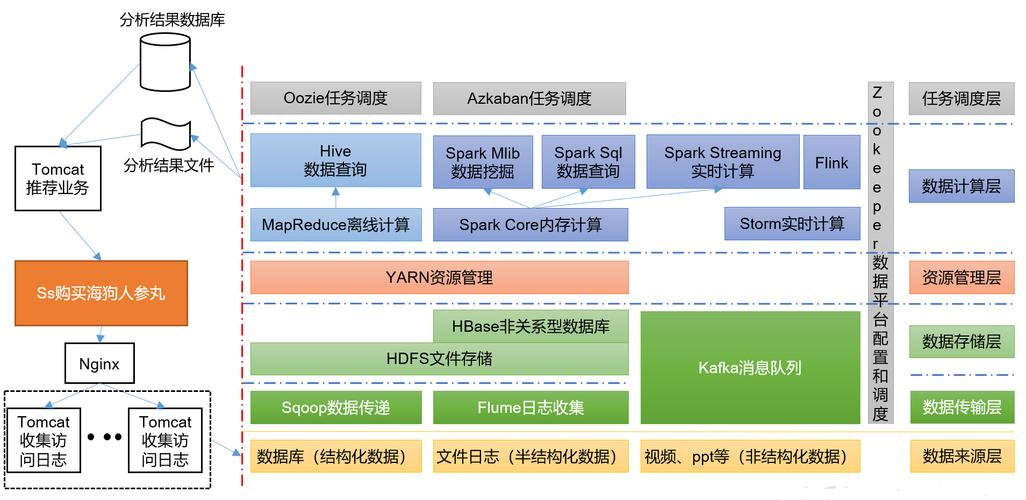
The Hadoop Java API is the primary way for Java applications to interact with a Hadoop cluster. It allows you to:
- Read and write data to Hadoop Distributed File System (HDFS).
- Process data using the MapReduce programming model.
- Interact with other Hadoop ecosystem components like YARN (for job submission) and HBase.
The API is organized into several key packages, the most important being org.apache.hadoop.fs for file system operations and org.apache.hadoop.mapreduce for MapReduce jobs.
Part 1: The Hadoop File System (HDFS) API (org.apache.hadoop.fs)
This is the foundation for any data access in Hadoop. The central concept is the FileSystem class, which provides a generic interface to any file system, including HDFS, the local file system, and cloud storage.
Getting a FileSystem Instance
You should never instantiate FileSystem directly using new FileSystem(). Instead, use the static get() method. This allows Hadoop to load the correct implementation based on your configuration.

import org.apache.hadoop.conf.Configuration;
import org.apache.hadoop.fs.FileSystem;
import org.apache.hadoop.fs.Path;
public class HdfsExample {
    public static void main(String[] args) throws Exception {
        // A Configuration object holds the cluster settings.
        // It loads from core-site.xml, hdfs-site.xml, etc.
        Configuration conf = new Configuration();
        // Get the default FileSystem instance.
        // This will typically be an instance of DistributedFileSystem for HDFS.
        FileSystem fs = FileSystem.get(conf);
        System.out.println("File System: " + fs.getUri());
    }
}
Common HDFS Operations
Let's explore the most frequent operations using the FileSystem object.
a. Checking if a Path Exists
Path path = new Path("/user/hadoop/myfile.txt");
boolean exists = fs.exists(path);
System.out.println("Path " + path + " exists: " + exists);
b. Creating a Directory
Path dir = new Path("/user/hadoop/newdir");
boolean created = fs.mkdirs(dir);
System.out.println("Directory " + dir + " created: " + created);
c. Uploading a File (Copy from Local to HDFS)
This is done using FSDataOutputStream.
// Local file path
Path localPath = new Path("/path/to/local/file.txt");
// HDFS destination path
Path hdfsPath = new Path("/user/hadoop/uploaded_file.txt");
// Use copyFromLocalFile for a simple, high-level copy
fs.copyFromLocalFile(localPath, hdfsPath);
// Or, for more control (e.g., overwriting):
// FSDataOutputStream out = fs.create(hdfsPath, true); // 'true' to overwrite
// try (InputStream in = new BufferedInputStream(new FileInputStream(localPath.toString()))) {
//     IOUtils.copyBytes(in, out, 4096, false);
// }
d. Downloading a File (Copy from HDFS to Local)
Similarly, use FSDataInputStream.
// HDFS source path
Path hdfsPath = new Path("/user/hadoop/downloaded_file.txt");
// Local destination path
Path localPath = new Path("/path/to/local/download.txt");
// Use copyToLocalFile for a simple copy
fs.copyToLocalFile(hdfsPath, localPath);
e. Reading a File
Use FSDataInputStream, which is an InputStream.

Path readPath = new Path("/user/hadoop/myfile.txt");
try (FSDataInputStream in = fs.open(readPath);
     BufferedReader br = new BufferedReader(new InputStreamReader(in))) {
    String line;
    System.out.println("--- Reading file content ---");
    while ((line = br.readLine()) != null) {
        System.out.println(line);
    }
}
f. Writing to a File
Use FSDataOutputStream, which is an OutputStream.
Path writePath = new Path("/user/hadoop/output.txt");
// The 'true' parameter overwrites the file if it already exists.
try (FSDataOutputStream out = fs.create(writePath, true);
     BufferedWriter bw = new BufferedWriter(new OutputStreamWriter(out))) {
    bw.write("Hello, Hadoop!");
    bw.newLine();
    bw.write("This is a new line.");
}
g. Deleting a File or Directory
Path pathToDelete = new Path("/user/hadoop/newdir");
// 'recursive' is true to delete directories and their contents.
boolean deleted = fs.delete(pathToDelete, true);
System.out.println("Path " + pathToDelete + " deleted: " + deleted);
Part 2: The MapReduce API (org.apache.hadoop.mapreduce)
MapReduce is Hadoop's original data processing model. A job consists of a Mapper and a Reducer.
The Mapper Class
The Mapper processes input records and emits key-value pairs. You extend the Mapper class and override the map method.
import org.apache.hadoop.io.LongWritable;
import org.apache.hadoop.io.Text;
import org.apache.hadoop.mapreduce.Mapper;
// Context: Allows the Mapper to emit output and access job configuration.
// KeyIn: The type of the input key (e.g., line offset). LongWritable is common.
// ValueIn: The type of the input value (e.g., the line of text). Text is common.
// KeyOut: The type of the output key. Text for a word.
// ValueOut: The type of the output value. LongWritable for a count of 1.
public class WordCountMapper extends Mapper<LongWritable, Text, Text, LongWritable> {
    private final static LongWritable one = new LongWritable(1);
    private Text word = new Text();
    @Override
    protected void map(LongWritable key, Text value, Context context)
            throws IOException, InterruptedException {
        // 1. Get the input line as a String
        String line = value.toString();
        // 2. Split the line into words
        String[] words = line.split("\\s+");
        // 3. For each word, emit (word, 1)
        for (String w : words) {
            word.set(w);
            context.write(word, one);
        }
    }
}
The Reducer Class
The Reducer processes all values associated with a particular key. You extend the Reducer class and override the reduce method.
import org.apache.hadoop.io.LongWritable;
import org.apache.hadoop.io.Text;
import org.apache.hadoop.mapreduce.Reducer;
// KeyIn: Must match the Mapper's KeyOut (Text).
// ValueIn: Must match the Mapper's ValueOut (LongWritable).
// KeyOut: The type of the final output key (Text).
// ValueOut: The type of the final output value (LongWritable).
public class WordCountReducer extends Reducer<Text, LongWritable, Text, LongWritable> {
    private LongWritable result = new LongWritable();
    @Override
    protected void reduce(Text key, Iterable<LongWritable> values, Context context)
            throws IOException, InterruptedException {
        // 1. Sum up the counts for the current word
        long sum = 0;
        for (LongWritable val : values) {
            sum += val.get();
        }
        // 2. Emit the final (word, total_count) pair
        result.set(sum);
        context.write(key, result);
    }
}
The Driver Class (Job Configuration)
The Driver class is the entry point for your MapReduce job. It sets up the job, specifies the input/output paths, and tells Hadoop which Mapper and Reducer to use.
import org.apache.hadoop.conf.Configuration;
import org.apache.hadoop.fs.Path;
import org.apache.hadoop.io.LongWritable;
import org.apache.hadoop.io.Text;
import org.apache.hadoop.mapreduce.Job;
import org.apache.hadoop.mapreduce.lib.input.FileInputFormat;
import org.apache.hadoop.mapreduce.lib.output.FileOutputFormat;
public class WordCountDriver {
    public static void main(String[] args) throws Exception {
        // 1. Create a Configuration and a Job
        Configuration conf = new Configuration();
        Job job = Job.getInstance(conf, "Word Count");
        // 2. Set the JAR file that contains the job's driver, mapper, and reducer
        job.setJarByClass(WordCountDriver.class);
        // 3. Set the Mapper and Reducer classes
        job.setMapperClass(WordCountMapper.class);
        job.setReducerClass(WordCountReducer.class);
        // 4. Set the output key and value types for the final output
        job.setOutputKeyClass(Text.class);
        job.setOutputValueClass(LongWritable.class);
        // 5. Set the input and output paths
        FileInputFormat.addInputPath(job, new Path(args[0])); // args[0] is input path
        FileOutputFormat.setOutputPath(job, new Path(args[1])); // args[1] is output path
        // 6. Submit the job and wait for it to complete
        System.exit(job.waitForCompletion(true) ? 0 : 1);
    }
}
Compiling and Running the Job
You need Hadoop in your classpath to compile this. The easiest way is to use a build tool like Maven or Gradle.
Maven pom.xml snippet:
<dependencies>
    <dependency>
        <groupId>org.apache.hadoop</groupId>
        <artifactId>hadoop-common</artifactId>
        <version>3.3.6</version> <!-- Use a recent, stable version -->
    </dependency>
    <dependency>
        <groupId>org.apache.hadoop</groupId>
        <artifactId>hadoop-mapreduce-client-core</artifactId>
        <version>3.3.6</version>
    </dependency>
</dependencies>
To run the job:
- Package your code into a JAR file.
- Submit the job to the Hadoop cluster using the
hadoop jarcommand.
# Create a JAR file
mvn clean package
# Submit the job to the cluster
# Syntax: hadoop jar <your-jar-file.jar> <driver-class> <input-path> <output-path>
hadoop jar wordcount-1.0-SNAPSHOT.jar WordCountDriver /user/hadoop/input /user/hadoop/output
Part 3: Key Hadoop Writable Types
Hadoop serializes data to send it over the network and to write it to disk. It has its own efficient serialization framework. You must use Hadoop's writable types for keys and values, not standard Java types.
| Java Type | Hadoop Writable Type | Description |
|---|---|---|
String |
Text |
A UTF-8 string. |
Integer, Long |
IntWritable, LongWritable |
For integer numbers. |
Float, Double |
FloatWritable, DoubleWritable |
For floating-point numbers. |
Boolean |
BooleanWritable |
For boolean values. |
byte[] |
BytesWritable |
For a sequence of bytes. |
null |
NullWritable |
A placeholder for keys or values that are always null. |
Part 4: Best Practices and Modern Alternatives
- Configuration: Always use a
Configurationobject. It automatically loads settings from*-site.xmlfiles in your classpath. This is how you specify things like the NameNode address. - Resource Management (YARN): The
Jobclass in the driver handles all communication with the YARN ResourceManager to submit the job and track its progress. - Error Handling: Always use
try-with-resourcesfor streams (FSDataInputStream,FSDataOutputStream) to ensure they are closed properly. HandleIOExceptionandInterruptedException. - Modern APIs:
- Hadoop MapReduce v2 (YARN): The
org.apache.hadoop.mapreduceAPI we covered is the modern, YARN-based API. The olderorg.apache.hadoop.mapredAPI is now considered legacy. - Apache Spark: For most new data processing tasks, Apache Spark is the preferred choice. It provides a higher-level, more expressive API (in Java, Scala, Python, and R) and is significantly faster than MapReduce for many workloads because it can keep data in memory. HDFS remains a common storage layer for Spark.
- Hadoop MapReduce v2 (YARN): The
This guide provides a solid foundation for working with the core Hadoop Java APIs. The official Hadoop documentation on the Apache Hadoop website is the ultimate resource for more details on all classes and methods.