Of course! Using Python with Alibaba Cloud Elastic Compute Service (ECS) is a common and powerful way to automate your cloud infrastructure. The primary tool for this is the Alibaba Cloud Python SDK, which allows you to programmatically create, manage, and monitor your ECS instances, disks, VPCs, and more.
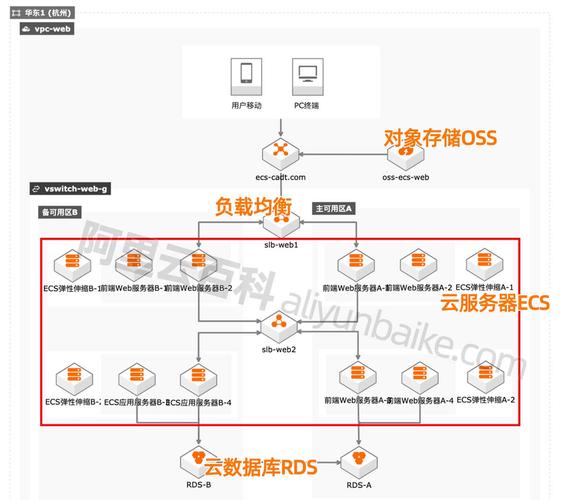
Here’s a comprehensive guide covering everything from setup to practical examples.
Prerequisites
Before you start, make sure you have the following:
- Alibaba Cloud Account: An active account on the Alibaba Cloud platform.
- AccessKey Pair: This is your programmatic identity for API access.
- Go to the RAM (Resource Access Management) Console.
- Create a new user if you haven't already.
- Generate an
AccessKey IDandAccessKey Secret. Treat your AccessKey Secret like a password and never expose it in client-side code or commit it to version control.
- Python Environment: Python 3.6 or higher installed on your machine.
- Region ID: The ID of the Alibaba Cloud region where you want to create resources (e.g.,
cn-hangzhou,us-west-1).
Installation
First, you need to install the Alibaba Cloud Python SDK. The core library is aliyun-python-sdk-core, and for ECS, you'll need aliyun-python-sdk-ecs.
Open your terminal or command prompt and run:
pip install aliyun-python-sdk-core
pip install aliyun-python-sdk-ecs
Configuration and Authentication
The SDK needs to know your credentials and the region you're working with. The recommended way is to use an environment file.
Create a file named .env in your project directory:
.env
ALIYUN_ACCESS_KEY_ID=your_access_key_id
ALIYUN_ACCESS_KEY_SECRET=your_access_key_secret
ALIYUN_REGION_ID=cn-hangzhou
Now, you can write a small helper function to initialize the AcsClient (the main client for interacting with Alibaba Cloud services).
# config.py
import os
from aliyunsdkcore.client import AcsClient
def get_client():
    """Initializes and returns an AcsClient."""
    access_key_id = os.getenv("ALIYUN_ACCESS_KEY_ID")
    access_key_secret = os.getenv("ALIYUN_ACCESS_KEY_SECRET")
    region_id = os.getenv("ALIYUN_REGION_ID")
    if not all([access_key_id, access_key_secret, region_id]):
        raise ValueError("Missing one or more required environment variables: ALIYUN_ACCESS_KEY_ID, ALIYUN_ACCESS_KEY_SECRET, ALIYUN_REGION_ID")
    return AcsClient(access_key_id, access_key_secret, region_id)
Practical Examples
Let's dive into common tasks. Each example will follow this pattern:
- Import necessary modules.
- Create an AcsClient.
- Create a request object.
- Set parameters on the request object.
- Send the request and get a response.
Example 1: List All ECS Instances
This is a great starting point to verify your setup.
# list_instances.py
from aliyunsdkcore.acs_exception.exceptions import ServerException, ClientException
from aliyunsdkcore.client import AcsClient
from aliyunsdkcore.request import CommonRequest
import json
# Initialize the client
client = AcsClient(
    "<your-access-key-id>",
    "<your-access-key-secret>",
    "cn-hangzhou"  # Replace with your region
)
# Create a CommonRequest object
request = CommonRequest()
request.set_product("Ecs")
request.set_domain("ecs.cn-hangzhou.aliyuncs.com") # Region-specific domain
request.set_version("2025-05-26")
request.set_action_name("DescribeInstances")
# Optional: Add parameters to filter the results
# request.add_query_param("RegionId", "cn-hangzhou")
# request.add_query_param("InstanceType", "ecs.g6.large")
try:
    # Send the request and get the response
    response = client.do_action_with_exception(request)
    # The response is a JSON string, so we parse it
    response_dict = json.loads(response.decode('utf-8'))
    # Print the instance IDs and names
    if "Instances" in response_dict and "Instance" in response_dict["Instances"]:
        instances = response_dict["Instances"]["Instance"]
        print(f"Found {len(instances)} instance(s):")
        for instance in instances:
            print(f"  - ID: {instance['InstanceId']}, Name: {instance['InstanceName']}, Status: {instance['Status']}")
    else:
        print("No instances found.")
except ServerException as e:
    print(f"Server Error: {e}")
except ClientException as e:
    print(f"Client Error: {e}")
Example 2: Create a New ECS Instance
This is a more complex example as it requires several parameters. Warning: Creating an instance will incur costs.
# create_instance.py
from aliyunsdkcore.acs_exception.exceptions import ServerException, ClientException
from aliyunsdkcore.client import AcsClient
from aliyunsdkcore.request import CommonRequest
import json
# Initialize the client
client = AcsClient(
    "<your-access-key-id>",
    "<your-access-key-secret>",
    "cn-hangzhou"
)
# Create a CommonRequest object
request = CommonRequest()
request.set_product("Ecs")
request.set_domain("ecs.cn-hangzhou.aliyuncs.com")
request.set_version("2025-05-26")
request.set_action_name("RunInstances")
# --- Set parameters for the instance ---
# You can find these values in the Alibaba Cloud Console
request.add_query_param("RegionId", "cn-hangzhou")
request.add_query_param("ImageId", "ubuntu_20_04_x64_20G_alibase_20251221.vhd") # An Ubuntu 20.04 image ID
request.add_query_param("InstanceType", "ecs.g6.large") # Instance type
request.add_query_param("SecurityGroupId", "sg-xxxxxxxxxxxxx") # Your security group ID
request.add_query_param("VSwitchId", "vsw-xxxxxxxxxxxxx") # Your VSwitch ID
request.add_query_param("InternetMaxBandwidthOut", "10") # Bandwidth in Mbps
request.add_query_param("InstanceName", "My-Python-Created-Instance")
request.add_query_param("Password", "YourStrongPassword123!") # Password for the instance
try:
    response = client.do_action_with_exception(request)
    response_dict = json.loads(response.decode('utf-8'))
    instance_id = response_dict['InstanceId']
    print(f"Successfully created instance with ID: {instance_id}")
    print("Please wait a few minutes for the instance to enter the 'Running' state.")
except ServerException as e:
    print(f"Server Error: {e}")
except ClientException as e:
    print(f"Client Error: {e}")
Example 3: Start, Stop, and Delete an Instance
# manage_instance.py
from aliyunsdkcore.acs_exception.exceptions import ServerException, ClientException
from aliyunsdkcore.client import AcsClient
from aliyunsdkcore.request import CommonRequest
import json
# Initialize the client
client = AcsClient(
    "<your-access-key-id>",
    "<your-access-key-secret>",
    "cn-hangzhou"
)
# --- Function to manage instance state ---
def manage_instance(instance_id, action):
    request = CommonRequest()
    request.set_product("Ecs")
    request.set_domain("ecs.cn-hangzhou.aliyuncs.com")
    request.set_version("2025-05-26")
    request.set_action_name(action) # "StartInstance", "StopInstance", or "DeleteInstance"
    request.add_query_param("RegionId", "cn-hangzhou")
    request.add_query_param("InstanceId", instance_id)
    try:
        response = client.do_action_with_exception(request)
        response_dict = json.loads(response.decode('utf-8'))
        print(f"Successfully initiated {action} for instance {instance_id}.")
        print(f"Request ID: {response_dict.get('RequestId')}")
    except (ServerException, ClientException) as e:
        print(f"Error during {action}: {e}")
# --- Main execution ---
INSTANCE_ID = "i-xxxxxxxxxxxxx" # Replace with your instance ID
if __name__ == "__main__":
    print("Starting instance...")
    manage_instance(INSTANCE_ID, "StartInstance")
    print("\nStopping instance...")
    manage_instance(INSTANCE_ID, "StopInstance")
    print("\nDeleting instance...")
    manage_instance(INSTANCE_ID, "DeleteInstance")
Best Practices
-
Use Environment Variables: Never hardcode your
AccessKey IDandSecret. Use thepython-dotenvlibrary for a cleaner way to manage your.envfile.pip install python-dotenv
Then in your script:
from dotenv import load_dotenv import os load_dotenv() # Load variables from .env file access_key_id = os.getenv("ALIYUN_ACCESS_KEY_ID") -
Use Infrastructure as Code (IaC): For complex deployments, consider using a dedicated IaC tool like Terraform or Ansible. They provide a more declarative and maintainable way to manage your cloud resources. The Python SDK is excellent for custom automation scripts, while IaC tools are better for defining entire environments.
-
Error Handling: Always wrap your API calls in
try...exceptblocks to handle potentialServerException(e.g., insufficient permissions) andClientException(e.g., invalid parameter). -
Pagination: The
Describe*API calls often return results in pages. If you have many resources, you'll need to handle pagination by using theNextTokenparameter in subsequent requests. The SDK provides aRoaRequestobject that can simplify this, but forCommonRequest, you must implement it manually.
Official Resources
- Alibaba Cloud Python SDK GitHub: https://github.com/aliyun/aliyun-openapi-python-sdk
- Alibaba Cloud ECS API Documentation: https://help.aliyun.com/document_detail/25484.html (This is the most important reference for all available actions and parameters).
- Alibaba Cloud RAM AccessKey Guide: https://help.aliyun.com/document_detail/53045.html