| 方法 | 输入类型 | 优点 | 缺点 | 适用场景 |
|---|---|---|---|---|
Integer.parseInt() |
String |
性能最高,直接返回基本类型 int |
如果字符串格式不正确,会抛出 NumberFormatException |
当你确定字符串一定是有效的数字,并且你需要 int 值进行计算时。 |
Integer.valueOf() |
String 或 int |
返回 Integer 对象,可以利用缓存(-128到127) |
如果字符串格式不正确,会抛出 NumberFormatException |
当你需要一个 Integer 对象(存入集合、作为泛型参数)时,这是最常用和推荐的方法。 |
new Integer() |
String 或 int |
构造函数,可以创建 Integer 对象 |
已废弃 (Deprecated),不推荐使用 | 旧版 Java 代码中可能见到,新代码应避免使用。 |
Number 类型的 .intValue() |
Double, Float, Long, BigDecimal 等 |
通用性强,可以处理各种数字类型 | 需要先有一个 Number 类型的对象 |
当你需要将其他数字类型(如 Double, Long)转换为 int 时。 |
从 String 转换为 Integer (最常见场景)
这是最常见的需求,比如从用户输入、文件读取或网络请求中获取的数字字符串。
Integer.parseInt(String s)
这个方法将字符串解析为基本数据类型 int。
特点:
- 返回值是
int(基本类型)。 - 如果字符串不能被解析为整数(
"abc","12.3","123a"),它会抛出NumberFormatException异常。 - 性能最好,因为它直接创建一个
int值,不需要装箱。
示例代码:
public class StringToIntExample {
    public static void main(String[] args) {
        String str1 = "123";
        String str2 = "456";
        // --- 成功转换 ---
        try {
            int num1 = Integer.parseInt(str1);
            System.out.println("字符串 '" + str1 + "' 转换为 int: " + num1);
            System.out.println("num1 的类型是: " + ((Object)num1).getClass().getName()); // 需要强制转为Object才能获取类型
            // --- 失败转换 ---
            String invalidStr = "hello123";
            int num2 = Integer.parseInt(invalidStr); // 这一行会抛出异常
            System.out.println("这行代码不会被执行");
        } catch (NumberFormatException e) {
            System.err.println("错误: 无法将字符串 '" + invalidStr + "' 转换为整数。");
            e.printStackTrace();
        }
    }
}
输出:
字符串 '123' 转换为 int: 123
num1 的类型是: int
错误: 无法将字符串 'hello123' 转换为整数。
java.lang.NumberFormatException: For input string: "hello123"
    at java.base/java.lang.NumberFormatException.forInputString(NumberFormatException.java:65)
    at java.base/java.lang.Integer.parseInt(Integer.java:652)
    at java.base/java.lang.Integer.parseInt(Integer.java:770)
    at StringToIntExample.main(StringToIntExample.java:14)
Integer.valueOf(String s)
这个方法将字符串解析为 Integer 对象(包装类型)。
特点:
- 返回值是
Integer(对象)。 - 同样,如果字符串格式不正确,会抛出
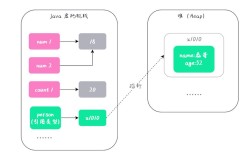
NumberFormatException。 - 优点:在 -128 到 127 的范围内,它会返回一个缓存的对象,可以节省内存,这是 Java 自动装箱机制的一部分。
- 这是当你需要一个
Integer对象时的首选方法。
示例代码:
public class StringToIntegerObjectExample {
    public static void main(String[] args) {
        String str1 = "100";
        String str2 = "100";
        // --- 使用 valueOf 转换 ---
        Integer intObj1 = Integer.valueOf(str1);
        Integer intObj2 = Integer.valueOf(str2);
        System.out.println("字符串 '" + str1 + "' 转换为 Integer 对象: " + intObj1);
        System.out.println("intObj1 的类型是: " + intObj1.getClass().getName());
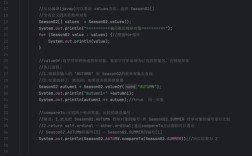
        // --- 演示缓存 ---
        // 因为 100 在 -128 到 127 范围内,intObj1 和 intObj3 指向同一个对象
        Integer intObj3 = 100; // 自动装箱,内部调用 Integer.valueOf(100)
        System.out.println("intObj1 == intObj2? " + (intObj1 == intObj2)); // true
        System.out.println("intObj1 == intObj3? " + (intObj1 == intObj3)); // true
        // --- 失败转换 ---
        String invalidStr = "3.14";
        try {
            Integer invalidInt = Integer.valueOf(invalidStr);
        } catch (NumberFormatException e) {
            System.err.println("错误: 无法将字符串 '" + invalidStr + "' 转换为 Integer 对象。");
        }
    }
}
输出:
字符串 '100' 转换为 Integer 对象: 100
intObj1 的类型是: java.lang.Integer
intObj1 == intObj2? true
intObj1 == intObj3? true
错误: 无法将字符串 '3.14' 转换为 Integer 对象。
从其他数字类型转换为 Integer
如果你有一个 Double, Long, Float 或 BigDecimal 类型的变量,并想将其转换为 Integer,最安全的方法是先将其转换为 Number 类型,然后调用 .intValue() 方法。
示例代码:
public class OtherNumbersToIntegerExample {
    public static void main(String[] args) {
        // 从 Double 转换
        double doubleValue = 98.7;
        // 方法1:先转为long,再由JVM自动装箱为Integer
        Integer fromDouble1 = (long) doubleValue; // 强制转换会截断小数部分
        // 方法2:更通用的方式
        Integer fromDouble2 = new Double(doubleValue).intValue();
        System.out.println("Double " + doubleValue + " 转换为 Integer: " + fromDouble1); // 输出 98
        // 从 Long 转换
        long longValue = 999L;
        Integer fromLong = longValue.intValue(); // long 有直接的 intValue() 方法
        // 或者 Integer.valueOf(longValue.intValue());
        System.out.println("Long " + longValue + " 转换为 Integer: " + fromLong);
        // 从 BigDecimal 转换
        BigDecimal bigDecimalValue = new BigDecimal("1234.56");
        Integer fromBigDecimal = bigDecimalValue.intValue(); // 截断小数部分
        System.out.println("BigDecimal " + bigDecimalValue + " 转换为 Integer: " + fromBigDecimal); // 输出 1234
    }
}
new Integer() 构造函数 (已废弃)
在 Java 9 及更高版本中,Integer 的构造函数已被标记为 @Deprecated,官方不推荐使用,因为 valueOf() 方法在性能和内存利用上更优。
// 不推荐的方式
Integer oldWay = new Integer("123"); // 编译器会警告
Integer anotherOldWay = new Integer(456);
你应该始终优先使用 Integer.parseInt() 或 Integer.valueOf()。
最佳实践与选择指南
-
我需要
int值来进行数学运算?- 使用
Integer.parseInt(),它直接返回基本类型,避免了不必要的对象创建,性能最高。
- 使用
-
我需要一个
Integer对象(存入List<Integer>或作为泛型参数)?- 使用
Integer.valueOf(),这是最标准、最推荐的方式,它利用了缓存机制,在特定范围内能提高性能和节省内存。
- 使用
-
我的输入可能不是一个有效的数字,并且我想优雅地处理这种情况?
- 使用
try-catch块来捕获NumberFormatException,这是处理用户输入等不可控数据的标准做法。
- 使用
-
我需要将
Double或Long转换为Integer?- 使用
.intValue()方法,注意,这会截断小数部分,而不是四舍五入,如果你需要四舍五入,应该先调用.round()或.setScale()等方法。
- 使用
double d = 99.6;
// 直接转换会截断
int truncatedInt = (int) d; // 结果是 99
// 四舍五入
int roundedInt = (int) Math.round(d); // 结果是 100