Of course! The collections module in Python is a built-in module that implements specialized container datatypes. Think of it as a "superpower" for your standard Python lists, dictionaries, tuples, and sets. It provides high-performance alternatives with additional features.
Here’s a comprehensive guide, starting with the most commonly used ones.
Why Use collections?
Standard Python containers (like dict, list, set, tuple) are fantastic. But what if you need:
- A dictionary that remembers the order you added items? (Before Python 3.7, standard dicts didn't do this).
- A dictionary that can have default values for missing keys?
- A container that acts like a set but remembers how many times an item was added?
- A way to efficiently count items in a list?
The collections module provides exactly these tools.
namedtuple: The Read-Only Tuple with Fields
A standard tuple is indexed by numbers (e.g., person[0], person[1]). This is fine, but not very descriptive. A namedtuple gives your tuple elements names, making your code more readable and self-documenting.
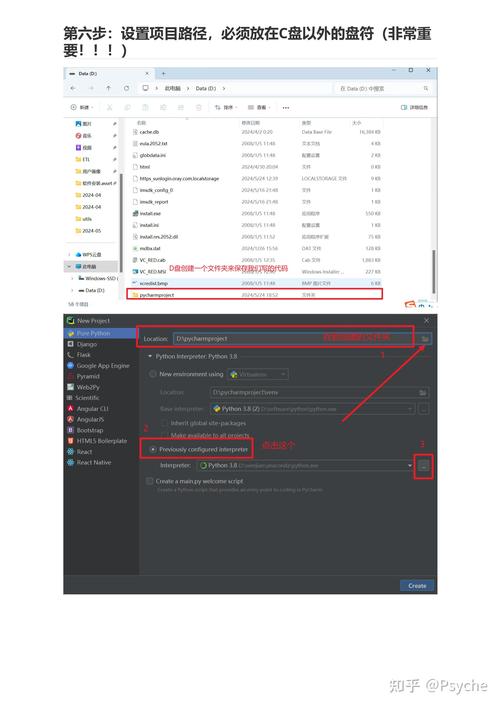
Key Idea: A tuple subclass with named fields.
# Import namedtuple
from collections import namedtuple
# Define the 'blueprint' for our namedtuple
# 'Person' is the name of the type
# 'name, age, city' are the field names
Person = namedtuple('Person', ['name', 'age', 'city'])
# Create an instance just like a regular tuple
p1 = Person(name='Alice', age=30, city='New York')
p2 = Person('Bob', 25, 'Los Angeles') # Positional arguments also work
# Access elements by index (like a tuple)
print(p1[0]) # Output: Alice
# Access elements by name (the magic!)
print(p1.name)   # Output: Alice
print(p1.age)    # Output: 30
print(p1.city)   # Output: New York
# It's still a tuple, so it's immutable
# p1.age = 31 # This would raise an AttributeError!
# You can get a standard dictionary from it
print(p1._asdict())
# Output: {'name': 'Alice', 'age': 30, 'city': 'New York'}
Use Case: Perfect for creating simple, lightweight data objects or records where you don't need the full functionality of a class. It's much more memory-efficient than a simple class.
Counter: The Dictionary for Counting Hashable Objects
This is one of the most useful tools. It's a dictionary subclass specifically designed for counting hashable objects.
Key Idea: A dictionary where keys are the items you count, and values are their counts.
from collections import Counter
# Count items in a list
letters = ['a', 'b', 'a', 'c', 'b', 'a', 'd', 'a']
letter_counts = Counter(letters)
print(letter_counts)
# Output: Counter({'a': 4, 'b': 2, 'c': 1, 'd': 1})
# It behaves like a dictionary
print(letter_counts['a']) # Output: 4
print(letter_counts['z']) # Output: 0 (doesn't raise a KeyError!)
# Get the most common items
print(letter_counts.most_common(2))
# Output: [('a', 4), ('b', 2)]
# You can perform arithmetic operations on Counters
more_letters = ['a', 'a', 'e']
c1 = Counter(letters)
c2 = Counter(more_letters)
# Addition (sums counts)
print(c1 + c2)
# Output: Counter({'a': 6, 'b': 2, 'c': 1, 'd': 1, 'e': 1})
# Subtraction (removes common elements, keeps positive counts)
print(c1 - c2)
# Output: Counter({'b': 2, 'c': 1, 'd': 1})
Use Case: Counting word frequencies, finding the most common elements in a dataset, tallying votes, etc.
defaultdict: The Dictionary That Never Raises KeyError
When you try to access a key that doesn't exist in a normal dictionary, you get a KeyError. A defaultdict automatically creates a default value for a key the first time it's accessed.
Key Idea: A dictionary that calls a factory function to supply missing values.
from collections import defaultdict
# Normal dict
normal_dict = {}
# normal_dict['colors'].append('blue') # KeyError!
# defaultdict requires a "default factory" - a function that returns a default value
# list() is a common choice. It returns an empty list [].
dd = defaultdict(list)
# Now, accessing a non-existent key creates it with an empty list as the value
dd['colors'].append('blue')
dd['colors'].append('red')
dd['shapes'].append('circle')
print(dd)
# Output: defaultdict(<class 'list'>, {'colors': ['blue', 'red'], 'shapes': ['circle']})
# You can inspect it like a normal dict
print(dd['colors']) # Output: ['blue', 'red']
print(dd['shapes']) # Output: ['circle']
# If you access a key that was never set, it gets the default value
print(dd['sizes']) # Output: [] (an empty list)
Use Case: Grouping items by a key. For example, grouping a list of words by their first letter.
words = ['apple', 'ant', 'bat', 'ball', 'cat']
# Group by first letter
grouped = defaultdict(list)
for word in words:
    grouped[word[0]].append(word)
print(grouped)
# Output: defaultdict(<class 'list'>, {'a': ['apple', 'ant'], 'b': ['bat', 'ball'], 'c': ['cat']})
OrderedDict: The Dictionary That Remembers Insertion Order
In Python 3.7 and later, standard dictionaries preserve insertion order. However, OrderedDict is still useful for its specific features and for code that needs to guarantee this behavior across all Python versions. It also has additional methods for reordering items.
Key Idea: A dictionary that remembers the order in which items were inserted.
from collections import OrderedDict
# A standard dict in Python 3.7+ also preserves order, but let's use OrderedDict
od = OrderedDict()
od['a'] = 1
od['b'] = 2
od['c'] = 3
print(od)
# Output: OrderedDict([('a', 1), ('b', 2), ('c', 3)])
# It has useful methods for moving items
# Move an item to the end (if it exists)
od.move_to_end('b')
print(od)
# Output: OrderedDict([('a', 1), ('c', 3), ('b', 2)])
# Pop the first item
first_item = od.popitem(last=False)
print(f"Popped: {first_item}")
# Output: Popped: ('a', 1)
print(od)
# Output: OrderedDict([('c', 3), ('b', 2)])
Use Case: When you need to explicitly control the order of items, such as implementing an LRU (Least Recently Used) cache.
deque: The Fast Double-Ended Queue
Lists in Python are great, but inserting or deleting items from the beginning (list.pop(0)) is slow because all other items have to be shifted. A deque (pronounced "deck") is optimized for fast appends and pops from both ends.
Key Idea: A list-like container with fast appends and pops on both ends.
from collections import deque
# Create a deque
d = deque(['a', 'b', 'c'])
print(d)
# Output: deque(['a', 'b', 'c'])
# Add to the right (end)
d.append('d')
print(d)
# Output: deque(['a', 'b', 'c', 'd'])
# Add to the left (beginning)
d.appendleft('z')
print(d)
# Output: deque(['z', 'a', 'b', 'c', 'd'])
# Remove from the right (end)
d.pop()
print(d)
# Output: deque(['z', 'a', 'b', 'c'])
# Remove from the left (beginning) - This is VERY fast!
d.popleft()
print(d)
# Output: deque(['a', 'b', 'c'])
# You can limit the size, and it will automatically remove from the opposite end
d = deque(maxlen=3)
d.append(1)
d.append(2)
d.append(3)
print(d) # Output: deque([1, 2, 3])
d.append(4) # Now it will remove the leftmost item (1)
print(d) # Output: deque([2, 3, 4])
Use Case: Implementing queues, breadth-first search (BFS) algorithms, and any situation where you need to add/remove items from both ends of a sequence frequently.
ChainMap: Groups Multiple Dictionaries into One View
ChainMap combines multiple dictionaries (or other mappings) into a single, updatable view. It searches through the mappings in the order they are provided.
Key Idea: A single view that looks up keys across multiple dictionaries.
from collections import ChainMap
# Define some configuration layers
defaults = {'theme': 'dark', 'language': 'en'}
user_settings = {'theme': 'light', 'font_size': 12}
command_line_args = {'font_size': 14}
# Create a ChainMap
combined = ChainMap(command_line_args, user_settings, defaults)
# Look up a key. It searches in order.
print(combined['theme'])      # Found in command_line_args? No. user_settings? Yes. Output: 'light'
print(combined['language'])   # Found in command_line_args? No. user_settings? No. defaults? Yes. Output: 'en'
print(combined['font_size'])  # Found in command_line_args? Yes. Output: 14
# You can add new keys to the first mapping
combined['new_key'] = 'new_value'
print(command_line_args) # Output: {'font_size': 14, 'new_key': 'new_value'}
Use Case: Managing hierarchical configurations, like combining command-line arguments, user preferences, and system defaults.
Summary Table
| Class | Key Idea | Common Use Case |
|---|---|---|
namedtuple |
Tuple with named, indexable fields. | Lightweight data objects, records. |
Counter |
Dictionary for counting hashable objects. | Counting frequencies, finding most common items. |
defaultdict |
Dictionary that creates default values for missing keys. | Grouping items by a key. |
OrderedDict |
Dictionary that remembers insertion order. | LRU cache, explicit order control. |
deque |
Fast appends and pops from both ends. | Queues, stacks, BFS algorithms. |
ChainMap |
Groups multiple dictionaries into one view. | Managing layered configurations. |
To see all the available classes, you can run:
import collections
print(dir(collections))