Of course! Let's dive deep into the concept of Observable in Java.
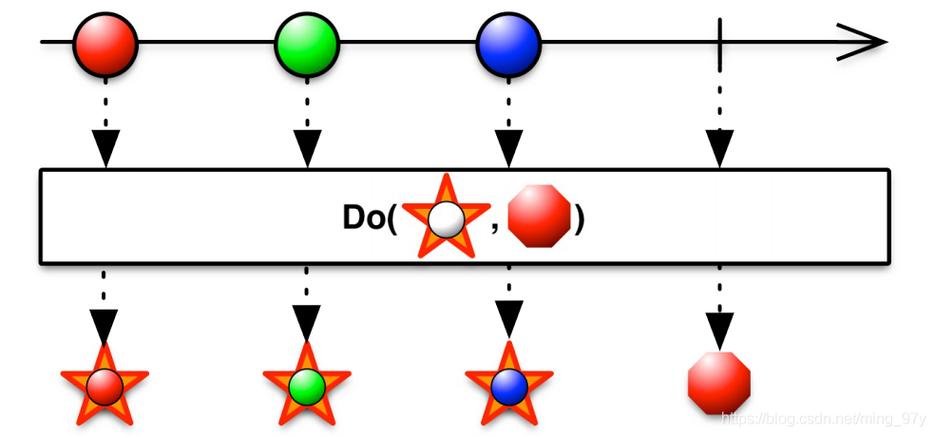
This is a classic and fundamental design pattern in software engineering. In modern Java, it's primarily associated with Reactive Programming and libraries like RxJava, but it's also a core part of the Java Collections Framework.
We'll cover three main areas:
- The Classic Observer Pattern (The
java.util.Observableclass) - Modern Reactive Observables (RxJava)
- The
Observablein JavaFX
The Classic Observer Pattern (java.util.Observable)
This is the built-in implementation of the Observer pattern in Java, part of the java.util package. It's a simple way to implement the "publish-subscribe" model.
Core Concepts
- Observable (The Subject): The object being watched. It maintains a list of its observers and provides methods to add, remove, and notify them of changes.
- Observer (The Subscriber): An object that wants to be notified of changes in the Observable. It must implement the
Observerinterface.
How it Works
- The Observable class holds a list of
Observerobjects. - When the state of the
Observableobject changes, it calls itsnotifyObservers()method. notifyObservers()iterates through the list of observers and calls theupdate()method on each one.- The Observer's
update()method is then executed, allowing it to react to the change.
Example Code
Let's create a simple weather station that broadcasts temperature updates.
Step 1: Create the Observer Interface (it's already provided, but good to see)
java.util.Observer is an interface with one method:
public interface Observer {
    void update(Observable o, Object arg); // o is the Observable, arg is the optional data
}
Step 2: Create the Observable Class
We'll extend java.util.Observable to make our custom object observable.
import java.util.Observable;
// This is our Observable object (the Subject)
public class WeatherStation extends Observable {
    private float temperature;
    public WeatherStation() {
        // The constructor doesn't need to do anything special.
        // The parent Observable class handles the list of observers.
    }
    public void setTemperature(float temperature) {
        this.temperature = temperature;
        System.out.println("Weather Station: Setting temperature to " + temperature + "°C");
        // Something has changed, so we must notify our observers.
        // 1. Mark the state as changed.
        setChanged();
        // 2. Notify all observers. We can pass the new temperature as the argument.
        notifyObservers(temperature);
    }
    // We don't need a getter for the temperature for this example,
    // as the update() method receives the new value as an argument.
}
Step 3: Create the Observer Class
Any class that wants to listen to the WeatherStation must implement the Observer interface.
import java.util.Observable;
import java.util.Observer;
// This is our Observer (the Subscriber)
public class PhoneDisplay implements Observer {
    private String name;
    public PhoneDisplay(String name) {
        this.name = name;
    }
    @Override
    public void update(Observable o, Object arg) {
        // This method is called automatically when WeatherStation notifies.
        if (o instanceof WeatherStation) {
            Float newTemperature = (Float) arg;
            System.out.println(name + " - Display updated. New temperature is: " + newTemperature + "°C");
        }
    }
}
Step 4: Putting It All Together (The Main Application)

public class Main {
    public static void main(String[] args) {
        // 1. Create the Observable (the subject)
        WeatherStation station = new WeatherStation();
        // 2. Create Observers (the subscribers) and register them
        PhoneDisplay phone1 = new PhoneDisplay("Phone 1");
        PhoneDisplay phone2 = new PhoneDisplay("Phone 2");
        station.addObserver(phone1);
        station.addObserver(phone2);
        System.out.println("--- Observers registered ---");
        // 3. Change the state of the Observable. This will trigger the update.
        station.setTemperature(25.5f);
        System.out.println("\n--- Removing an observer ---");
        station.deleteObserver(phone1);
        // 4. Change the state again. Only the remaining observer will be notified.
        station.setTemperature(27.0f);
    }
}
Output:
--- Observers registered ---
Weather Station: Setting temperature to 25.5°C
Phone 1 - Display updated. New temperature is: 25.5°C
Phone 2 - Display updated. New temperature is: 25.5°C
--- Removing an observer ---
Weather Station: Setting temperature to 27.0°C
Phone 2 - Display updated. New temperature is: 27.0°C
⚠️ Important Note: The
java.util.Observableclass is considered obsolete and problematic.
- It's a class, not an interface, so you can't extend it if you already extend another class.
- It's not thread-safe.
- The
setChanged()method is required, which is a bit of a boilerplate.- It lacks many modern features like error handling, backpressure, and complex composition of streams.
Because of these limitations, modern Java development rarely uses java.util.Observable.
Modern Reactive Observables (RxJava)
In modern, asynchronous, and event-driven applications, the ReactiveX (Reactive Extensions) approach is dominant. RxJava is the most popular implementation for the JVM. Its Observable is far more powerful and flexible.
Core Concepts (ReactiveX)
Observable<T>: Represents a stream of data or events that an observer can subscribe to. It can emit zero, one, or many items, and can also terminate successfully or with an error. It's often described as a "push" collection.Observer<T>(orSubscriber): The consumer that subscribes to anObservableand reacts to the items it emits.- Operators: The heart of RxJava. These are pure functions that you can chain together to transform, filter, combine, or otherwise manipulate the data stream (e.g.,
map(),filter(),flatMap(),debounce()).
How it Works
- You create an
Observablethat defines a sequence of events (items, completion, error). - An
Observerimplements methods to handle these events:onNext()for each item,onComplete()for successful termination, andonError()for failure. - The Observer subscribes to the
Observable. - When subscribed, the
Observable"pushes" events to the Observer's methods.
Example Code (RxJava 3)
First, add the RxJava dependency to your project (e.g., for Maven):
<dependency>
    <groupId>io.reactivex.rxjava3</groupId>
    <artifactId>rxjava</artifactId>
    <version>3.1.6</version>
</dependency>
import io.reactivex.rxjava3.core.Observable;
import io.reactivex.rxjava3.observables.ConnectableObservable;
public class RxJavaExample {
    public static void main(String[] args) throws InterruptedException {
        // 1. Create an Observable that emits a sequence of strings
        Observable<String> stringObservable = Observable.just("Hello", "Reactive", "World!");
        // 2. Create an Observer (we can use a lambda for convenience)
        // onNext is called for each item
        // onComplete is called when the stream finishes
        // onError is called if an error occurs
        stringObservable
            .map(String::toUpperCase) // Operator: Transform each item to uppercase
            .filter(s -> s.length() > 5) // Operator: Filter out items with length <= 5
            .subscribe(
                item -> System.out.println("Received: " + item), // onNext
                error -> System.err.println("Error: " + error),  // onError
                () -> System.out.println("Stream completed!")     // onComplete
            );
        System.out.println("\n--- A more advanced example with multiple subscribers ---");
        // 3. Create a "hot" observable that emits events over time
        ConnectableObservable<Long> hotObservable = Observable.interval(1, java.util.concurrent.TimeUnit.SECONDS)
                                                              .publish();
        // Two subscribers connect to the same source
        hotObservable.subscribe(
            item -> System.out.println("Subscriber A: " + item)
        );
        hotObservable.subscribe(
            item -> System.out.println("Subscriber B: " + item)
        );
        // You must call connect() to start emitting events
        hotObservable.connect();
        // Let it run for a few seconds
        Thread.sleep(5000);
    }
}
Output:
Received: HELLO
Received: REACTIVE
Received: WORLD!
Stream completed!
--- A more advanced example with multiple subscribers ---
Subscriber A: 0
Subscriber B: 0
Subscriber A: 1
Subscriber B: 1
Subscriber A: 2
Subscriber B: 2
Subscriber A: 3
Subscriber B: 3
Subscriber A: 4
Subscriber B: 4
As you can see, RxJava's Observable is incredibly powerful for handling asynchronous data flows, applying complex transformations, and managing concurrency.
The Observable in JavaFX
JavaFX has its own implementation of the Observer pattern, tailored for UI updates. It's the standard way to ensure that the UI automatically updates when the underlying data model changes.
Core Concepts
ObservableValue<T>: Represents a value that can be observed for changes. It's the base interface for all observable values in JavaFX.ObservableObjectValue<T>: AnObservableValuefor a generic object.ObservableList<T>: An observable list that notifies listeners when the list is modified (add, remove, etc.).ObservableMap<K,V>: An observable map that notifies listeners when the map is modified.InvalidationListener: A listener that is notified when the value becomes invalid (i.e., it has changed). It doesn't get the old/new values.ChangeListener<T>: A listener that is notified when the value changes, and it receives the old and new values.
Example Code
import javafx.beans.property.SimpleStringProperty;
import javafx.beans.property.StringProperty;
import javafx.beans.value.ChangeListener;
import javafx.beans.value.ObservableValue;
public class JavaFXObservableExample {
    public static void main(String[] args) {
        // 1. Create an ObservableValue using a Property
        // StringProperty is a concrete implementation of ObservableValue<String>
        StringProperty name = new SimpleStringProperty("Initial Name");
        // 2. Add a ChangeListener
        // This listener will be called whenever the value of 'name' changes.
        name.addListener(new ChangeListener<String>() {
            @Override
            public void changed(ObservableValue<? extends String> observable,
                                String oldValue,
                                String newValue) {
                System.out.println("Value changed from '" + oldValue + "' to '" + newValue + "'");
            }
        });
        // 3. Modify the property. This will trigger the listener.
        System.out.println("--- Setting a new value ---");
        name.set("Alice");
        // 4. Modify it again.
        System.out.println("\n--- Setting another value ---");
        name.set("Bob");
        // 5. You can also bind properties together
        StringProperty anotherName = new SimpleStringProperty();
        System.out.println("\n--- Binding anotherName to name ---");
        anotherName.bind(name); // anotherName will now always be the same as name
        System.out.println("anotherName is now: " + anotherName.get());
        System.out.println("\n--- Changing the original name again ---");
        name.set("Charlie"); // This will trigger the listener on 'name' and update 'anotherName'
        System.out.println("anotherName is now: " + anotherName.get());
    }
}
Output:
--- Setting a new value ---
Value changed from 'Initial Name' to 'Alice'
--- Setting another value ---
Value changed from 'Alice' to 'Bob'
--- Binding anotherName to name ---
anotherName is now: Bob
--- Changing the original name again ---
Value changed from 'Bob' to 'Charlie'
anotherName is now: Charlie
This property binding mechanism is the foundation of the "model-view" (MVVM) architecture in JavaFX, allowing for a clean separation between the data model and the UI.
Summary: Which One to Use?
| Feature | java.util.Observable (Classic) |
RxJava Observable (Reactive) |
JavaFX Observable (UI) |
|---|---|---|---|
| Primary Use Case | Simple, one-to-one event notification in desktop apps. | Asynchronous, complex data streams (network, UI events, databases). | Java UI (Swing/JavaFX) data binding. |
| Paradigm | Observer Pattern | Reactive Programming (Functional + Observer) | Observer Pattern / Data Binding |
| Key Strength | Simple, built-in into Java. | Extremely powerful for async, backpressure, composition. | Seamless UI updates, MVVM support. |
| Key Weakness | Obsolete, inflexible, not thread-safe. | Steeper learning curve. | Tied to the JavaFX ecosystem. |
| When to Use | Almost never in new projects. Legacy code only. | The modern standard for building responsive, scalable, async applications. | Mandatory for any non-trivial JavaFX application. |
Conclusion:
While the classic java.util.Observable is a foundational design pattern, it's largely superseded. For general-purpose, modern Java development, especially involving concurrency and I/O, RxJava's Observable is the go-to solution. For building desktop applications with JavaFX, JavaFX's own observable properties and collections are the essential tool for creating reactive and maintainable user interfaces.