Of course! This is a very common question for Python developers, especially those coming from languages like Java, C++, or JavaScript.

Here's a complete guide to switch-case statements in Python, covering the modern approach, the historical workarounds, and why Python chose its current path.
The Short Answer: There is No switch Statement
As of Python 3.10, there is no native switch or case keyword. The language uses other, often more "Pythonic," constructs to achieve the same result.
The most common and recommended way to handle this is with a series of if/elif/else statements.
The Traditional Pythonic Way: if/elif/else
This is the standard, universally understood way to implement switch-case logic in Python. It's readable and works in all versions of Python.

How it Works
You chain together if and elif (which stands for "else if") statements. The else block acts as the "default" case.
Example: Simple Menu System
Let's say you want to perform an action based on a user's menu choice.
def process_choice(choice):
    if choice == '1':
        print("You chose: Open File")
    elif choice == '2':
        print("You chose: Save File")
    elif choice == '3':
        print("You chose: Print Document")
    elif choice == '4':
        print("You chose: Quit Application")
    else:
        print("Invalid choice. Please enter a number from 1 to 4.")
# --- Test the function ---
process_choice('2')  # Output: You chose: Save File
process_choice('5')  # Output: Invalid choice. Please enter a number from 1 to 4.
Pros and Cons
- Pros:
- Simple, explicit, and easy to read.
- Works in all versions of Python.
- Allows for complex conditions in each
if/elif(e.g.,if x > 10 and y < 5:).
- Cons:
- Can become verbose if you have many cases.
- The logic is not grouped together as neatly as in a
switchblock.
The Modern Way (Python 3.10+): The match Statement
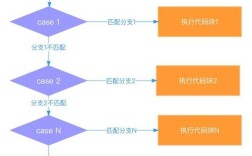
This is the game-changer! Python 3.10 introduced the match statement, which is functionally equivalent to a switch statement in other languages. It's more powerful and often more concise than a long chain of if/elifs.
How it Works
The match statement takes an expression and compares its value to a series of case patterns. It executes the code block for the first matching pattern.

Example: Same Menu System with match
def process_choice_modern(choice):
    match choice:
        case '1':
            print("You chose: Open File")
        case '2':
            case '3': # You can group cases like this!
                print("You chose: Save or Print")
        case '4':
            print("You chose: Quit Application")
        case _: # The underscore '_' is the wildcard pattern, like 'default'
            print("Invalid choice. Please enter a number from 1 to 4.")
# --- Test the function ---
process_choice_modern('2') # Output: You chose: Save or Print
process_choice_modern('3') # Output: You chose: Save or Print
process_choice_modern('9') # Output: Invalid choice. Please enter a number from 1 to 4.
Key Features of the match Statement
- Pattern Matching: It's not just about equality. It can match data structures, types, and even perform assignments.
- Wildcard (
_): The_pattern acts as the default case, matching anything. - Guard Clauses: You can add an
ifcondition to acaseto make it more specific. - Structural Matching: This is the superpower. You can match the structure of an object.
Example: Advanced Pattern Matching
def process_command(command):
    # command is a tuple like ('connect', 'user', 'pass')
    match command:
        case ('connect', user, password) if len(password) > 8:
            print(f"Connecting {user} with a strong password.")
        case ('connect', user, password):
            print(f"Connecting {user} with a weak password.")
        case ('send', message):
            print(f"Sending message: '{message}'")
        case _:
            print("Unknown command structure.")
process_command(('connect', 'alice', 'password123')) # Output: Connecting alice with a strong password.
process_command(('send', 'Hello World!'))           # Output: Sending message: 'Hello World!'
process_command(('disconnect',))                   # Output: Unknown command structure.
Pros and Cons
- Pros:
- Extremely powerful and expressive.
- More concise and readable than
if/eliffor complex, multi-condition logic. - The modern, preferred way in Python 3.10+.
- Cons:
- Only available in Python 3.10 and newer.
- Can be overkill for simple equality checks.
The "Clever" but Discouraged Way: Dictionary Mapping
Before match was introduced, some Python developers used dictionaries to simulate a switch-case. This works well for simple, one-to-one mappings where each case just returns a value or calls a function.
How it Works
You create a dictionary where keys are the possible cases and values are the functions to execute. You then look up and call the function using the get() method, providing a default function for the "default" case.
Example: Using a Dictionary
def open_file():
    print("Opening file...")
def save_file():
    print("Saving file...")
def print_doc():
    print("Printing document...")
def quit_app():
    print("Quitting application.")
def default_action():
    print("Invalid choice.")
# Create the "switch" dictionary
actions = {
    '1': open_file,
    '2': save_file,
    '3': print_doc,
    '4': quit_app,
}
def process_choice_dict(choice):
    # Get the function from the dictionary, or use default_action if not found
    action_to_execute = actions.get(choice, default_action)
    # Call the retrieved function
    action_to_execute()
# --- Test the function ---
process_choice_dict('1') # Output: Opening file...
process_choice_dict('5') # Output: Invalid choice.
Pros and Cons
- Pros:
- Very fast for lookups.
- Cleanly separates the mapping logic from the execution logic.
- Great for dispatching to functions based on a string key.
- Cons:
- Less Readable: It's not immediately obvious what's happening to a new Python developer.
- Not "Pythonic": Guido van Rossum (Python's creator) explicitly discouraged this as it hides the control flow.
- Limited: It's best for simple function calls. Handling complex logic or conditional checks inside the dictionary is awkward.
Summary: Which One Should You Use?
| Method | Best For | Python Version | Recommendation |
|---|---|---|---|
if/elif/else |
Simple logic, maximum compatibility, complex conditions. | All | Always a safe and good choice. |
match/case |
Complex logic, pattern matching, modern Python code. Python 3.10+ | Highly Recommended for new code if you can use Python 3.10+. | |
| Dictionary Mapping | Simple function dispatching, performance-critical lookups. | All | Discouraged for general use. Use only in very specific scenarios where its benefits outweigh the loss of readability. |