Of course! In Python, "removing" items from a list can mean a few different things. The best method depends on what you know about the item you want to remove:
- Do you know its value?
- Do you know its index (position)?
- Do you want to remove based on a condition?
Here’s a complete guide covering all the main ways to remove items from a list, with clear examples.
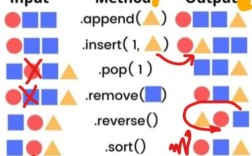
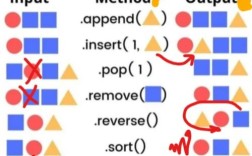
Method 1: Remove by Value (list.remove())
This is the most straightforward method if you know the value of the item you want to delete.
Key Points:
- It removes the first occurrence of the specified value.
- It raises a
ValueErrorif the value is not in the list. - It modifies the list in-place (doesn't return a new list).
Example:
my_list = ['apple', 'banana', 'cherry', 'apple', 'mango']
# Remove the first 'apple'
my_list.remove('apple')
print(my_list)
# Output: ['banana', 'cherry', 'apple', 'mango']
# Trying to remove a value that doesn't exist will cause an error
# my_list.remove('grape')
# This will raise: ValueError: list.remove(x): x not in list
Best for: Quickly deleting a specific value when you know it exists.
Method 2: Remove by Index (list.pop())
Use this when you know the index (position) of the item you want to remove.
Key Points:
- It removes the item at the specified index.
- It returns the removed item.
- If no index is provided, it removes and returns the last item (this is a common way to use a list as a stack).
- It raises an
IndexErrorif the index is out of range.
Example:
my_list = ['apple', 'banana', 'cherry', 'mango']
# Remove the item at index 1 ('banana')
removed_item = my_list.pop(1)
print(f"Removed item: {removed_item}")
# Output: Removed item: banana
print(f"List after pop: {my_list}")
# Output: List after pop: ['apple', 'cherry', 'mango']
# Remove the last item (index -1)
last_item = my_list.pop()
print(f"Removed last item: {last_item}")
# Output: Removed last item: mango
print(f"List after pop: {my_list}")
# Output: List after pop: ['apple', 'cherry']
Best for: When you need to know what was removed or when you are working with the position of an item.
Method 3: Remove by Index (without returning the item) (del)
The del statement is a more powerful way to remove items by index or even a slice of the list.

Key Points:
- It deletes an item or a slice at a specific index.
- It does not return the removed item (it returns
None). - It can also delete an entire slice or even the whole list.
Example:
my_list = ['apple', 'banana', 'cherry', 'mango', 'grape']
# Delete the item at index 2
del my_list[2]
print(f"List after del my_list[2]: {my_list}")
# Output: List after del my_list[2]: ['apple', 'banana', 'mango', 'grape']
# Delete a slice (from index 1 up to, but not including, index 3)
del my_list[1:3]
print(f"List after del my_list[1:3]: {my_list}")
# Output: List after del my_list[1:3]: ['apple', 'grape']
# Delete the entire list
del my_list
# print(my_list) # This would raise a NameError because my_list no longer exists
Best for: When you don't need the removed item and want to delete a range of items (a slice).
Method 4: Remove All Items That Match a Condition
This is a very common task. You want to remove all items that meet a certain criterion (e.g., all numbers greater than 10).
The most "Pythonic" and efficient way to do this is with a list comprehension.
Example:
# Remove all numbers greater than 10
numbers = [1, 15, 2, 12, 5, 20, 8]
# Create a new list with only the items that DO NOT meet the condition
numbers = [num for num in numbers if num <= 10]
print(numbers)
# Output: [1, 2, 5, 8]
How it works:
[num for num in numbers if num <= 10]
for num in numbers: Iterates through each item in the original list.if num <= 10: This is the filter. Only items that satisfy this condition are included in the new list.num: This is the item that gets added to the new list.
Best for: The most readable, concise, and efficient way to filter a list based on a condition.
Method 5: Remove Items While Iterating (Use with Caution!)
If you try to modify a list while looping over it directly, you will run into problems. For example, if you remove an item, the list gets shorter, and your loop's counter will be incorrect.
The WRONG way:
my_list = [1, 2, 3, 4, 5, 6, 7, 8]
for i in range(len(my_list)):
    if my_list[i] % 2 == 0:
        my_list.pop(i) # This will cause issues and errors
The RIGHT way: Iterate over a copy of the list.
my_list = [1, 2, 3, 4, 5, 6, 7, 8]
# Iterate over a copy of the list
for item in my_list[:]: # The [:] creates a shallow copy
    if item % 2 == 0:
        my_list.remove(item)
print(my_list)
# Output: [1, 3, 5, 7]
Alternatively, you can iterate backwards, which also avoids the index-shifting problem.
Summary Table: Which Method to Use?
| Method | What It Does | Returns the Item? | Modifies In-Place? | Best For... |
|---|---|---|---|---|
list.remove(value) |
Removes the first item with the given value. | No | Yes | Removing a specific, known value. |
list.pop(index) |
Removes the item at a specific index. | Yes | Yes | Removing an item by its position when you need the value back. |
del list[index] |
Deletes the item at a specific index. | No | Yes | Deleting an item by position when you don't need the value back. |
| List Comprehension | Creates a new list with items that pass a filter. | N/A (creates new list) | No | The best, most Pythonic way to remove items based on a condition. |
list.clear() |
Removes all items from the list. | No | Yes | Emptying a list completely. |
Bonus: list.clear()
If you want to remove all items from a list, use the clear() method.
my_list = [1, 2, 3, 4, 5]
my_list.clear()
print(my_list)
# Output: []