Of course! Let's break down the Oracle Java API, a fundamental concept for any Java developer.
What is the Java API?
At its core, the Java API (Application Programming Interface) is a massive, pre-built library of classes and methods that you can use in your Java programs. Instead of writing everything from scratch (like how to connect to a network, read a file, or create a graphical window), you can use the code provided by the API.
Think of it like a toolbox. When you build something, you don't forge your own hammer and nails; you use the ones already in the toolbox. The Java API is the ultimate toolbox for Java programmers.
What is the "Oracle" Java API?
The "Oracle" part specifies the provider of the official reference implementation. The Java language and its core APIs are defined by a specification (the Java SE Specification). Oracle, as the steward of Java, develops and releases the official implementation, which includes the APIs.
However, it's crucial to know that the source code for the core Java APIs is open source under the GPL (GNU General Public License). This means anyone can view, modify, and distribute it. Other companies (like Amazon, Azul, and Eclipse Adoptium) also provide their own builds of the OpenJDK, which include the same standard APIs.
So, when people talk about the "Oracle Java API," they are almost always referring to the standard, official Java API that comes with the Java Development Kit (JDK), regardless of whether you downloaded it from Oracle or another vendor.
The Structure of the Java API
The Java API is organized into a hierarchy of packages. Each package is a namespace that groups related classes and interfaces together.
The Package Hierarchy
Packages are organized in a tree-like structure, typically starting with java. for the core platform and javax. for extensions (though many javax. packages have been moved into java. in recent Java versions).
Here are some of the most important packages and what they contain:
| Package | Description | Common Classes/Interfaces |
|---|---|---|
java.lang |
The heart of Java. Automatically imported. Contains fundamental classes. | String, System, Math, Object, Thread, Exception |
java.util |
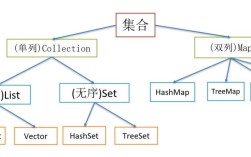
The utility belt. Contains collections, data structures, and helper classes. | ArrayList, HashMap, LinkedList, Date, Scanner, Optional |
java.io |
Input/Output. For reading from and writing to files, streams, and consoles. | File, FileInputStream, BufferedReader, PrintWriter |
java.net |
Networking. For working with URLs, sockets, and web connections. | URL, HttpURLConnection, Socket, ServerSocket |
java.time |
Date and Time API (Java 8+). The modern way to handle dates and times. | LocalDate, LocalTime, ZonedDateTime, Duration |
java.sql |
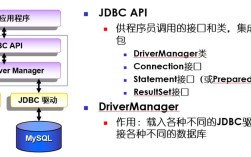
JDBC (Java Database Connectivity). For connecting to relational databases. | Connection, Statement, ResultSet, DriverManager |
java.nio |
New I/O. A more powerful and flexible alternative to java.io. |
Path, Files, ByteBuffer, Charset |
java.text |
Text formatting and parsing. For numbers, dates, and messages. | NumberFormat, SimpleDateFormat, MessageFormat |
java.math |
Arbitrary-precision integers and decimals. | BigInteger, BigDecimal |
java.awt & javax.swing |
GUI (Graphical User Interface) toolkits for building desktop applications. | Button, Frame, JPanel, JButton, JFrame |
java.concurrent |
Utilities for concurrent programming (multithreading). | ExecutorService, Future, CountDownLatch, Semaphore |
Core Concepts within the API
- Classes: Blueprints for creating objects. E.g.,
Stringis a class that represents a sequence of characters. - Interfaces: Contracts that classes can implement. They define a set of methods a class must have. E.g., the
Listinterface defines methods likeadd(),get(), andsize().ArrayListis a class that implements theListinterface. - Methods: Functions that belong to a class or interface. They define the behavior of an object. E.g.,
myString.length()is a method that returns the length of the string. - Fields (or Properties): Variables that belong to a class. They hold the state of an object. E.g.,
myString.lengthis a field (thoughlengthis often accessed via a method in Java).
How to Use the Java API: A Practical Example
Let's say you want to read a line of text from the console and then find out how many words are in it. You can do this entirely with classes from the standard API.
Goal: Read user input and count the words.
Classes we'll use from the API:
java.util.Scanner: To read input from a source (like the console).java.lang.String: To hold the input text and manipulate it.
Here's the code:
// Import the Scanner class from the java.util package
import java.util.Scanner;
public class ApiExample {
    public static void main(String[] args) {
        // 1. Use the Scanner class from the API to read from the console (System.in)
        Scanner scanner = new Scanner(System.in);
        // 2. Prompt the user for input
        System.out.print("Please enter a sentence: ");
        // 3. Use the nextLine() method of the Scanner object to read a full line of text
        String userInput = scanner.nextLine();
        // 4. Close the scanner to free up resources (a good practice)
        scanner.close();
        // 5. Use the String API to process the text
        //    - split("\\s+") splits the string by one or more whitespace characters
        //    - .length returns the number of elements in the resulting array
        String[] words = userInput.split("\\s+");
        int wordCount = words.length;
        // 6. Print the result to the console using System.out
        System.out.println("Your sentence has " + wordCount + " words.");
    }
}
In this small example, we didn't write a single line of code for reading input or splitting a string. We simply used the powerful, tested, and reliable code provided by the Java API.
How to Explore the Java API
You can't memorize the entire API. The key skill is knowing how to find what you need. Here are the best resources:
-
Official Oracle Java Documentation (The Best Resource)
- URL: https://docs.oracle.com/en/java/javase/21/docs/api/ (Use your current Java version)
- What it is: The definitive, searchable, and hyperlinked source for all classes, methods, and fields in the standard API.
- How to use it: It's organized by package. You can browse or use the search bar. Each class page shows its inheritance, method signatures, and detailed descriptions.
-
IDE Integrated Help (Your Best Friend for Development)
- Tools: IntelliJ IDEA, Eclipse, VS Code with Java extensions.
- How to use it: As you type code (e.g.,
Scanner.), your IDE will show you a pop-up list of all available methods and fields (this is called IntelliSense or Code Completion). You can pressCtrl+Space(orCmd+Spaceon Mac) to trigger it. This is the fastest way to explore the API while you code.
-
Third-Party Websites
- Examples:
- What they are: These sites often scrape the official documentation and present it in a different format. They can sometimes be easier to navigate but may not be as up-to-date.
Summary
- The Java API is a pre-built library of code that saves you from "reinventing the wheel."
- Oracle provides the official reference implementation, but the API itself is open-source and part of the OpenJDK.
- It is organized into packages (
java.lang,java.util, etc.) that contain classes, interfaces, methods, and fields. - Learning to navigate and use the API is one of the most important skills for a Java developer.
- The official Oracle documentation is the ultimate source of truth, while your IDE is your best tool for daily exploration.