Of course! Let's dive deep into the Thread.join() method in Java. It's a fundamental concept for coordinating threads.
What is Thread.join()?
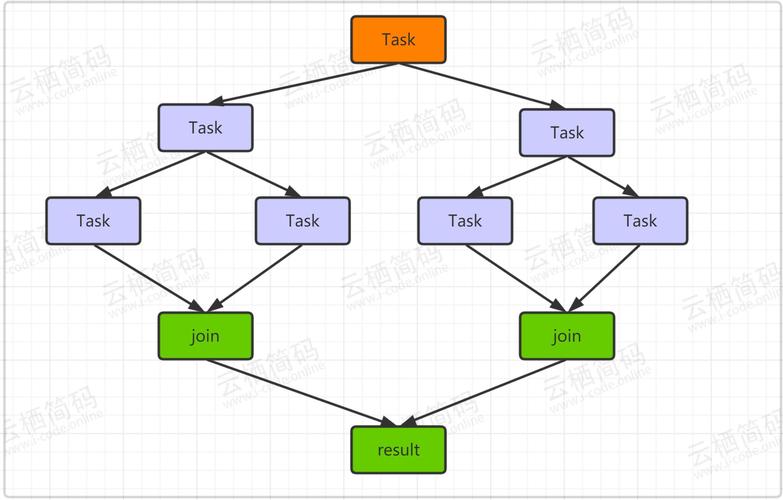
In simple terms, Thread.join() is a method that makes the current thread (the one calling join()) wait until the thread it's called on has finished its execution.
Think of it like this:
Imagine you are the main thread (the "main" method) and you start a worker thread to do a long task. You want to wait for that worker to finish before you proceed with the next step. join() is the tool that tells the main thread to "pause here and wait for the worker to join back."
The Core Concept: Blocking Behavior
The key characteristic of join() is that it's a blocking method. When a thread calls t.join(), the calling thread will pause its execution and move to the WAITING state. It will remain in this state until one of the following happens:
- The thread
tcompletes its execution. - The thread
tis interrupted (another thread callst.interrupt()). - The specified timeout (if one is provided) expires.
Method Signatures and Overloads
The Thread class provides three versions of the join() method:

-
join()- Purpose: Waits indefinitely for the thread to die.
- Behavior: The calling thread will block forever until the target thread finishes.
-
join(long millis)- Purpose: Waits for the thread to die for at most
millismilliseconds. - Behavior: The calling thread will block for up to the specified time. If the thread finishes within that time,
join()returns early. If the time expires,join()returns, but the target thread may still be running.
- Purpose: Waits for the thread to die for at most
-
join(long millis, int nanos)- Purpose: A more precise version that waits for up to
millismilliseconds andnanosnanoseconds. - Behavior: Same as the
millisversion, but with nanosecond precision.
- Purpose: A more precise version that waits for up to
Return Value: All join() methods return void. You don't check a return value to see if the join was successful. Instead, you know it's "done" when the calling thread resumes execution after the join() call.

Simple Code Example
Let's look at the most common use case: waiting for a worker thread to finish before the main program exits.
class MyTask implements Runnable {
    @Override
    public void run() {
        // Simulate a long-running task
        for (int i = 1; i <= 5; i++) {
            System.out.println("MyTask is running... Step " + i);
            try {
                // Sleep for 500 milliseconds to simulate work
                Thread.sleep(500);
            } catch (InterruptedException e) {
                System.out.println("MyTask was interrupted.");
                Thread.currentThread().interrupt(); // Restore the interrupted status
                return; // Exit the thread
            }
        }
        System.out.println("MyTask has finished.");
    }
}
public class ThreadJoinExample {
    public static void main(String[] args) {
        System.out.println("Main thread started.");
        // Create a new thread and pass our task to it
        Thread workerThread = new Thread(new MyTask(), "Worker-1");
        // Start the worker thread
        workerThread.start();
        System.out.println("Main thread is about to call join() and wait.");
        try {
            // Main thread will now pause here and wait for workerThread to finish
            workerThread.join();
        } catch (InterruptedException e) {
            System.out.println("Main thread was interrupted while waiting.");
            Thread.currentThread().interrupt();
        }
        // This line will ONLY execute AFTER workerThread has finished
        System.out.println("Main thread has resumed after workerThread joined.");
        System.out.println("Main thread finished.");
    }
}
Expected Output:
Main thread started.
Main thread is about to call join() and wait.
MyTask is running... Step 1
MyTask is running... Step 2
MyTask is running... Step 3
MyTask is running... Step 4
MyTask is running... Step 5
MyTask has finished.
Main thread has resumed after workerThread joined.
Main thread finished.
Notice how "Main thread has resumed..." only appears after "MyTask has finished." This is the power of join().
Advanced Example: Timeout and Multiple Threads
This example shows how to use a timeout and how to make multiple threads wait for each other.
import java.util.concurrent.TimeUnit;
class DataProcessor implements Runnable {
    private final String name;
    public DataProcessor(String name) {
        this.name = name;
    }
    @Override
    public void run() {
        try {
            System.out.println(name + " is processing data...");
            // Simulate work with a random duration
            long duration = (long) (Math.random() * 3);
            TimeUnit.SECONDS.sleep(duration);
            System.out.println(name + " has finished processing.");
        } catch (InterruptedException e) {
            System.out.println(name + " was interrupted.");
            Thread.currentThread().interrupt();
        }
    }
}
public class AdvancedJoinExample {
    public static void main(String[] args) throws InterruptedException {
        System.out.println("--- Starting Multi-Threaded Data Processing ---");
        Thread processor1 = new Thread(new DataProcessor("Processor-1"));
        Thread processor2 = new Thread(new DataProcessor("Processor-2"));
        Thread processor3 = new Thread(new DataProcessor("Processor-3"));
        processor1.start();
        processor2.start();
        processor3.start();
        // Wait for processor1 to finish, but no longer than 2 seconds
        System.out.println("\nMain thread is waiting for Processor-1 (max 2 seconds)...");
        processor1.join(2000); // Join with a timeout
        if (processor1.isAlive()) {
            System.out.println("Processor-1 did not finish in 2 seconds. Main thread is moving on.");
        } else {
            System.out.println("Processor-1 finished within the timeout.");
        }
        // Now wait for all other processors to finish (without a timeout)
        System.out.println("\nMain thread is now waiting for all other processors to finish...");
        processor2.join();
        processor3.join();
        System.out.println("\n--- All processors have finished. Main thread exiting. ---");
    }
}
Possible Output (will vary due to random sleep times):
--- Starting Multi-Threaded Data Processing ---
Main thread is waiting for Processor-1 (max 2 seconds)...
Processor-1 is processing data...
Processor-2 is processing data...
Processor-3 is processing data...
Processor-1 has finished processing.
Processor-1 finished within the timeout.
Main thread is now waiting for all other processors to finish...
Processor-2 has finished processing.
Processor-3 has finished processing.
--- All processors have finished. Main thread exiting. ---
(In another run, Processor-1 might take longer than 2 seconds, and you would see the "did not finish" message).
Important Considerations and Best Practices
-
InterruptedException: Always handle
InterruptedException. When a thread is waiting (in theWAITINGorTIMED_WAITINGstate) and another thread calls itsinterrupt()method, it is "woken up" and thejoin()method throws this exception. The best practice is to restore the interrupt flag by callingThread.currentThread().interrupt(). -
Avoiding Deadlocks: Be careful not to create a deadlock. If Thread A calls
join()on Thread B, and Thread B callsjoin()on Thread A, they will wait for each other forever, and neither will proceed. -
Alternatives in Modern Java: While
join()is perfectly valid and useful, modern Java (Java 5+) provides higher-level concurrency utilities in thejava.util.concurrentpackage that are often preferred for complex scenarios.ExecutorService: For managing a pool of threads.Future<T>: Represents the result of an asynchronous computation. You can callfuture.get()to wait for the task to complete, which is functionally similar tojoin()but more flexible.CountDownLatch: A versatile utility for allowing one or more threads to wait until a set of operations being performed in other threads completes. It's very powerful for coordinating multiple threads.
Example with
Future:ExecutorService executor = Executors.newSingleThreadExecutor(); Future<String> future = executor.submit(() -> { Thread.sleep(1000); return "Task completed"; }); // This is like join(), it blocks until the result is available try { String result = future.get(); // The main thread waits here System.out.println(result); } catch (InterruptedException | ExecutionException e) { e.printStackTrace(); } executor.shutdown();
Summary: join() vs. Future.get()
| Feature | thread.join() |
future.get() |
|---|---|---|
| Origin | java.lang.Thread (old, low-level) |
java.util.concurrent (modern, high-level) |
| What it Waits For | For a Thread object to terminate. |
For a Future task to complete and produce a result. |
| Return Value | void |
The result object of the computation (<T>). |
| Exception | InterruptedException |
InterruptedException, ExecutionException |
| Flexibility | Less flexible. Only waits for termination. | More flexible. Can get a result, check status, etc. |
| Use Case | Simple scenarios, waiting for a specific thread to die. | Complex applications with thread pools and tasks. |
Conclusion: Thread.join() is a simple and effective tool for basic thread coordination. For simple cases where you just need to wait for one thread to finish, it's perfect. For more complex applications involving thread pools, tasks, and results, the java.util.concurrent utilities are generally a better and safer choice.