最直接、最可靠的方法是使用 subprocess 模块,通过命令行去执行 Python 2 的脚本或命令,Python 3 和 Python 2 是两个独立的程序,Python 3 解释器本身并不能直接“运行”或“嵌入” Python 2 的代码,因为它们的解释器、标准库甚至语法都有不兼容的地方。
使用 subprocess 模块(推荐)
这是最常用、最灵活也是最安全的方法。subprocess 模块允许你创建新的进程,连接到它们的输入/输出/错误管道,并获取它们的返回码。
场景1:执行一个独立的 Python 2 脚本
假设你有一个 Python 2 脚本 script2.py:
# script2.py (Python 2)
import sys
print "Hello from Python 2!"
print "Python version:", sys.version
print "Arguments received:", sys.argv
你可以在 Python 3 脚本中这样调用它:
# script3.py (Python 3)
import subprocess
import sys
# 定义要执行的命令和参数
# 注意:命令和参数都需要是字符串列表
# python2 命令可能需要根据你的系统是 'python2' 还是 'python2.7'
command = ['python2', 'script2.py', 'arg1', 'arg2']
try:
    # 使用 run() 函数 (Python 3.5+ 推荐)
    # check=True 会在命令返回非零退出码时抛出 CalledProcessError
    # capture_output=True 会捕获 stdout 和 stderr
    # text=True 会将输出解码为文本 (在 Python 3.7+ 中,也可以用 universal_newlines=True)
    result = subprocess.run(command, check=True, capture_output=True, text=True, encoding='utf-8')
    # 打印从 Python 2 脚本捕获的标准输出
    print("--- Output from Python 2 script ---")
    print(result.stdout)
    # 打印返回码 (0 表示成功)
    print("\nReturn code:", result.returncode)
except FileNotFoundError:
    print(f"Error: The command '{command[0]}' was not found. Is Python 2 installed and in your PATH?")
except subprocess.CalledProcessError as e:
    print(f"Error executing command: {e}")
    print(f"Return code: {e.returncode}")
    print(f"Stderr: {e.stderr}")
如何运行:
- 确保你的系统上同时安装了 Python 2 和 Python 3。
- 将
script2.py和script3.py放在同一个目录下。 - 用 Python 3 运行
script3.py:python3 script3.py
预期输出:
--- Output from Python 2 script ---
Hello from Python 2!
Python version: 2.7.18 (default, Oct 21 2025, 10:41:48)
[GCC 9.3.0]
Arguments received: ['script2.py', 'arg1', 'arg2']
Return code: 0
场景2:执行 Python 2 的单行命令
如果你只是想执行一行 Python 2 代码,可以使用 subprocess.run 并传入 -c 参数。
# script3.py (Python 3)
import subprocess
command = ['python2', '-c', 'print "The sum is:", 1 + 1']
try:
    result = subprocess.run(command, capture_output=True, text=True, check=True)
    print(result.stdout)
except subprocess.CalledProcessError as e:
    print("Error:", e.stderr)
预期输出:
The sum is: 2通过系统 Shell 调用(不推荐,但有特定用途)
你也可以使用 os.system() 或 subprocess 的 shell=True 参数,通过系统的 shell(如 Bash)来执行命令。
import os
import subprocess
# 方法A: os.system (简单,但不灵活)
# os.system('python2 script2.py')
# 方法B: subprocess with shell=True (更灵活,但有安全风险)
# 注意:command 来自不可信的用户,shell=True 可能导致命令注入漏洞。
# command 是我们自己写的,所以是安全的。
command_str = 'python2 script2.py arg1 arg2'
try:
    # 使用 shell=True 可以使用 shell 的特性,如通配符、管道等
    result = subprocess.run(command_str, shell=True, check=True, capture_output=True, text=True)
    print(result.stdout)
except subprocess.CalledProcessError as e:
    print("Error:", e.stderr)
为什么不推荐?
- 安全风险:
command_str的一部分来自用户输入,攻击者可以注入恶意命令(用户输入; rm -rf /)。 - 平台依赖性:shell 的语法在不同操作系统(Linux/Bash vs. Windows/PowerShell)上不同,降低了代码的可移植性。
- 复杂性:需要正确处理引号、转义等,比直接传递列表更麻烦。
什么时候用?
当你需要利用 shell 特有的功能(ls | grep something)时,才考虑使用 shell=True。
使用 __future__ 模块(代码兼容性,而非调用)
这个方法不属于“调用 Python 2”,而是让你的 Python 3 代码能够兼容 Python 2 的语法,从而可以在两个环境中运行,这通常是在新项目中避免同时使用两个版本的策略。
通过在 Python 2 脚本的顶部导入 __future__ 模块,可以使用 Python 3 的特性。
为了让 print 语句像函数一样工作(Python 3 的方式):
# script2_compatible.py (在 Python 2 和 Python 3 中都能运行)
from __future__ import print_function
print("This works in both Python 2 and Python 3")
print("The sum is:", 1 + 1, sep=" -> ")
注意:这只能解决语法层面的一些问题(如 print, unicode, division 等),对于库不兼容(如 print 在 Python 2 中是语句,在 Python 3 中是函数)、urllib 重构等深层问题无能为力。
重要注意事项和最佳实践
-
Python 2 的生命周期已结束 Python 2 在 2025 年 1 月 1 日已经停止官方支持,这意味着它不再接收安全补丁或更新,继续使用 Python 2 会带来安全风险。最佳策略是尽快将遗留代码迁移到 Python 3。
-
环境隔离:使用
venv或conda不要在系统全局安装和管理 Python 2 和 Python 3,强烈建议使用虚拟环境来隔离项目依赖。# 为 Python 2 项目创建虚拟环境 python2 -m virtualenv py2-env source py2-env/bin/activate # Linux/macOS # py2_env\Scripts\activate # Windows # 为 Python 3 项目创建虚拟环境 python3 -m venv py3-env source py3-env/bin/activate # Linux/macOS # py3_env\Scripts\activate # Windows
这样可以确保你的 Python 3 脚本总能找到正确的
python2解释器,而不会与系统或其他项目的环境冲突。 -
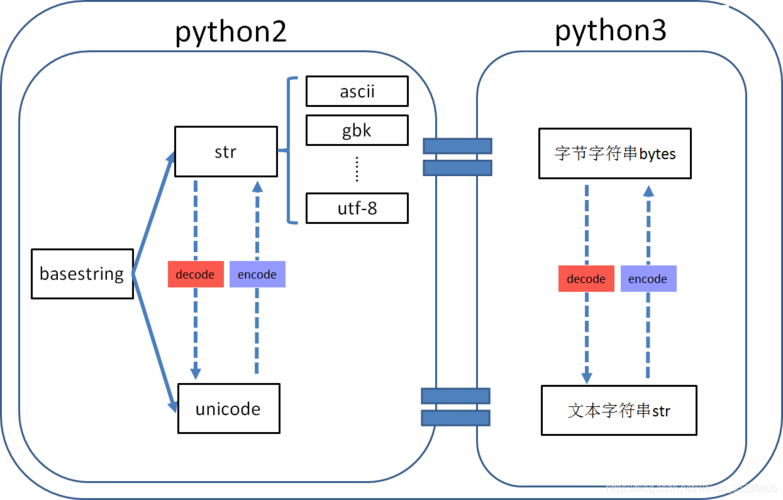
处理输入和输出编码 Python 2 默认使用 ASCII 作为默认编码,而 Python 3 默认使用 UTF-8,当
subprocess在两个版本之间传递文本时,可能会遇到编码问题。- 在上面的
subprocess.run示例中,我们使用了text=True和encoding='utf-8',这能很好地处理大多数情况。 - Python 2 脚本输出的是字节流(
stdout默认是字节),你需要手动解码它:output_bytes = result.stdout; output_text = output_bytes.decode('utf-8')。
- 在上面的
-
性能考虑 通过
subprocess启动一个新进程是有开销的,如果需要频繁、大量地在两个版本间交换数据,这种方式的性能会很差,在这种情况下,应该重新评估架构,考虑用纯 Python 3 重写逻辑,或者通过更轻量的进程间通信机制(如 TCP Socket)来交互。
| 方法 | 描述 | 优点 | 缺点 | 适用场景 |
|---|---|---|---|---|
subprocess |
推荐,启动新进程执行 Python 2 脚本/命令。 | 灵活、安全、功能强大、是标准库的一部分。 | 有进程创建开销,处理编码需小心。 | 绝大多数需要调用 Python 2 的场景。 |
os.system |
通过系统 shell 执行命令。 | 简单,可利用 shell 特性。 | 不安全(有注入风险)、平台依赖、不灵活。 | 需要利用 shell 特性(如管道)且输入可信时。 |
__future__ |
代码兼容,让 Python 2 代码能运行在 Python 3 环境。 | 解决部分语法不兼容问题。 | 无法解决库和深层次不兼容问题,治标不治本。 | 迁移代码时,作为临时过渡方案。 |
最终建议:
优先使用 subprocess.run() 来调用 Python 2 脚本,但请将此视为一种临时的解决方案,并尽快制定计划,将依赖 Python 2 的部分完全迁移到 Python 3,以获得更好的安全性、性能和社区支持。