Of course! Here is a comprehensive guide on how to perform an INSERT operation using Java JDBC (Java Database Connectivity).
We'll cover:
- Prerequisites: What you need before you start.
- The Basic Steps: The fundamental flow of any JDBC operation.
- Code Example: A complete, runnable example with detailed explanations.
- Best Practices: Crucial information for writing robust and secure code.
- Using
PreparedStatementfor Dynamic Data: The correct way to handle user input.
Prerequisites
Before you can run the code, you need:
- Java Development Kit (JDK): Ensure you have a JDK installed (version 8 or newer is recommended).
- A Database: We'll use SQLite for this example because it's file-based, doesn't require a separate server, and is perfect for learning. You can download it from the official SQLite website.
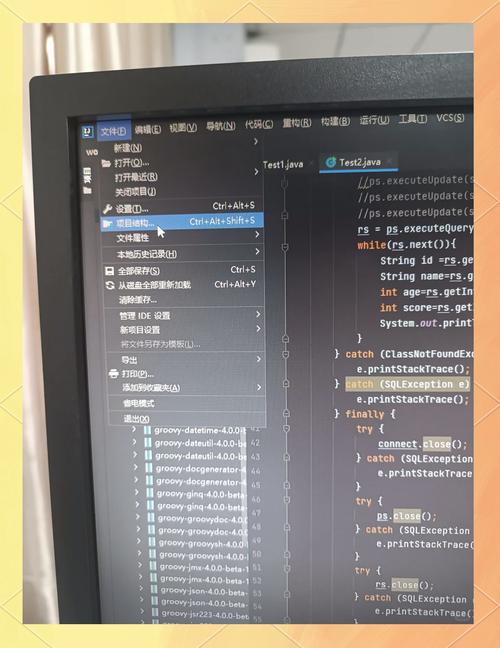
- JDBC Driver: You need the JDBC driver for your database. For SQLite, download the "JDBC Package" (e.g.,
sqlite-jdbc-3.45.1.0.jar). You'll need to add this JAR file to your project's classpath.
The Basic JDBC Steps
Any JDBC operation, whether it's an INSERT, UPDATE, or DELETE, follows these general steps:
- Load the JDBC Driver: Register the driver with the
DriverManager. - Establish a Connection: Create a connection object to your database using a connection URL, username, and password.
- Create a Statement: Create a
StatementorPreparedStatementobject to execute SQL queries. - Execute the Query: Use the
executeUpdate()method forINSERT,UPDATE, orDELETEstatements. This method returns an integer representing the number of affected rows. - Process the Result (Optional): For
INSERT, you might want to get the auto-generated key. - Close Resources: Crucially, close the
Statement,Connection, and other resources in afinallyblock or using try-with-resources to prevent resource leaks.
Complete Code Example (SQLite)
This example creates a database file (mydatabase.db), creates a table (users), and inserts a new record into it.
Step 1: Set up your project
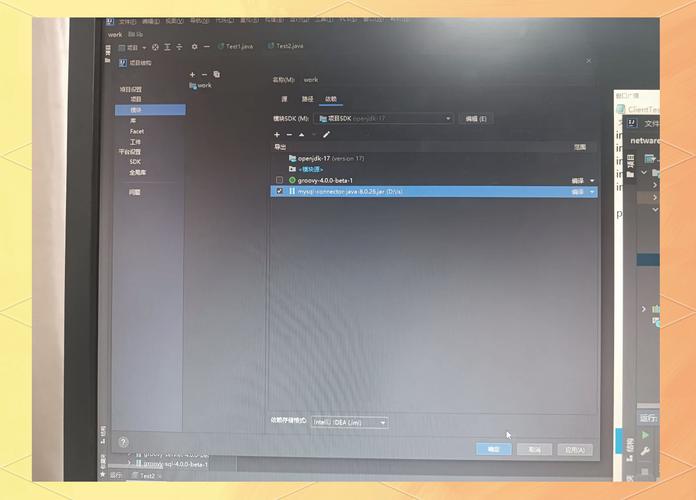
- Create a new Java project in your favorite IDE (IntelliJ, Eclipse, VS Code, etc.).
- Download the SQLite JDBC driver JAR.
- Add the JAR to your project's libraries/dependencies.
Step 2: The Java Code (JdbcInsertExample.java)
import java.sql.Connection;
import java.sql.DriverManager;
import java.sql.SQLException;
import java.sql.Statement;
public class JdbcInsertExample {
    // 1. Database connection details
    private static final String DB_URL = "jdbc:sqlite:mydatabase.db";
    private static final String SQL_INSERT = "INSERT INTO users(name, email, age) VALUES ('Alice', 'alice@example.com', 30)";
    public static void main(String[] args) {
        // The 'try-with-resources' statement ensures that the connection is closed automatically.
        try (Connection conn = DriverManager.getConnection(DB_URL)) {
            if (conn != null) {
                System.out.println("Connection to SQLite has been established.");
                // Create a table if it doesn't exist
                createTable(conn);
                // Execute the INSERT statement
                insertUser(conn);
            }
        } catch (SQLException e) {
            System.out.println(e.getMessage());
        }
    }
    /**
     * Creates the users table if it doesn't already exist.
     */
    private static void createTable(Connection conn) throws SQLException {
        // SQL statement for creating a new table
        String sql = "CREATE TABLE IF NOT EXISTS users (\n"
                + " id integer PRIMARY KEY AUTOINCREMENT,\n"
                + " name text NOT NULL,\n"
                + " email text NOT NULL UNIQUE,\n"
                + " age integer\n"
                + ");";
        try (Statement stmt = conn.createStatement()) {
            // executeUpdate is used for CREATE, INSERT, UPDATE, or DELETE statements
            stmt.execute(sql);
            System.out.println("Table 'users' created or already exists.");
        }
    }
    /**
     * Inserts a new user into the users table.
     */
    private static void insertUser(Connection conn) throws SQLException {
        // Using try-with-resources for the Statement
        try (Statement stmt = conn.createStatement()) {
            // The executeUpdate method returns the number of rows affected.
            int rowsAffected = stmt.executeUpdate(SQL_INSERT);
            if (rowsAffected > 0) {
                System.out.println(rowsAffected + " row(s) inserted successfully.");
            } else {
                System.out.println("No rows were inserted.");
            }
        }
    }
}
How to Run It:
- Save the code as
JdbcInsertExample.java. - Compile and run it from your IDE or the command line.
- After running, you will see a file named
mydatabase.dbin your project's root directory. This is your SQLite database file.
Expected Output:
Connection to SQLite has been established.
Table 'users' created or already exists.
1 row(s) inserted successfully.
Best Practices: Using PreparedStatement
The previous example uses a hardcoded SQL string. This is fine for simple scripts, but it's not secure and not flexible. If you need to insert data that comes from a user (like a web form), you should use a PreparedStatement.
Why use PreparedStatement?
- Security: It prevents SQL Injection attacks. User input is treated as data, not as part of the SQL command.
- Performance: The database can pre-compile the SQL statement, which can be faster if you execute the same statement multiple times with different data.
- Readability: It makes the code cleaner when dealing with dynamic values.
Example with PreparedStatement
Let's modify the insertUser method to accept user data as parameters.
import java.sql.Connection;
import java.sql.DriverManager;
import java.sql.PreparedStatement;
import java.sql.SQLException;
public class JdbcInsertPreparedStatementExample {
    private static final String DB_URL = "jdbc:sqlite:mydatabase.db";
    public static void main(String[] args) {
        // Data to be inserted
        String name = "Bob";
        String email = "bob@example.com";
        int age = 25;
        // SQL query with placeholders (?)
        String sql = "INSERT INTO users(name, email, age) VALUES (?, ?, ?)";
        // Using try-with-resources for Connection and PreparedStatement
        try (Connection conn = DriverManager.getConnection(DB_URL);
             PreparedStatement pstmt = conn.prepareStatement(sql)) {
            // Set the values for the placeholders
            pstmt.setString(1, name);   // 1st '?' is replaced with 'Bob'
            pstmt.setString(2, email);  // 2nd '?' is replaced with 'bob@example.com'
            pstmt.setInt(3, age);       // 3rd '?' is replaced with 25
            // Execute the update
            int rowsAffected = pstmt.executeUpdate();
            System.out.println(rowsAffected + " row(s) inserted using PreparedStatement.");
        } catch (SQLException e) {
            System.out.println(e.getMessage());
        }
    }
}
Key Changes Explained:
- SQL with Placeholders: The SQL string now uses as placeholders for the values.
INSERT INTO users(name, email, age) VALUES (?, ?, ?)
PreparedStatement: We create aPreparedStatementobject by passing the SQL with placeholders toconn.prepareStatement().- Setting Values: We use methods like
setString(),setInt(), etc., to assign values to each placeholder. The index is 1-based (the first is index 1). - Execute: We call
pstmt.executeUpdate()just like before.
Getting Auto-Generated Keys
It's very common for a table to have an auto-incrementing primary key (like id). After you insert a new row, you might want to know what the ID of the new row is.
You can do this by telling the PreparedStatement that you want to retrieve generated keys.
Example: Insert and Get Generated ID
// ... (same DB_URL and imports as before)
public class JdbcInsertWithGeneratedKey {
    private static final String DB_URL = "jdbc:sqlite:mydatabase.db";
    public static void main(String[] args) {
        String name = "Charlie";
        String email = "charlie@example.com";
        int age = 42;
        String sql = "INSERT INTO users(name, email, age) VALUES (?, ?, ?)";
        try (Connection conn = DriverManager.getConnection(DB_URL);
             // Parameter 2: Statement.RETURN_GENERATED_KEYS tells the driver to get the new ID
             PreparedStatement pstmt = conn.prepareStatement(sql, Statement.RETURN_GENERATED_KEYS)) {
            pstmt.setString(1, name);
            pstmt.setString(2, email);
            pstmt.setInt(3, age);
            int rowsAffected = pstmt.executeUpdate();
            if (rowsAffected > 0) {
                // Get the generated keys
                try (var rs = pstmt.getGeneratedKeys()) {
                    if (rs.next()) {
                        // The first column of the first row is the generated ID
                        long newId = rs.getLong(1);
                        System.out.println(rowsAffected + " row(s) inserted. New ID: " + newId);
                    }
                }
            }
        } catch (SQLException e) {
            System.out.println(e.getMessage());
        }
    }
}
Key Changes:
Statement.RETURN_GENERATED_KEYS: This is the second argument inconn.prepareStatement(). It's a flag that instructs the JDBC driver to make the generated keys available.getGeneratedKeys(): AfterexecuteUpdate(), you call this method on thePreparedStatementto get aResultSetcontaining the generated keys.- Process the
ResultSet: You then iterate through theResultSet(even though it only has one row) to retrieve the ID.rs.getLong(1)gets the value from the first column.