Of course! In Python, "appending" an item means adding it to the end of a list. The most common and direct way to do this is with the .append() method.
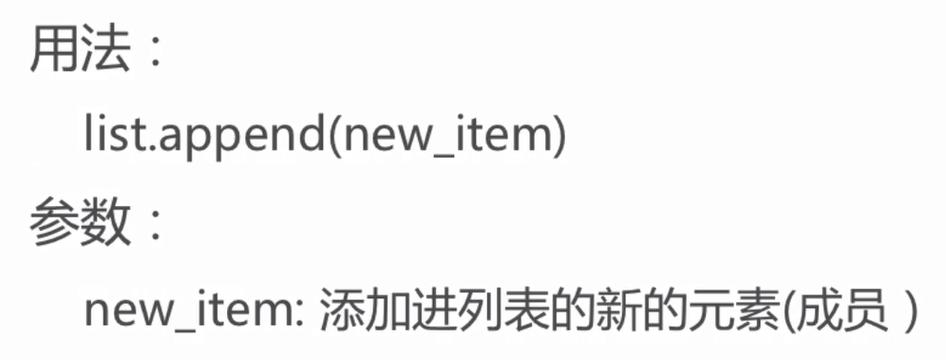
Here’s a complete guide covering the different ways to add items to a list, from the most common to more advanced use cases.
The list.append() Method (Most Common)
This is the standard way to add a single item to the end of a list. It modifies the list in-place, meaning it doesn't return a new list but changes the original one.
Syntax:
my_list.append(item_to_add)
Example:
# Start with a list of fruits
fruits = ['apple', 'banana', 'cherry']
# Append 'orange' to the end of the list
fruits.append('orange')
# Print the list to see the change
print(fruits)
Output:
['apple', 'banana', 'cherry', 'orange']Key Characteristics of .append():
- Modifies in-place: It changes the original list.
- Adds one item: You can only add a single item. If you try to pass a list, that entire list will become a single new element (a nested list).
- Returns
None: If you try to assign the result of.append()to a variable, that variable will beNone.
Example of a Common Mistake:
my_list = [1, 2, 3]
new_list = my_list.append(4) # This is a common error!
print(f"my_list is: {my_list}")      # my_list is correctly modified
print(f"new_list is: {new_list}")    # new_list is None!
Output:
my_list is: [1, 2, 3, 4]
new_list is: None
The list.insert() Method (Add at a Specific Position)
If you don't want to add the item to the end, but at a specific index, use .insert().
Syntax:
my_list.insert(index, item_to_add)
- If the
indexis 0, the item is added to the beginning. - If the
indexis greater than the list's length, it behaves just like.append()and adds the item to the end.
Example:
letters = ['a', 'b', 'd']
# Insert 'c' at index 2
letters.insert(2, 'c')
print(letters)
# Insert 'z' at the beginning (index 0)
letters.insert(0, 'z')
print(letters)
Output:
['a', 'b', 'c', 'd']
['z', 'a', 'b', 'c', 'd']
The list.extend() Method (Add Multiple Items from an Iterable)
To add all items from another list (or any iterable like a tuple, set, etc.) to the end of your list, use .extend(). It "unpacks" the items and adds them one by one.
Syntax:
my_list.extend(iterable_to_add)
Example:
main_numbers = [1, 2, 3]
more_numbers = [4, 5, 6]
# Add all items from more_numbers to main_numbers
main_numbers.extend(more_numbers)
print(main_numbers)
Output:
[1, 2, 3, 4, 5, 6]How is .extend() different from .append()?
This is a very important distinction.
# Using .append()
list1 = [1, 2, 3]
list1.append([4, 5])
print(f"Using append: {list1}") # Adds the entire second list as one item
# Using .extend()
list2 = [1, 2, 3]
list2.extend([4, 5])
print(f"Using extend: {list2}") # Adds the individual items from the second list
Output:
Using append: [1, 2, 3, [4, 5]]
Using extend: [1, 2, 3, 4, 5]
The Operator (Concatenation)
You can use the operator to combine two lists. Important: This does not modify the original lists. It returns a new list containing the elements of both.
Example:
list_a = [1, 2, 3]
list_b = [4, 5, 6]
# Create a new list by concatenating list_a and list_b
list_c = list_a + list_b
print(f"list_a: {list_a}") # list_a is unchanged
print(f"list_b: {list_b}") # list_b is unchanged
print(f"list_c: {list_c}") # list_c is the new combined list
Output:
list_a: [1, 2, 3]
list_b: [4, 5, 6]
list_c: [1, 2, 3, 4, 5, 6]
The Operator (In-place Concatenation)
If you want to modify a list by adding another list to its end (similar to .extend()), you can use the operator.
Example:
my_list = [1, 2, 3]
other_list = [4, 5, 6]
# Add all items from other_list to the end of my_list
my_list += other_list # This is equivalent to my_list.extend(other_list)
print(my_list)
Output:
[1, 2, 3, 4, 5, 6]Summary Table
| Method | What it Does | Modifies Original? | Adds One Item? |
|---|---|---|---|
.append(item) |
Adds a single item to the end. | Yes | Yes |
.insert(index, item) |
Adds a single item at a specific position. | Yes | Yes |
.extend(iterable) |
Adds all items from an iterable to the end. | Yes | No (adds multiple) |
list1 + list2 |
Creates a new list by combining two lists. | No | No |
list1 += list2 |
Adds all items from the second list to the first (in-place). | Yes | No (adds multiple) |
Quick Guide: Which one should I use?
- To add one item to the end? → Use
.append().my_list.append(10)
- To add one item to a specific spot? → Use
.insert().my_list.insert(0, 10) # Add to the beginning
- To add all items from another list to the end? → Use
.extend().my_list.extend([10, 11, 12])
- To create a brand new combined list without changing the originals? → Use the operator.
new_list = my_list + [10, 11, 12]