Of course! Here is a comprehensive guide on using Java with the SQLite JDBC driver. We'll cover everything from setting up your project to performing common database operations (CRUD) and best practices.
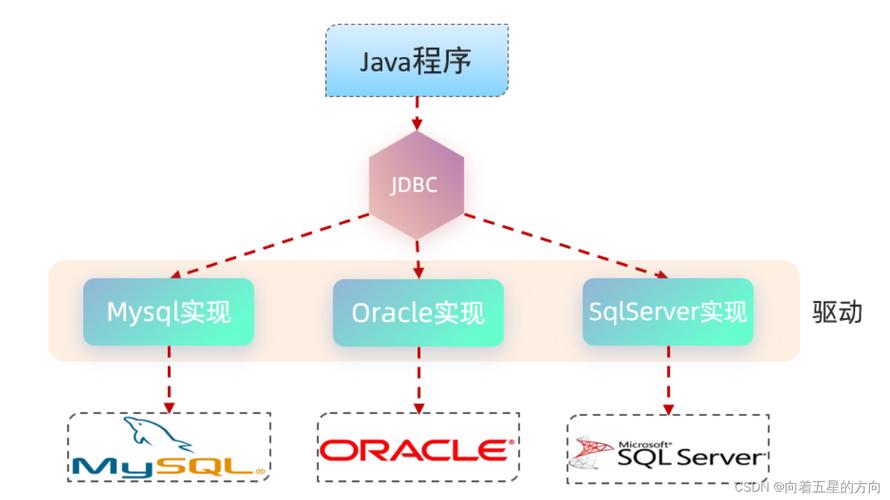
What is SQLite?
SQLite is a C-language library that implements a small, fast, self-contained, high-reliability, full-featured, SQL database engine.
Key characteristics that make it popular for Java applications:
- Serverless: It's not a client-server database. The database is stored in a single file on your disk.
- Zero Configuration: No complex setup or administration is needed.
- Self-Contained: The database engine and database are in the same file.
- Portable: Works across all major operating systems (Windows, macOS, Linux).
- Embeddable: Perfect for applications that need a local database, like desktop apps, mobile apps (Android), and small web servers.
Setting Up Your Project
The most common way to manage dependencies in modern Java projects is with a build tool like Maven or Gradle.
Using Maven (Recommended)
Add the sqlite-jdbc dependency to your pom.xml file. The official repository is on Maven Central.
<project xmlns="http://maven.apache.org/POM/4.0.0"
         xmlns:xsi="http://www.w3.org/2001/XMLSchema-instance"
         xsi:schemaLocation="http://maven.apache.org/POM/4.0.0 http://maven.apache.org/xsd/maven-4.0.0.xsd">
    <modelVersion>4.0.0</modelVersion>
    <groupId>com.example</groupId>
    <artifactId>java-sqlite-example</artifactId>
    <version>1.0-SNAPSHOT</version>
    <properties>
        <maven.compiler.source>11</maven.compiler.source>
        <maven.compiler.target>11</maven.compiler.target>
        <project.build.sourceEncoding>UTF-8</project.build.sourceEncoding>
    </properties>
    <dependencies>
        <!-- SQLite JDBC Driver -->
        <dependency>
            <groupId>org.xerial</groupId>
            <artifactId>sqlite-jdbc</artifactId>
            <version>3.45.1.0</version> <!-- Use the latest version available -->
        </dependency>
    </dependencies>
</project>
Using Gradle
Add the sqlite-jdbc dependency to your build.gradle file.
plugins {
    id 'java'
}
group = 'com.example'
version = '1.0-SNAPSHOT'
repositories {
    mavenCentral()
}
dependencies {
    // SQLite JDBC Driver
    implementation 'org.xerial:sqlite-jdbc:3.45.1.0' // Use the latest version available
}
java {
    toolchain {
        languageVersion = JavaLanguageVersion.of(11)
    }
}
Connecting to the Database
The connection URL for SQLite is the key to establishing a connection.
- Format:
jdbc:sqlite:<database_file_path> - Examples:
jdbc:sqlite:mydatabase.db(Creates/opens a database file namedmydatabase.dbin the project's root directory)jdbc:sqlite:C:/data/sales.db(Uses an absolute path on Windows)jdbc:sqlite:/var/data/myapp.db(Uses an absolute path on Linux/macOS)jdbc:sqlite::memory:(Creates a temporary in-memory database. Data is lost when the connection is closed)
Important: The SQLite JDBC driver will automatically create the database file if it doesn't exist.
Example: Basic Connection
Here's a simple try-with-resources block to connect to the database. This is the recommended way as it ensures the connection is always closed.
import java.sql.Connection;
import java.sql.DriverManager;
import java.sql.SQLException;
import java.sql.Statement;
public class SQLiteJDBCExample {
    public static void main(String[] args) {
        // The SQLite JDBC driver
        String url = "jdbc:sqlite:mydatabase.db";
        try (Connection conn = DriverManager.getConnection(url)) {
            if (conn != null) {
                System.out.println("Connection to SQLite has been established.");
            }
        } catch (SQLException e) {
            System.out.println(e.getMessage());
        }
    }
}
CRUD Operations (Create, Read, Update, Delete)
Let's create a table named users and perform basic operations.
Step 1: Create a Table
We use a Statement object to execute SQL DDL (Data Definition Language) commands.
private static void createNewTable() {
    // SQL statement for creating a new table
    String sql = "CREATE TABLE IF NOT EXISTS users (\n"
            + " id integer PRIMARY KEY,\n"
            + " name text NOT NULL,\n"
            + " email text NOT NULL UNIQUE,\n"
            + " age integer\n"
            + ");";
    try (Connection conn = DriverManager.getConnection(url);
         Statement stmt = conn.createStatement()) {
        // executeUpdate is used for CREATE, INSERT, UPDATE, DELETE
        stmt.execute(sql);
        System.out.println("Table 'users' created successfully.");
    } catch (SQLException e) {
        System.out.println(e.getMessage());
    }
}
Step 2: Insert Data (Create)
There are two ways to insert data: using Statement and using PreparedStatement. PreparedStatement is highly recommended as it prevents SQL injection and is more efficient for repeated queries.
Using PreparedStatement (Best Practice):
private static void insert(String name, String email, int age) {
    String sql = "INSERT INTO users(name, email, age) VALUES(?, ?, ?)";
    try (Connection conn = DriverManager.getConnection(url);
         PreparedStatement pstmt = conn.prepareStatement(sql)) {
        pstmt.setString(1, name);
        pstmt.setString(2, email);
        pstmt.setInt(3, age);
        pstmt.executeUpdate();
        System.out.println(name + " inserted successfully.");
    } catch (SQLException e) {
        System.out.println(e.getMessage());
    }
}
Step 3: Select Data (Read)
We use a ResultSet to iterate over the data returned by a SELECT query.
private static void selectAll() {
    String sql = "SELECT id, name, email, age FROM users";
    try (Connection conn = DriverManager.getConnection(url);
         Statement stmt = conn.createStatement();
         ResultSet rs = stmt.executeQuery(sql)) {
        // Loop through the result set
        System.out.println("--- All Users ---");
        while (rs.next()) {
            System.out.println(rs.getInt("id") +  "\t" +
                               rs.getString("name") + "\t" +
                               rs.getString("email") + "\t" +
                               rs.getInt("age"));
        }
    } catch (SQLException e) {
        System.out.println(e.getMessage());
    }
}
Step 4: Update Data
Again, we use PreparedStatement for safety and efficiency.
private static void update(int id, String newName) {
    String sql = "UPDATE users SET name = ? WHERE id = ?";
    try (Connection conn = DriverManager.getConnection(url);
         PreparedStatement pstmt = conn.prepareStatement(sql)) {
        pstmt.setString(1, newName);
        pstmt.setInt(2, id);
        int affectedRows = pstmt.executeUpdate();
        if (affectedRows > 0) {
            System.out.println("User with ID " + id + " updated successfully.");
        } else {
            System.out.println("No user found with ID " + id);
        }
    } catch (SQLException e) {
        System.out.println(e.getMessage());
    }
}
Step 5: Delete Data
private static void delete(int id) {
    String sql = "DELETE FROM users WHERE id = ?";
    try (Connection conn = DriverManager.getConnection(url);
         PreparedStatement pstmt = conn.prepareStatement(sql)) {
        pstmt.setInt(1, id);
        int affectedRows = pstmt.executeUpdate();
        if (affectedRows > 0) {
            System.out.println("User with ID " + id + " deleted successfully.");
        } else {
            System.out.println("No user found with ID " + id);
        }
    } catch (SQLException e) {
        System.out.println(e.getMessage());
    }
}
Complete Runnable Example
Here is a full main method that ties everything together.
import java.sql.Connection;
import java.sql.DriverManager;
import java.sql.PreparedStatement;
import java.sql.ResultSet;
import java.sql.SQLException;
import java.sql.Statement;
public class Main {
    private static final String url = "jdbc:sqlite:mydatabase.db";
    public static void main(String[] args) {
        // 1. Create the table
        createNewTable();
        // 2. Insert some data
        insert("Alice", "alice@example.com", 30);
        insert("Bob", "bob@example.com", 25);
        insert("Charlie", "charlie@example.com", 35);
        // 3. Read all data
        System.out.println("\n--- Initial Data ---");
        selectAll();
        // 4. Update a record
        update(1, "Alice Smith");
        System.out.println("\n--- After Update ---");
        selectAll();
        // 5. Delete a record
        delete(2);
        System.out.println("\n--- After Delete ---");
        selectAll();
    }
    private static void createNewTable() {
        String sql = "CREATE TABLE IF NOT EXISTS users (\n"
                + " id integer PRIMARY KEY,\n"
                + " name text NOT NULL,\n"
                + " email text NOT NULL UNIQUE,\n"
                + " age integer\n"
                + ");";
        try (Connection conn = DriverManager.getConnection(url);
             Statement stmt = conn.createStatement()) {
            stmt.execute(sql);
        } catch (SQLException e) {
            System.out.println(e.getMessage());
        }
    }
    private static void insert(String name, String email, int age) {
        String sql = "INSERT INTO users(name, email, age) VALUES(?, ?, ?)";
        try (Connection conn = DriverManager.getConnection(url);
             PreparedStatement pstmt = conn.prepareStatement(sql)) {
            pstmt.setString(1, name);
            pstmt.setString(2, email);
            pstmt.setInt(3, age);
            pstmt.executeUpdate();
        } catch (SQLException e) {
            System.out.println(e.getMessage());
        }
    }
    private static void selectAll() {
        String sql = "SELECT id, name, email, age FROM users";
        try (Connection conn = DriverManager.getConnection(url);
             Statement stmt = conn.createStatement();
             ResultSet rs = stmt.executeQuery(sql)) {
            System.out.println("ID\tName\t\tEmail\t\tAge");
            System.out.println("--------------------------------------------");
            while (rs.next()) {
                System.out.println(rs.getInt("id") +  "\t" +
                                   rs.getString("name") + "\t" +
                                   rs.getString("email") + "\t" +
                                   rs.getInt("age"));
            }
        } catch (SQLException e) {
            System.out.println(e.getMessage());
        }
    }
    private static void update(int id, String newName) {
        String sql = "UPDATE users SET name = ? WHERE id = ?";
        try (Connection conn = DriverManager.getConnection(url);
             PreparedStatement pstmt = conn.prepareStatement(sql)) {
            pstmt.setString(1, newName);
            pstmt.setInt(2, id);
            pstmt.executeUpdate();
        } catch (SQLException e) {
            System.out.println(e.getMessage());
        }
    }
    private static void delete(int id) {
        String sql = "DELETE FROM users WHERE id = ?";
        try (Connection conn = DriverManager.getConnection(url);
             PreparedStatement pstmt = conn.prepareStatement(sql)) {
            pstmt.setInt(1, id);
            pstmt.executeUpdate();
        } catch (SQLException e) {
            System.out.println(e.getMessage());
        }
    }
}
Best Practices
-
Always Use
try-with-resources: This ensures thatConnection,Statement, andResultSetobjects are closed automatically, preventing resource leaks. -
Prefer
PreparedStatement: Use it for all queries that take parameters. It protects against SQL injection and can be more efficient if you execute the same query multiple times. -
Use Transactions for Atomic Operations: If you need to perform multiple operations that must all succeed or all fail (e.g., transferring money between two accounts), use transactions.
// Example of using a transaction try (Connection conn = DriverManager.getConnection(url)) { conn.setAutoCommit(false); // Start transaction // Perform multiple operations updateAccountBalance(conn, "account1", -100); updateAccountBalance(conn, "account2", 100); conn.commit(); // Commit the transaction if all operations are successful System.out.println("Transaction committed successfully."); } catch (SQLException e) { // If an error occurs, the transaction will be rolled back automatically // when the try block exits. System.out.println("Transaction failed. Rolled back."); e.printStackTrace(); } -
Handle Exceptions Gracefully: Don't just print the stack trace. Log the error with a proper logging framework (like SLF4J with Logback) and inform the user in a user-friendly way.