Of course! Let's dive deep into the HashMap.get() method in Java.
Overview
The HashMap.get(Object key) method is used to retrieve the value associated with a specified key in a HashMap. It's one of the most fundamental and frequently used methods in the Java Collections Framework.
Syntax:
public V get(Object key)
V: This is the type of the values stored in the map (e.g.,String,Integer).key: The key whose associated value is to be returned.
Return Value:
- The value to which the specified key is mapped.
nullif this map contains no mapping for the key.
How It Works: The Internal Mechanism
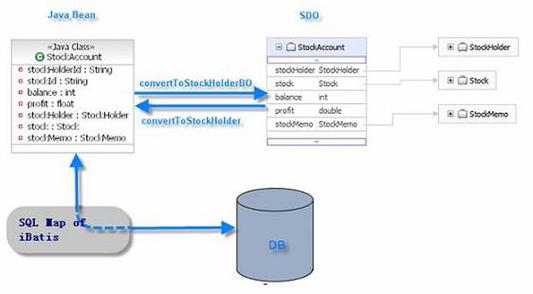
Understanding how get() works is key to understanding why HashMap is so fast. The process relies on two core concepts: hashing and chaining.
-
Calculate the Hash Code:
- When you call
map.get(myKey), the first thing Java does is calculate the hash code of themyKeyobject using itshashCode()method. - This hash code is an integer that (ideally) is unique for each object.
- When you call
-
Find the Bucket Index:
- The raw hash code can be a very large number. The
HashMapneeds to map this number to an index within its internal array. This is done using the modulo operator (). - Index =
hashCode(key) % (capacity of the array) - This index points to a specific location in the array, often called a bucket. This is where the value (or a list of values) is stored.
- The raw hash code can be a very large number. The
-
Handle Collisions with Chaining:
- Collision: What if two different keys produce the same index? This is called a collision. For example,
key1.hashCode() % 16might be5, andkey2.hashCode() % 16might also be5. - Solution: In Java's
HashMap, each bucket doesn't store a single value. It stores a linked list (or, in Java 8+, a balanced tree) ofMap.Entryobjects. All entries that hash to the same bucket are stored in this list/tree. This technique is called chaining. - So, when you
get(key), the algorithm goes to the correct bucket and then must traverse the linked list/tree to find the entry with an exactly equal key.
- Collision: What if two different keys produce the same index? This is called a collision. For example,
-
Find the Exact Key (using
equals()):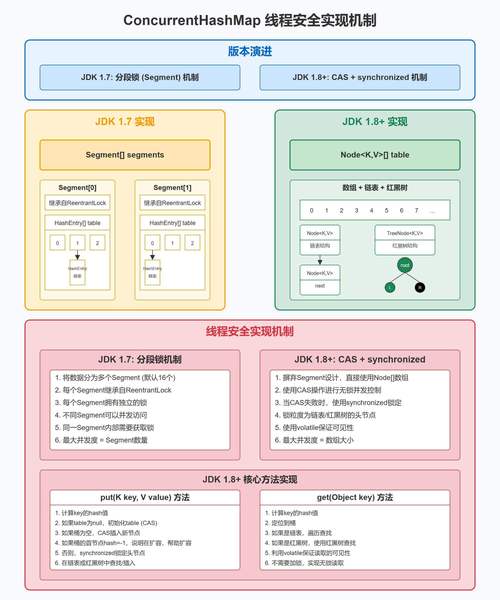 (图片来源网络,侵删)
- Once the correct bucket is found, the
HashMapiterates through the entries in that bucket. - For each entry, it calls
key.equals(entry.getKey())to find a perfect match. It's not enough for the hash codes to be equal; the keys must be considered equal by theequals()contract. - When a match is found, the corresponding value (
entry.getValue()) is returned.
- Once the correct bucket is found, the
-
Return
nullif Not Found:- If the algorithm traverses the entire bucket and finds no entry whose key matches the given key, it returns
null.
- If the algorithm traverses the entire bucket and finds no entry whose key matches the given key, it returns
Visual Example:
Imagine a HashMap with an internal array of size 8.
  Index  |  Bucket (Linked List of Entries)
  -------------------------------------------
    0    |  (empty)
    1    |  -> "name" -> "Alice"
    2    |  -> "age" -> "30"
    3    |  (empty)
    4    |  -> "city" -> "New York"
    5    |  -> "id" -> "123" -> "country" -> "USA"
    6    |  (empty)
7 | (empty)-
map.get("city"):"city".hashCode()-> let's say it's52.52 % 8->4. It goes to index 4.- The bucket at index 4 has one entry. It checks if
"city".equals("city"). Yes! - It returns the value
"New York".
-
map.get("country"):"country".hashCode()-> let's say it's37.37 % 8->5. It goes to index 5.- The bucket at index 5 has a linked list. It starts traversing.
- First entry:
"id". Is"country".equals("id")? No. - Second entry:
"country". Is"country".equals("country")? Yes! - It returns the value
"USA".
Important Considerations and "Gotchas"
The null Key is Special
A HashMap can store one and only one null key. The get() method handles this as a special case.
- If you call
map.get(null), it bypasses the hashing logic and goes directly to a reserved bucket (usually the first one, index 0) to look for the entry with anullkey.
get(key) Returns null: What Does It Mean?
This is a very common point of confusion. If map.get(key) returns null, it could mean one of two things:
- The key does not exist in the map. (Most common case)
- The key does exist in the map, and its associated value is
null.
How can you tell the difference?
You can't, just by calling get(). You must use the containsKey() method first.
HashMap<String, String> map = new HashMap<>();
map.put("key1", "value1");
map.put("key2", null); // A valid entry
// Scenario 1: Key does not exist
String value1 = map.get("nonExistentKey");
if (value1 == null) {
    System.out.println("Key 'nonExistentKey' is not in the map.");
    // This will be printed
}
// Scenario 2: Key exists, but its value is null
String value2 = map.get("key2");
if (value2 == null) {
    // This block executes, but is the key missing or is the value null?
    // We don't know from `get()` alone!
    System.out.println("The value for 'key2' is null.");
}
// The correct way to check
if (!map.containsKey("key2")) {
    System.out.println("Key 'key2' is not in the map.");
} else {
    System.out.println("Key 'key2' is in the map, its value is: " + map.get("key2"));
    // This will be printed, showing the value is null
}
Performance: O(1) on Average
The get() operation has an average-case time complexity of O(1), or constant time. This is because, assuming a good hash function and a properly sized map, the hash code will distribute keys evenly across buckets, leading to very few collisions.
- Best Case: No collisions. The key is found in the first bucket it checks.
O(1). - Worst Case: All keys hash to the same bucket. The
HashMapdegenerates into a linked list, andget()must traverse the entire list. This isO(n), wherenis the number of entries in the map. This is extremely rare with a well-designedHashMap.
Overriding hashCode() and equals()
For HashMap (and all hash-based collections) to work correctly, any object you use as a key must properly override both hashCode() and equals().
- The Golden Rule: If two objects are equal according to the
equals()method, they must have the same hash code. - The Reverse is NOT Required: Two objects can have the same hash code but not be equal (this is the definition of a hash collision).
Example of a good Key class:
public class Person {
    private final String name;
    private final int age;
    public Person(String name, int age) {
        this.name = name;
        this.age = age;
    }
    // Must override equals()
    @Override
    public boolean equals(Object o) {
        if (this == o) return true;
        if (o == null || getClass() != o.getClass()) return false;
        Person person = (Person) o;
        return age == person.age && Objects.equals(name, person.name);
    }
    // Must override hashCode()
    @Override
    public int hashCode() {
        return Objects.hash(name, age);
    }
}
// Usage
HashMap<Person, String> userMap = new HashMap<>();
Person p1 = new Person("Alice", 30);
userMap.put(p1, "Engineer");
// This will work correctly because p1 and p2 are equal and have the same hash code.
Person p2 = new Person("Alice", 30);
System.out.println(userMap.get(p2)); // Output: Engineer
Code Examples
Example 1: Basic Usage
import java.util.HashMap;
import java.util.Map;
public class HashMapGetExample {
    public static void main(String[] args) {
        Map<String, Integer> ages = new HashMap<>();
        ages.put("Alice", 30);
        ages.put("Bob", 25);
        ages.put("Charlie", 35);
        // Get a value for an existing key
        Integer aliceAge = ages.get("Alice");
        System.out.println("Alice's age: " + aliceAge); // Output: Alice's age: 30
        // Get a value for a non-existing key
        Integer daveAge = ages.get("Dave");
        System.out.println("Dave's age: " + daveAge); // Output: Dave's age: null
    }
}
Example 2: Handling the null Value Case
import java.util.HashMap;
import java.util.Map;
public class HashMapNullExample {
    public static void main(String[] args) {
        Map<String, String> settings = new HashMap<>();
        settings.put("theme", "dark");
        settings.put("notifications", null); // A valid setting with a null value
        // Case 1: Getting a key that doesn't exist
        String fontSize = settings.get("fontSize");
        if (fontSize == null) {
            // Check if the key is missing or the value is null
            if (!settings.containsKey("fontSize")) {
                System.out.println("Setting 'fontSize' is not configured.");
            } else {
                System.out.println("Setting 'fontSize' is set to null.");
            }
        }
        // Case 2: Getting a key that exists but has a null value
        String notifications = settings.get("notifications");
        if (notifications == null) {
            if (!settings.containsKey("notifications")) {
                System.out.println("Setting 'notifications' is not configured.");
            } else {
                System.out.println("Setting 'notifications' is set to null.");
            }
        }
    }
}
Summary
| Method | V get(Object key) |
|---|---|
| Purpose | Retrieves the value associated with a given key. |
| Return Value | The value, or null if the key is not found or its value is null. |
| Time Complexity | O(1) average case, O(n) worst case (very rare). |
| Key Requirement | Keys must correctly implement hashCode() and equals(). |
null Key |
Supported. get(null) looks for the entry with a null key. |
null Value |
Supported. A return value of null is ambiguous; use containsKey() to disambiguate. |