Of course! Let's dive deep into FileInputStream in Java. It's a fundamental class for reading raw bytes from a file.
What is FileInputStream?
FileInputStream is part of Java's I/O (Input/Output) package (java.io). Its primary purpose is to read bytes from a file in the file system.
Key Characteristics:
- Low-Level: It reads raw bytes (0-255), not characters. This makes it suitable for reading any type of file, including images, videos, audio files, and raw text files.
- Stream-based: It reads data sequentially, byte by byte, from the beginning to the end of the file.
- Unbuffered (by default): It reads directly from the file system for every
read()call, which can be slow for large files. It's highly recommended to wrap it in aBufferedInputStreamfor better performance.
When to Use FileInputStream?
You should use FileInputStream when you need to:
- Read binary data (e.g., images,
.pdf,.zip,.mp3files). - Read a plain text file if you want to handle the character encoding manually (though
FileReaderis usually more convenient for text). - Implement low-level file reading operations.
When NOT to use it for text: For reading text files, it's almost always better to use FileReader (which handles character encoding) or, even better, the modern java.nio.file classes like Files.readString().
Core Constructors
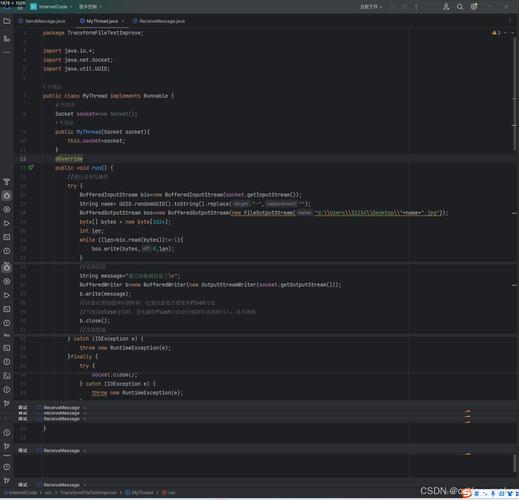
To create a FileInputStream, you need to provide the path to the file you want to read.
// Constructs a FileInputStream to read from the specified File object
FileInputStream fis1 = new FileInputStream(new File("path/to/your/file.txt"));
// Constructs a FileInputStream to read from the specified file path (String)
FileInputStream fis2 = new FileInputStream("path/to/your/file.txt");
// Constructs a FileInputStream to read from the specified FileDescriptor
// (This is less common, used when you already have an open file descriptor)
FileInputStream fis3 = new FileInputStream(FileDescriptor.in); // e.g., for standard input
⚠️ Important: Exception Handling
Both constructors can throw a FileNotFoundException. This checked exception occurs if the file does not exist, is a directory instead of a file, or for some other security reason.
Key Methods
Here are the most important methods you'll use with FileInputStream.
| Method Signature | Description |
|---|---|
int read() |
Reads one byte of data from the input stream and returns it as an integer (0-255). If the end of the stream is reached, it returns -1. This is the most basic method. |
int read(byte[] b) |
Reads up to b.length bytes of data from the input stream into an array of bytes. It returns the number of bytes read, or -1 if the end of the stream is reached. This is the most efficient method. |
int read(byte[] b, int off, int len) |
Reads up to len bytes of data into a portion of the specified byte array, starting at offset off. Returns the number of bytes read, or -1 for end-of-stream. |
void close() |
Closes the file input stream and releases any system resources associated with the stream (like the file handle). This is crucial! |
long skip(long n) |
Skips and discards n bytes from the input stream. |
int available() |
Returns the estimated number of bytes that can be read without blocking. |
Complete Code Examples
Example 1: The Classic Way (Using a try-finally block)
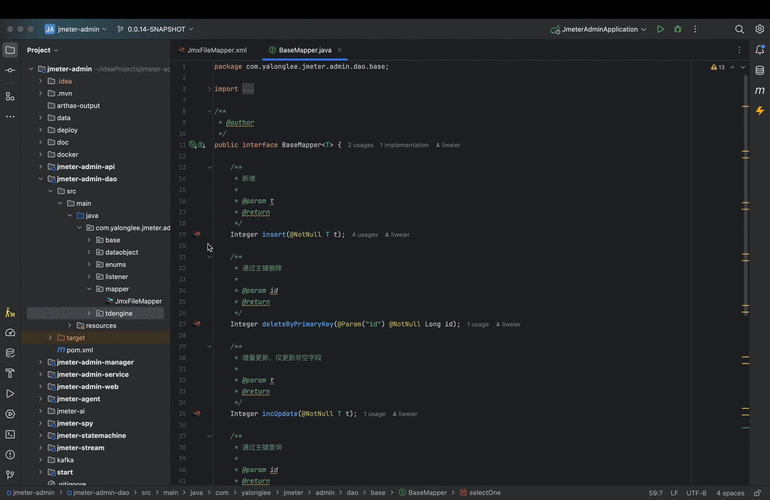
This is the traditional way to ensure the stream is closed, even if an error occurs.
import java.io.FileInputStream;
import java.io.IOException;
public class FileInputStreamExample {
    public static void main(String[] args) {
        // Use a try-with-resources block for the file object itself
        File file = new File("example.txt");
        FileInputStream fis = null;
        try {
            fis = new FileInputStream(file);
            int byteData;
            System.out.println("Reading file, one byte at a time:");
            // read() returns an int, but it's actually a byte (0-255)
            // It returns -1 when the end of the file is reached
            while ((byteData = fis.read()) != -1) {
                // Cast the int to a char to print it, but this only works for simple text
                System.out.print((char) byteData);
            }
        } catch (IOException e) {
            System.err.println("An error occurred: " + e.getMessage());
        } finally {
            // The finally block ensures the stream is always closed
            if (fis != null) {
                try {
                    fis.close();
                } catch (IOException e) {
                    System.err.println("Error closing the stream: " + e.getMessage());
                }
            }
        }
    }
}
Example 2: The Modern & Recommended Way (Using try-with-resources)
Since Java 7, the try-with-resources statement is the best practice. It automatically closes any resource that implements the AutoCloseable interface (which FileInputStream does) at the end of the try block. This prevents resource leaks and makes your code much cleaner.
import java.io.FileInputStream;
import java.io.IOException;
public class TryWithResourcesExample {
    public static void main(String[] args) {
        // The file path
        String filePath = "example.txt";
        // try-with-resources automatically closes the FileInputStream
        try (FileInputStream fis = new FileInputStream(filePath)) {
            System.out.println("Reading file into a byte array:");
            // Create a buffer to hold the data
            byte[] buffer = new byte[1024]; // Read in chunks of 1KB
            int bytesRead;
            // read(byte[] b) reads data into the buffer and returns the number of bytes read
            while ((bytesRead = fis.read(buffer)) != -1) {
                // Convert the byte array to a string for printing
                // Important: Use the bytesRead count, not buffer.length!
                String chunk = new String(buffer, 0, bytesRead);
                System.out.print(chunk);
            }
        } catch (IOException e) {
            System.err.println("An error occurred while reading the file: " + e.getMessage());
        }
        // No need for a finally block to close the stream!
    }
}
Best Practices
-
Always Use
try-with-resources: This is the single most important best practice. It guarantees that your file handle is closed, preventing resource leaks. -
Read in Chunks: Avoid calling
read()in a loop for large files. It's inefficient because each call can result in a system call. Instead, useread(byte[] b)to read a block of data into a buffer at once. -
Handle Exceptions: Always wrap your file operations in a
try-catchblock to handleIOException, which can occur for many reasons (file not found, read permission denied, disk full, etc.). -
Choose the Right Tool for the Job:
- Binary data (images, etc.):
FileInputStream(wrapped inBufferedInputStream). - Text data: Prefer
java.nio.file.Files.readString()for simplicity, orFiles.readAllBytes()followed bynew String(...). For more control, useBufferedReaderwithFileReader.
- Binary data (images, etc.):
FileInputStream vs. FileReader
This is a common point of confusion.
| Feature | FileInputStream |
FileReader |
|---|---|---|
| Data Type | Reads bytes (0-255). | Reads characters (char). |
| Purpose | Binary files, raw data. | Text files. |
| Encoding | Platform-dependent. It uses the system's default character encoding (e.g., UTF-8 on Linux, Windows-1252 on older Windows). This can cause problems if you share files between systems. | Can take an encoding in its constructor (e.g., new FileReader("file.txt", StandardCharsets.UTF_8)). This makes it more reliable for text. |
| Typical Use | new FileInputStream("image.png") |
new FileReader("document.txt") |
The Modern Alternative: java.nio.file
For most new Java applications, the java.nio.file package (introduced in Java 7) is preferred. It's more powerful, flexible, and often easier to use.
Example using Files class:
import java.nio.file.Files;
import java.nio.file.Paths;
import java.io.IOException;
public class NioFileExample {
    public static void main(String[] args) {
        String filePath = "example.txt";
        try {
            // The simplest way to read all content of a text file into a String
            String content = Files.readString(Paths.get(filePath));
            System.out.println(content);
            // The most efficient way to read all bytes from a binary file
byte[] allBytes = Files.readAllBytes(Paths.get