Of course! Let's break down how to work with NumPy arrays saved in the .npz format. This is a crucial skill for anyone using NumPy for machine learning, data analysis, or scientific computing.
What is a .npz file?
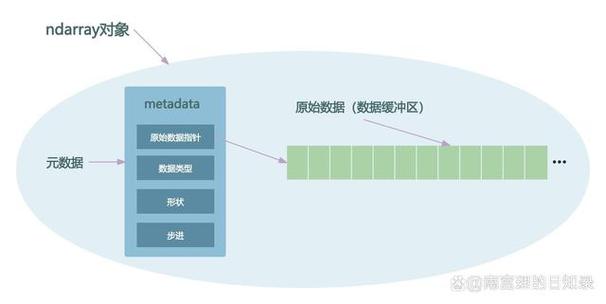
A .npz file is a compressed archive format created by NumPy. Its primary purpose is to save multiple NumPy arrays into a single file.
Think of it like a .zip file, but specifically designed for NumPy arrays. It's an extension of the older .npy format, which could only save a single array.
Key Advantages of .npz:
- Save multiple arrays: You can store several arrays (e.g., training data, labels, model weights) in one file.
- Space-efficient: The file is compressed, saving disk space compared to saving multiple uncompressed
.npyfiles. - Preserves data types: It remembers the data type (
dtype) of each array (e.g.,float32,int64). - Preserves shapes: It remembers the dimensions (shape) of each array.
How to Save Arrays to an .npz File
You use the numpy.savez() or numpy.savez_compressed() function. The key is to pass the arrays as keyword arguments. The argument name becomes the "key" for accessing the array later inside the .npz file.
numpy.savez(): Saves in a compressed format by default.numpy.savez_compressed(): Uses a more aggressive compression algorithm, resulting in smaller files at the cost of slightly slower save/load times.
Example: Saving Multiple Arrays
Let's create some sample data and save it.
import numpy as np
# 1. Create some sample arrays
data = np.arange(20).reshape(4, 5)
labels = np.array(['cat', 'dog', 'bird', 'cat'])
weights = np.random.rand(5) # e.g., model weights
# 2. Save them to a single .npz file
# The keywords 'my_data', 'my_labels', and 'my_weights' are the keys
np.savez('my_arrays.npz',
         my_data=data,
         my_labels=labels,
         my_weights=weights)
print("Arrays saved to my_arrays.npz")
After running this, you will have a file named my_arrays.npz in your current directory.
How to Load Arrays from an .npz File
Loading is just as simple. You use numpy.load(), which returns a special dictionary-like object called a NpzFile.
You can then access the individual arrays using the keys you defined when saving.

Example: Loading Arrays
# 1. Load the .npz file
loaded_data = np.load('my_arrays.npz')
# 2. The 'loaded_data' object is a NpzFile, which is like a dictionary
print("Type of loaded object:", type(loaded_data))
print("\nKeys available in the .npz file:", list(loaded_data.keys()))
# 3. Access individual arrays using their keys
retrieved_data = loaded_data['my_data']
retrieved_labels = loaded_data['my_labels']
retrieved_weights = loaded_data['my_weights']
# 4. Verify the loaded arrays
print("\n--- Retrieved Data ---")
print("Shape of retrieved_data:", retrieved_data.shape)
print(retrieved_data)
print("\nShape of retrieved_labels:", retrieved_labels.shape)
print(retrieved_labels)
print("\nShape of retrieved_weights:", retrieved_weights.shape)
print(retrieved_weights)
Output of the loading script:
Type of loaded object: <class 'numpy.lib.npyio.NpzFile'>
Keys available in the .npz file: ['my_labels', 'my_weights', 'my_data']
--- Retrieved Data ---
Shape of retrieved_data: (4, 5)
[[ 0  1  2  3  4]
 [ 5  6  7  8  9]
 [10 11 12 13 14]
 [15 16 17 18 19]]
Shape of retrieved_labels: (4,)
['cat' 'dog' 'bird' 'cat']
Shape of retrieved_weights: (5,)
[0.123... 0.456... 0.789... 0.321... 0.654...]
Advanced Usage: Working with the NpzFile Object
The NpzFile object has some useful attributes and methods.
.files attribute
This attribute gives you a list of all the keys (array names) in the file.
loaded_data = np.load('my_arrays.npz')
print(loaded_data.files)
# Output: ['my_labels', 'my_weights', 'my_data']
Checking if a key exists
You can use the in keyword to check if an array exists in the file before trying to load it.
loaded_data = np.load('my_arrays.npz')
if 'my_data' in loaded_data:
    print("The 'my_data' array is present.")
    print(loaded_data['my_data'])
else:
    print("The 'my_data' array was not found.")
if 'non_existent_key' in loaded_data:
    print("This will not be printed.")
else:
    print("The 'non_existent_key' array was not found.")
Loading arrays into memory with with
For very large .npz files, it's good practice to use a with statement. This ensures the file is properly closed after you're done, which can free up resources.
with np.load('my_arrays.npz') as loaded_data:
    # You can access arrays inside this block
    data = loaded_data['my_data']
    labels = loaded_data['my_labels']
# The file is now automatically closed
print(data)
.npz vs. .npy: When to Use Which?
| Feature | .npy (NumPy binary) |
.npz (NumPy zip archive) |
|---|---|---|
| Content | One NumPy array only. | Multiple NumPy arrays. |
| Function | np.save(), np.load() |
np.savez(), np.load() |
| Use Case | Saving a single, large array (e.g., a dataset matrix, a single layer of weights). | Saving a group of related arrays (e.g., X_train, y_train, X_test, y_test, model_weights). |
| Analogy | Saving a single document as a .docx file. |
Saving a project folder as a .zip file. |
Complete Workflow Example
Here is a full, commented example showing a typical workflow: create data, save it, clear it from memory, and then load it back.
import numpy as np
# --- 1. CREATE DATA ---
print("--- Step 1: Creating sample data ---")
# Features for 100 samples, 10 features each
X_train = np.random.rand(100, 10)
# Corresponding labels (0 or 1)
y_train = np.random.randint(0, 2, 100)
# Some metadata
metadata = {'version': '1.0', 'description': 'Sample training data'}
print(f"Shape of X_train: {X_train.shape}")
print(f"Shape of y_train: {y_train.shape}")
print(f"Metadata: {metadata}")
# --- 2. SAVE DATA TO .NPZ ---
print("\n--- Step 2: Saving data to 'dataset.npz' ---")
# Note: You can't save a standard Python dict directly.
# You must convert it to an array of objects or a structured array.
# Here, we'll convert it to a 1D array of objects.
metadata_array = np.array([metadata], dtype=object)
np.savez_compressed('dataset.npz',
                    features=X_train,
                    labels=y_train,
                    info=metadata_array)
print("Data saved successfully.")
# --- 3. CLEAR DATA FROM MEMORY ---
print("\n--- Step 3: Clearing variables from memory ---")
del X_train
del y_train
del metadata
del metadata_array
# Verify they are gone
try:
    print(X_train.shape)
except NameError:
    print("X_train has been deleted from memory.")
# --- 4. LOAD DATA FROM .NPZ ---
print("\n--- Step 4: Loading data from 'dataset.npz' ---")
loaded_archive = np.load('dataset.npz')
# Access the arrays
loaded_X_train = loaded_archive['features']
loaded_y_train = loaded_archive['labels']
loaded_metadata_array = loaded_archive['info']
# Convert the metadata array back to a dictionary
loaded_metadata = loaded_metadata_array[0].item()
print(f"Shape of loaded_X_train: {loaded_X_train.shape}")
print(f"Shape of loaded_y_train: {loaded_y_train.shape}")
print(f"Loaded metadata: {loaded_metadata}")
# Verify the data is intact
print("\nVerification: Are original and loaded X_train the same?")
print(np.array_equal(X_train, loaded_X_train)) # This will raise an error because X_train was deleted
# A better check:
print("Verification: Sum of loaded_X_train:", np.sum(loaded_X_train))