Of course! In Python, try and for are two fundamental keywords, but they are used for very different purposes. They don't work together in a single block, but you can certainly use a for loop to repeatedly execute a try...except block.
Let's break them down individually and then see how they can be combined.
The try Keyword (Error Handling)
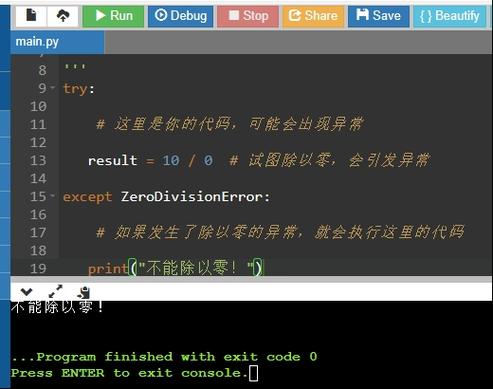
The try keyword is used to start a try...except block. This is Python's mechanism for exception handling, or what is often called "error handling."
The core idea is:
try: You "try" to run a block of code that you think might cause an error.except: If an error does occur in thetryblock, Python immediately jumps to theexceptblock to handle the error gracefully, instead of crashing the program.finally: This is an optional block that runs no matter what. It runs if there was an error or if there wasn't. It's typically used for cleanup actions, like closing a file.
Why is this important?
Without try...except, a single unexpected error could stop your entire program. With it, you can anticipate problems and write code that can recover from them.
Simple Example of try...except
# Let's try to convert a string to a number
user_input = "hello"
try:
    # This line might cause a ValueError
    number = int(user_input)
    print(f"The number is: {number}")
except ValueError:
    # This block only runs if a ValueError occurs in the 'try' block
    print(f"Error: Could not convert '{user_input}' to an integer.")
print("The program continues running!")
Output:
Error: Could not convert 'hello' to an integer.
The program continues running!
Without the try...except block, the program would have crashed with a ValueError. With it, it prints a helpful message and keeps going.
The for Keyword (Looping)
The for keyword is used to create a for loop, which is a way to repeat a block of code for each item in a sequence (like a list, tuple, string, or range).
The core idea is: "For each item in this list, do something."

Why is this important?
Loops are essential for automating repetitive tasks. You don't want to write the same code 100 times if you can write it once and tell the computer to repeat it 100 times.
Simple Example of a for loop
# A list of fruits
fruits = ["apple", "banana", "cherry"]
# Loop through each item in the 'fruits' list
for fruit in fruits:
    print(f"I like to eat {fruit}s.")
print("Loop finished!")
Output:
I like to eat apples.
I like to eat bananas.
I like to eat cherrys.
Loop finished!
Combining try and for
This is where the real power comes in. You often use a for loop to process a collection of items, and some of those items might cause errors. In this case, you put the code that might fail inside a try block, and you handle the error inside an except block.
Scenario: You have a list of numbers as strings, but one of them is not a valid number. You want to convert all of them to integers and print them. If one fails, you want to print an error for that specific item and continue with the rest.
Example: Looping with Error Handling
data = ["10", "20", "thirty", "40", "fifty", "60"]
print("Processing data...")
for item in data:
    try:
        # Try to convert the current item to an integer
        number = int(item)
        print(f"Successfully converted: {item} -> {number}")
    except ValueError:
        # If a ValueError occurs, print a message for this specific item
        print(f"Failed to convert: '{item}' is not a valid integer.")
print("\nData processing complete.")
Output:
Processing data...
Successfully converted: 10 -> 10
Successfully converted: 20 -> 20
Failed to convert: 'thirty' is not a valid integer.
Successfully converted: 40 -> 40
Failed to convert: 'fifty' is not a valid integer.
Successfully converted: 60 -> 60
Data processing complete.
In this example:
- The
forloop iterates through every string in thedatalist. - For each string, it attempts the
int(item)conversion inside thetryblock. - When it gets to
"thirty", theint()function raises aValueError. - The
except ValueErrorblock catches this specific error, prints a message, and then the loop continues to the next item ("fifty"). - Without the
try...except, the program would have crashed on"thirty"and never processed"40","fifty", or"60".
Summary Table
| Keyword | Purpose | Analogy |
|---|---|---|
try |
To handle potential errors (exceptions) gracefully. | Putting on a helmet before you ride a bike. You try not to fall, but if you do, the helmet protects you. |
for |
To repeat a block of code for each item in a sequence. | Going through a to-do list, one task at a time, until the list is done. |
try + for |
To process a list of items where some might cause errors, allowing the loop to continue even if one item fails. | Going through a to-do list, but if one task is impossible, you mark it as "failed" and move on to the next one. |