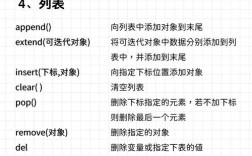
Of course! In Python, you don't directly "replace an index" of a list. Instead, you assign a new value to the element at that specific index.
This is a fundamental operation for mutable sequences like lists.
The Core Concept: Assignment by Index
The syntax is simple: list_name[index] = new_value.
Let's break it down with a clear example.
# 1. Create a list of fruits
fruits = ['apple', 'banana', 'cherry', 'date']
print(f"Original list: {fruits}")
# 2. Replace the element at index 1 ('banana') with 'blueberry'
#    Remember: Python uses 0-based indexing.
fruits[1] = 'blueberry'
# 3. Print the list to see the change
print(f"List after replacement: {fruits}")
Output:
Original list: ['apple', 'banana', 'cherry', 'date']
List after replacement: ['apple', 'blueberry', 'cherry', 'date']
Detailed Examples and Scenarios
Here are more detailed examples covering common use cases.

Example 1: Replacing an Element at a Specific Index
This is the most straightforward case. You know the exact index you want to change.
# A list of student scores
scores = [88, 92, 79, 95, 85]
# The student who scored 79 (at index 2) re-took the test and got a 98
scores[2] = 98
print(f"Updated scores: {scores}")
# Output: Updated scores: [88, 92, 98, 95, 85]
Example 2: Replacing Elements in a Loop
You often need to replace elements based on a condition. A for loop is perfect for this.
Let's say we want to replace all scores below 85 with a score of 85 (a "curve").

Important: When modifying a list while iterating over it, it's generally safest to iterate over a copy of the list if you are not using index-based replacement.
scores = [88, 92, 79, 95, 85, 72]
# Iterate over a copy of the list to avoid issues with modifying it directly
for score in scores[:]: # The [:] creates a shallow copy
    if score < 85:
        # We need the index to change the original list
        # So, this method is not ideal. Let's use a better one below.
        pass
# A better approach: Iterate using indices
for i in range(len(scores)):
    if scores[i] < 85:
        scores[i] = 85 # Assign the new value at the correct index
print(f"Curved scores: {scores}")
# Output: Curved scores: [88, 92, 85, 95, 85, 85]
Example 3: Handling Index Errors
What if you try to replace an index that doesn't exist? Python will raise an IndexError.
my_list = [10, 20, 30]
# This will cause an error because there is no index 3
try:
    my_list[3] = 40
except IndexError:
    print("Error: Index is out of range for the list.")
# To safely replace an element, you can check the length first
new_index = 3
if new_index < len(my_list):
    my_list[new_index] = 40
else:
    # If the index is too large, you can either append or do nothing
    print(f"Cannot replace index {new_index}. List length is {len(my_list)}.")
Example 4: Appending vs. Replacing at a High Index
If you try to assign a value to an index that is one position past the end of the list, Python will not replace it. Instead, it will fill the gap with None values and then add your new element.
This is often a source of bugs. It's better to use the .append() method to add elements to the end.
data = ['a', 'b', 'c']
# Let's try to assign to index 5
data[5] = 'z'
print(data)
# Output: ['a', 'b', 'c', None, None, 'z']
# This is usually not what you want!
# The correct way to add an element to the end is .append()
data.append('z')
print(data)
# Output: ['a', 'b', 'c', None, None, 'z', 'z']
Advanced: Replacing Multiple Items with Slicing
You can replace a whole "slice" (a portion) of a list with another list. The new list doesn't have to be the same length as the slice it's replacing.
letters = ['a', 'b', 'c', 'd', 'e', 'f']
# Replace the slice from index 1 up to (but not including) index 4
# with the new list ['x', 'y']
letters[1:4] = ['x', 'y']
print(letters)
# Output: ['a', 'x', 'y', 'e', 'f']
# Notice how 'd' was removed and 'e', 'f' shifted left.
# You can also replace a slice with more items than it originally contained
numbers = [1, 2, 3, 4]
numbers[1:3] = [20, 30, 40, 50]
print(numbers)
# Output: [1, 20, 30, 40, 50, 4]
Key Differences: Lists vs. Tuples
It's crucial to understand that this operation only works for mutable (changeable) sequences like lists.
It will fail for immutable (unchangeable) sequences like tuples.
# A tuple of coordinates
coords = (10, 20, 30)
# This will raise a TypeError because tuples cannot be changed
try:
    coords[1] = 25
except TypeError as e:
    print(f"Error: {e}")
    # Output: Error: 'tuple' object does not support item assignment
Summary
| Task | Method | Example |
|---|---|---|
| Replace a single element | Use index assignment | my_list[2] = 'new' |
| Add to the end | Use the .append() method |
my_list.append('new') |
| Insert at a position | Use the .insert() method |
my_list.insert(1, 'new') |
| Replace a slice | Use slice assignment | my_list[1:4] = ['a', 'b'] |
| Handle invalid index | Check length first or use a try-except block |
if index < len(my_list): ... |