Of course! The statement return true; in Java is a fundamental part of writing methods, especially those that answer a yes/no question or check for a condition.
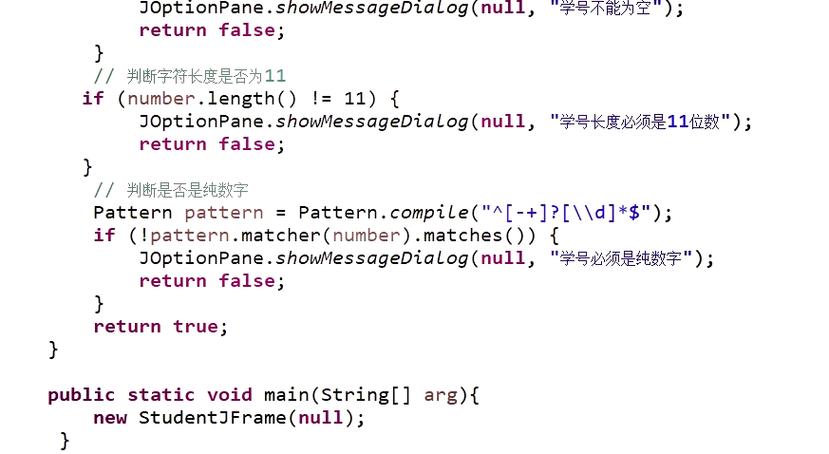
Let's break it down from the basics to more advanced use cases.
The Core Concept: What return true; Does
At its simplest, return true; does two things inside a method:
- Immediately stops the execution of the current method.
- Sends the boolean value
trueback to the code that called the method.
A method can only return a value if its return type is declared. For return true;, the method's return type must be boolean.
The Basic Syntax
Here is the simplest structure of a method that returns true.

public class Example {
    // This method has a return type of 'boolean'
    public boolean isPositive(int number) {
        // Check if the number is greater than zero
        if (number > 0) {
            // If the condition is true, stop the method and return 'true'
            return true;
        }
        // If the number is not positive, we need to return something else.
        // A boolean method must always return a value.
        return false;
    }
}
In this example:
public boolean isPositive(int number): This declares a method namedisPositivethat accepts an integer and is guaranteed to return a boolean value (trueorfalse).if (number > 0): This is our condition.return true;: If the condition is met, the method ends and sendstrueback.return false;: If the condition is not met, the code continues, and this line is executed, sendingfalseback.
Common Use Cases
You'll see return true; all over the place in Java programming.
Use Case 1: Validation Methods
This is the most common use case. You create a method to check if something is valid, correct, or meets a certain set of rules.
Example: Validating an email address (simplified)

public class Validator {
    public boolean isValidEmail(String email) {
        // A simple check: is the email null, empty, or doesn't contain an '@' symbol?
        if (email == null || email.isEmpty() || !email.contains("@")) {
            return false; // It's not valid
        }
        // If we passed all the checks, it's considered valid.
        return true;
    }
    public static void main(String[] args) {
        Validator validator = new Validator();
        System.out.println("Is 'test@example.com' valid? " + validator.isValidEmail("test@example.com")); // true
        System.out.println("Is 'invalid-email' valid? " + validator.isValidEmail("invalid-email"));    // false
        System.out.println("Is '' valid? " + validator.isValidEmail(""));                             // false
    }
}
Use Case 2: Checking for Existence or Membership
You can use a method to check if an item exists in a collection or if a certain state has been reached.
Example: Checking if a number is in an array
public class NumberFinder {
    public boolean containsNumber(int[] numbers, int target) {
        // Loop through the array
        for (int number : numbers) {
            // If we find the target number...
            if (number == target) {
                // ...we can stop searching and immediately return true.
                return true;
            }
        }
        // If the loop finishes without finding the number, it's not there.
        return false;
    }
    public static void main(String[] args) {
        int[] myNumbers = {1, 5, 8, 10, 15};
        NumberFinder finder = new NumberFinder();
        System.out.println("Does the array contain 8? " + finder.containsNumber(myNumbers, 8));  // true
        System.out.println("Does the array contain 99? " + finder.containsNumber(myNumbers, 99)); // false
    }
}
Notice the efficiency here. The return true; inside the loop stops the method as soon as the number is found, preventing unnecessary checks.
Use Case 3: Overriding Methods from a Parent Class
When you create a subclass, you can override methods from the parent class. A very common example is overriding the equals() method.
Example: Overriding equals()
public class Car {
    private String model;
    public Car(String model) {
        this.model = model;
    }
    // Override the equals method to compare Car objects by their model.
    @Override
    public boolean equals(Object obj) {
        // 1. Check if it's the exact same object in memory
        if (this == obj) {
            return true;
        }
        // 2. Check if the other object is null or not a Car
        if (obj == null || getClass() != obj.getClass()) {
            return false;
        }
        // 3. Now we know it's a Car, so we can cast it and compare the model
        Car otherCar = (Car) obj;
        // Use Objects.equals for a safe null check
        return java.util.Objects.equals(this.model, otherCar.model);
    }
    public static void main(String[] args) {
        Car car1 = new Car("Toyota Camry");
        Car car2 = new Car("Toyota Camry");
        Car car3 = new Car("Honda Civic");
        // car1 and car2 have the same model, so equals() should return true
        System.out.println("car1 equals car2? " + car1.equals(car2)); // true
        // car1 and car3 have different models, so equals() should return false
        System.out.println("car1 equals car3? " + car1.equals(car3)); // false
    }
}
Important Rules to Remember
-
Return Type Must Match: The method's return type must be
boolean. If you try toreturn true;from a method with avoidreturn type, you will get a compile-time error.public void thisWillNotWork() { // COMPILE ERROR: cannot return a value from method whose result type is void return true; } -
All Code Paths Must Return: If your method has
if/elseorswitchstatements, you must ensure that every possible path through the code leads to areturnstatement.// GOOD: Both the 'if' and 'else' paths have a return statement. public boolean isEven(int number) { if (number % 2 == 0) { return true; } else { return false; } } // BETTER (more concise): The condition itself is a boolean. public boolean isEvenBetter(int number) { return number % 2 == 0; // This expression evaluates to true or false } -
return;in avoidMethod: A method with avoidreturn type can use thereturn;statement by itself (without a value) to exit early. This is often used for error handling or if a precondition is not met.public void processUser(String username) { if (username == null || username.trim().isEmpty()) { System.out.println("Error: Username cannot be empty."); return; // Exit the method immediately, do nothing else. } // ... rest of the processing logic System.out.println("Processing user: " + username); }
Summary
return true; is a simple but powerful Java command. It's the standard way for a method to signal that a condition has been met, a check has passed, or an object has a certain property. Always remember to pair it with a boolean return type and ensure your method's logic guarantees a return on every possible execution path.