Of course! Let's break down the if-else and if-else-if-else statements in Java. This is a fundamental concept for controlling the flow of your program based on conditions.

The Basic Idea
An if-else statement allows your program to execute different blocks of code depending on whether a condition is true or false. It's like making a decision: "If this is true, do A. Otherwise, do B."
The if Statement (Simple Condition)
This is the most basic form. It checks a condition. If the condition is true, it executes the code inside the if block. If the condition is false, it simply skips that block.
Syntax
if (condition) {
    // Code to execute if the condition is true
}
Example
int age = 20;
if (age >= 18) {
    System.out.println("You are an adult.");
}
// If age was 15, this line would not be printed.
The if-else Statement (Two-Way Decision)
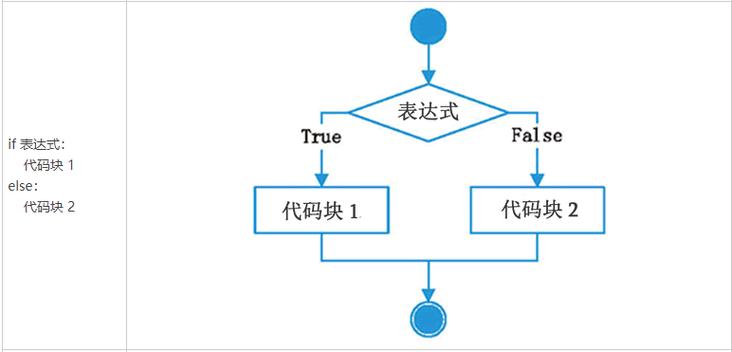
This structure adds an "otherwise" case. If the if condition is true, the first block runs. If the condition is false, the else block runs. Only one of these blocks will ever be executed.
Syntax
if (condition) {
    // Code to execute if the condition is true
} else {
    // Code to execute if the condition is false
}
Example
int score = 85;
if (score >= 60) {
    System.out.println("You passed the exam!");
} else {
    System.out.println("You failed the exam.");
}
// Output: You passed the exam!
The if-else-if-else Statement (Multi-Way Decision)
This is used when you have multiple conditions to check in sequence. The program checks each if condition in order. As soon as it finds a condition that is true, it executes that block and then skips all the remaining else-if and finalelseblocks. If none of theiforelse-ifconditions are true, the finalelse` block is executed.
Syntax
if (condition1) {
    // Code to execute if condition1 is true
} else if (condition2) {
    // Code to execute if condition1 is false and condition2 is true
} else if (condition3) {
    // Code to execute if condition1 and condition2 are false and condition3 is true
} else {
    // Code to execute if all previous conditions are false
}
Example
Let's categorize a student's grade.
int grade = 78;
if (grade >= 90) {
    System.out.println("Grade: A");
} else if (grade >= 80) {
    System.out.println("Grade: B");
} else if (grade >= 70) {
    System.out.println("Grade: C");
} else if (grade >= 60) {
    System.out.println("Grade: D");
} else {
    System.out.println("Grade: F");
}
// Output: Grade: C
Why is the output "Grade: C"?
grade >= 90? (78 >= 90) ->false.grade >= 80? (78 >= 80) ->false.grade >= 70? (78 >= 70) ->true.- The code inside this block is executed, and the rest of the
else-ifandelseare skipped.
Key Rules and Best Practices
-
Curly Braces :
- If your
iforelseblock contains more than one statement, you must use curly braces. - It is a highly recommended best practice to always use curly braces, even for a single statement. This prevents bugs, especially when you later add more code to the block.
Good (Recommended):
 (图片来源网络,侵删)
if (age >= 18) { System.out.println("You can vote."); System.out.println("Please register."); }Bad (Error if you add a line):
// This is legal but risky! if (age >= 18) System.out.println("You can vote."); System.out.println("This line will ALWAYS print, regardless of age!"); - If your
-
The
elseBelongs to the Nearestif: Pay close attention to howelsestatements are paired. Anelseis always associated with the most recentifthat hasn't already been paired with anelse.int x = 10; int y = 20; if (x == 10) if (y == 20) System.out.println("x is 10 and y is 20"); else // This 'else' belongs to the inner 'if (y == 20)' System.out.println("x is 10 but y is not 20");To make the logic clearer, use curly braces:
if (x == 10) {
    if (y == 20) {
        System.out.println("x is 10 and y is 20");
    } else {
        System.out.println("x is 10 but y is not 20");
    }
}
Complete Example: A Simple Number Guessing Game
Here is a practical example that combines if-else-if-else.
import java.util.Scanner; // Import the Scanner class to read user input
public class NumberGuesser {
    public static void main(String[] args) {
        // The secret number the user has to guess
        int secretNumber = 7;
        int guess;
        Scanner scanner = new Scanner(System.in);
        System.out.print("Guess a number between 1 and 10: ");
        guess = scanner.nextInt();
        // Use if-else-if-else to check the guess
        if (guess == secretNumber) {
            System.out.println("Congratulations! You guessed the correct number!");
        } else if (guess > secretNumber) {
            System.out.println("Too high! Try a lower number.");
        } else { // This covers the case where guess < secretNumber
            System.out.println("Too low! Try a higher number.");
        }
        // Close the scanner to prevent resource leaks
        scanner.close();
    }
}
Summary Table
| Statement Type | When to Use | How Many Blocks Can Run? |
|---|---|---|
if |
You only need to perform an action if a condition is true. | 0 or 1 |
if-else |
You need to perform one of two mutually exclusive actions. | Exactly 1 |
if-else-if-else |
You need to choose one action from several possible options. | Exactly 1 |