
Of course! Let's dive deep into Unicode and how it works with Python lists. This is a fundamental concept in modern Python programming.
Here's a breakdown covering:
- What is Unicode? (A quick refresher)
- How Python Represents Strings (The crucial link between Unicode and Python lists)
- Common Scenarios with Unicode in Lists (Practical examples)
- Handling Encoding/Decoding Errors (What to do when things go wrong)
- Key Takeaways
What is Unicode?
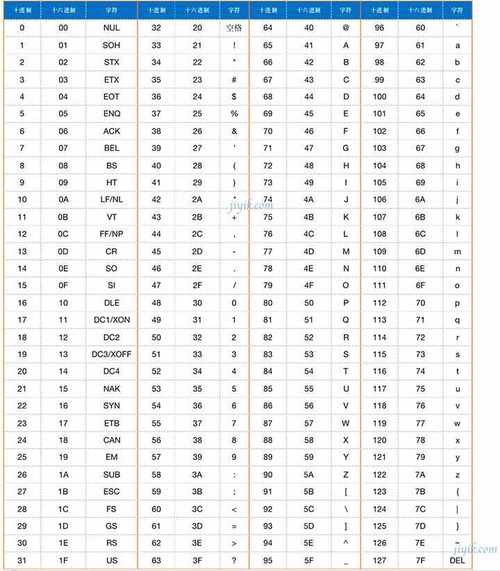
Think of Unicode as a giant, universal catalog of characters. Every character you can think of—from every language (like A, 你, , ) to symbols (like , , )—is assigned a unique number, called a code point.
- The code point for
AisU+0041. - The code point for
你isU+4F60. - The code point for is
U+1F602.
Unicode doesn't define how these numbers are stored in a computer; that's the job of an encoding. The most common encoding is UTF-8.
How Python Represents Strings (The str Type)
This is the most important part for understanding Python and Unicode.
In Python 3, there is no separate "unicode" type and "byte string" type. There are only two string types:
str: This is a sequence of Unicode code points. It's an abstract, human-readable representation of text. When you write"hello"or"café", you are creating astrobject.bytes: This is a sequence of raw bytes (numbers from 0-255). This is how text is actually stored on disk or sent over a network. It's tied to a specific encoding (like UTF-8, ASCII, etc.).
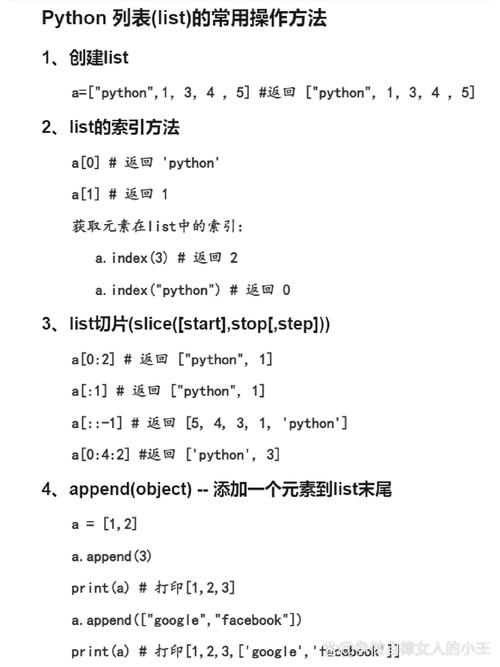
The connection to lists: A Python str is a sequence, which means you can treat it like a list of characters.
# A string is a sequence of Unicode characters (code points)
my_string = "café"
# You can access it like a list
print(my_string[0]) # Output: c
print(my_string[1]) # Output: a
print(my_string[2]) # Output: f
print(my_string[3]) # Output: é
# You can convert it to a list of its characters
char_list = list(my_string)
print(char_list)
# Output: ['c', 'a', 'f', 'é']
Notice that is a single character in the list. This is because Python's str type correctly handles it as one Unicode code point.
The "Grapheme Cluster" Caveat: Sometimes, what we perceive as a single character is actually a combination of multiple code points. For example, the flag of France is made of two regional indicator symbols: (U+1F1EB) and (U+1F1F7).
# The French flag is made of two code points
flag_str = "🇫🇷"
# len() sees two code points
print(len(flag_str)) # Output: 2
# list() will also create a list of two items
print(list(flag_str))
# Output: ['🇫', '🇷']
For complex text like this, you might need a specialized library like regex to handle grapheme clusters correctly, but for most day-to-day use, str and list work as expected.
Common Scenarios with Unicode in Lists
Scenario 1: Creating a List of Unicode Characters
You can create a list containing strings from different languages and symbols directly.
# A list with a mix of characters
my_list = ["Hello", "世界", "🌍", "42", "€"]
# Iterate through the list
for item in my_list:
    print(f"Item: {item}, Type: {type(item)}")
# You can also access characters within the strings
print(f"The second character of '世界' is: {my_list[1][1]}")
# Output: The second character of '世界' is: 界
Scenario 2: Encoding a List of Strings to Bytes
If you need to send this list over a network or save it to a file, you must first convert the str objects into bytes. The standard way to do this is with a JSON representation, which is then encoded into bytes.
import json
my_list = ["Hello", "世界", "🌍", "42", "€"]
# 1. Convert the list to a JSON string (this is still a str)
json_str = json.dumps(my_list)
print(f"JSON String: {json_str}")
# Output: JSON String: ["Hello", "\u4e16\u754c", "\U0001f30d", "42", "\u20ac"]
# 2. Encode the JSON string into bytes using UTF-8
# This is the crucial step for storage/transmission
json_bytes = json_str.encode('utf-8')
print(f"Encoded Bytes: {json_bytes}")
# Output: Encoded Bytes: b'["Hello", "\xe4\xb8\x96\xe7\x95\x8c", "\xf0\x9f\x8c\x8d", "42", "\xe2\x82\xac"]'
Scenario 3: Decoding Bytes from a List into Strings
When you receive bytes from a file or network, you must decode them back into str objects to work with them in Python.
# Let's assume we received these bytes from somewhere
received_bytes = b'["Bonjour", "le", "monde", "😊"]'
# 1. Decode the bytes into a JSON string (str)
json_str = received_bytes.decode('utf-8')
print(f"Decoded JSON String: {json_str}")
# Output: Decoded JSON String: ["Bonjour", "le", "monde", "😊"]
# 2. Parse the JSON string back into a Python list
original_list = json.loads(json_str)
print(f"Final Python List: {original_list}")
# Output: Final Python List: ['Bonjour', 'le', 'monde', '😊']
# Now you can work with it normally
print(f"The last emoji is: {original_list[-1]}")
# Output: The last emoji is: 😊
Handling Encoding/Decoding Errors
What happens if you try to decode bytes that contain a character not valid for the specified encoding?
# These bytes are not valid UTF-8
bad_bytes = b'\xff\xfe\xfd'
# This will raise a UnicodeDecodeError
try:
    bad_bytes.decode('utf-8')
except UnicodeDecodeError as e:
    print(f"Error: {e}")
    # Output: Error: 'utf-8' codec can't decode byte 0xff in position 0: invalid start byte
You can handle this gracefully by providing an errors argument:
'ignore': Silently drops the invalid bytes.'replace': Replaces the invalid bytes with a placeholder character (usually ).
# Using 'ignore'
print(bad_bytes.decode('utf-8', errors='ignore'))
# Output: (an empty string, as all bytes were invalid)
# Using 'replace'
print(bad_bytes.decode('utf-8', errors='replace'))
# Output: ���
Key Takeaways
- Python 3
stris Unicode: Astrobject is a sequence of abstract Unicode characters (code points). This is your native type for text manipulation. list(str)works as expected: When you convert a string to a list, you get a list of its individual Unicode characters.bytesis for storage/networking: Thebytestype is a sequence of raw bytes. You must encode yourstrobjects intobytesto save them or send them.- Use UTF-8: Always use UTF-8 as your encoding. It's the standard, it can represent every Unicode character, and it's backward-compatible with ASCII.
- Use
jsonfor lists/dicts: When you need to serialize a list or dictionary of strings,json.dumps()andjson.loads()are your best friends. They handle the conversion to and from a string format and then you can encode/decode that string. - Handle Errors: Always be prepared for
UnicodeDecodeErrorwhen dealing with external data (files, APIs, user input) and know how to handle it witherrors='ignore'orerrors='replace'.











