
Of course! In Java, there are two primary ways to iterate over a List using a "for-each" style loop. The most common and recommended way is the enhanced for-each loop. The second, more modern approach is using the forEach method with a lambda expression.
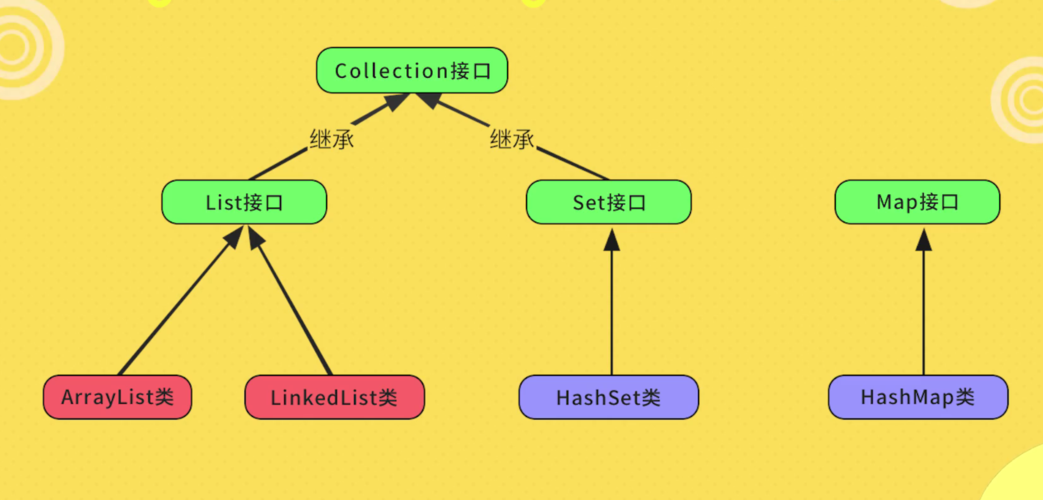
Let's break them down.
The Enhanced for-each Loop (The Classic Way)
This is the traditional and most widely used method. It's clean, readable, and less prone to errors than a traditional for loop with an index.
Syntax
for (Type variable : list) {
    // code to execute for each element
}
Type: The data type of the elements in the list (e.g.,String,Integer).variable: A temporary variable that will hold the current element in each iteration.list: TheListyou want to iterate over.
Example
Let's iterate over a List<String>.
import java.util.Arrays;
import java.util.List;
public class ForEachExample {
    public static void main(String[] args) {
        // Create a list of strings
        List<String> fruits = Arrays.asList("Apple", "Banana", "Cherry", "Date");
        System.out.println("Iterating using enhanced for-each loop:");
        // The enhanced for-each loop
        for (String fruit : fruits) {
            System.out.println(fruit);
        }
        // You can also modify the variable (it doesn't change the list)
        for (String fruit : fruits) {
            fruit = fruit.toUpperCase(); // This only changes the local 'fruit' variable
        }
        System.out.println("\nList after modifying local variables: " + fruits);
        // The list remains unchanged: [Apple, Banana, Cherry, Date]
    }
}
Output:
Iterating using enhanced for-each loop:
Apple
Banana
Cherry
Date
List after modifying local variables: [Apple, Banana, Cherry, Date]
Key Points
- Readability: Very easy to read and understand.
- No Index Management: You don't have to worry about off-by-one errors or managing an index variable (
i). - Cannot Modify List Elements: You can access elements, but you cannot directly change the element in the list using this method, as you are working with a copy of the reference. To modify the list itself (e.g., remove elements), you need to use an
Iterator. - Cannot Get Index: If you need the index of the current element, this loop is not suitable. You would need a traditional indexed
forloop orforEachwith an index.
The forEach Method with a Lambda Expression (Java 8+)
Since Java 8, the Iterable interface (which List implements) has a forEach method. This method takes a functional interface, typically a lambda expression, as an argument. This is the modern, functional approach.
Syntax
list.forEach(element -> {
    // code to execute for each element
});
element: A parameter representing the current element in the iteration.->: The lambda operator.- The code block to execute. It can be omitted if the code is a single expression.
Example
Using the same List<String> as before.
import java.util.Arrays;
import java.util.List;
public class LambdaForEachExample {
    public static void main(String[] args) {
        List<String> fruits = Arrays.asList("Apple", "Banana", "Cherry", "Date");
        System.out.println("Iterating using forEach with a lambda:");
        // The forEach method with a multi-statement lambda block
        fruits.forEach(fruit -> {
            System.out.println("Fruit: " + fruit);
            // You can put more logic here
        });
        System.out.println("\nIterating using forEach with a single expression:");
        // The forEach method with a single-expression lambda (no braces needed)
        fruits.forEach(fruit -> System.out.println(fruit.toUpperCase()));
    }
}
Output:
Iterating using forEach with a lambda:
Fruit: Apple
Fruit: Banana
Fruit: Cherry
Fruit: Date
Iterating using forEach with a single expression:
APPLE
BANANA
CHERRY
DATE
Key Points
- Modern & Functional: Aligns with modern functional programming paradigms.
- More Flexible: Can be used with streams and other functional constructs.
- Method Reference Shortcut: If your lambda only calls a single method on the element, you can use a method reference for even cleaner code.
Example with Method Reference:
// Instead of:
// fruits.forEach(fruit -> System.out.println(fruit));
// You can write:
fruits.forEach(System.out::println);
Comparison and When to Use Which
| Feature | Enhanced for-each Loop |
forEach with Lambda |
|---|---|---|
| Readability | Excellent. Very intuitive for most Java developers. | Excellent, especially with method references. Can be less intuitive for beginners. |
| Java Version | Java 1.5+ | Java 8+ |
| Flexibility | Rigid. Only for iteration. | Highly flexible. Can be used with streams, parallel streams, and custom actions. |
| Index Access | No direct access. | No direct access. |
| List Modification | Cannot modify the list (e.g., remove elements). | Cannot modify the list directly in the lambda body. |
| Best For | Simple, straightforward iteration over collections or arrays. | When you need to perform an action on each element, especially within a stream pipeline or when the action is a simple method call (use method references). |
How to Get the Index with forEach
If you need the index, the forEach method on its own doesn't provide it. However, you can use IntStream to get both the index and the element.
import java.util.Arrays;
import java.util.List;
public class ForEachWithIndex {
    public static void main(String[] args) {
        List<String> fruits = Arrays.asList("Apple", "Banana", "Cherry", "Date");
        System.out.println("Iterating with index using IntStream:");
        // Get the stream of indices and zip it with the stream of list elements
        IntStream.range(0, fruits.size())
                 .forEach(i -> System.out.println("Index: " + i + ", Fruit: " + fruits.get(i)));
    }
}
Output:
Iterating with index using IntStream:
Index: 0, Fruit: Apple
Index: 1, Fruit: Banana
Index: 2, Fruit: Cherry
Index: 3, Fruit: Date
Summary
- For simple iteration where you just need to read each element, the enhanced
for-eachloop is perfectly fine and is often preferred for its simplicity. - For a more modern, functional style, or when you are already working with streams, the
forEachmethod with a lambda (or method reference) is the way to go. It's more expressive and integrates well with other Java 8+ features.











