Of course! The term "datetimeutil" in Python most commonly refers to the datetime module from the standard library, often used in conjunction with dateutil for more advanced parsing. Let's break down everything you need to know about handling dates and times in Python, from the basics to powerful utility functions.
The Core: Python's datetime Module
This is the built-in, standard library module for working with dates and times. You should always start here.
Key Classes in datetime:
datetime.datetime: A combination of date and time.datetime.date: A date (year, month, day) without time.datetime.time: A time (hour, minute, second, microsecond) without date.datetime.timedelta: A duration, representing the difference between two dates or times.datetime.timezone: A timezone representation.
Creating datetime Objects
The most common way to get a datetime object is to create it directly or to get the current time.
a) Creating a Specific datetime Object
You can create a datetime object for a specific date and time.
import datetime
# Create a datetime object for a specific date and time
dt = datetime.datetime(2025, 10, 26, 10, 30, 0)
print(f"Full datetime: {dt}")
print(f"Year: {dt.year}")
print(f"Month: {dt.month}")
print(f"Day: {dt.day}")
print(f"Hour: {dt.hour}")
print(f"Minute: {dt.minute}")
b) Getting the Current datetime Object
Use .now() for the current local time or .utcnow() for the current UTC time.
import datetime
# Current local datetime
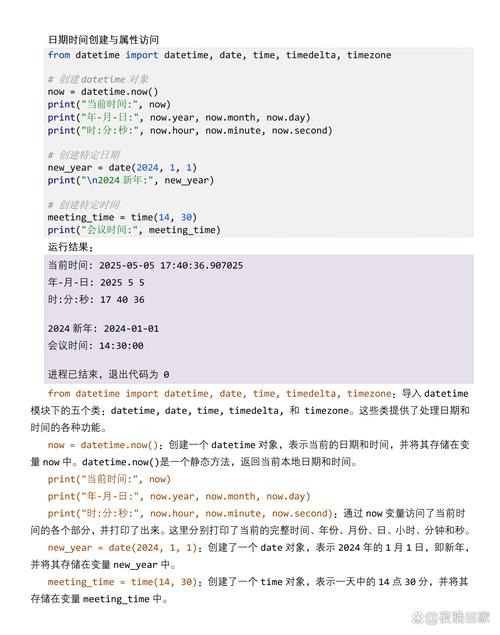
now = datetime.datetime.now()
print(f"Current local datetime: {now}")
# Current UTC datetime
now_utc = datetime.datetime.utcnow()
print(f"Current UTC datetime: {now_utc}")
Parsing Dates and Times from Strings
This is a very common task. The standard datetime module has a strict parser, strptime.
strptime (String Parse Time)
You need to provide a format code that matches the string exactly.
| Format Code | Meaning | Example |
|---|---|---|
%Y |
Year with century | 2025 |
%y |
Year without century | 23 |
%m |
Month as a zero-padded number | 10 |
%B |
Month as full name | October |
%b |
Month as abbreviated name | Oct |
%d |
Day of the month | 26 |
%H |
Hour (24-hour clock) | 14 |
%I |
Hour (12-hour clock) | 02 |
%M |
Minute | 30 |
%S |
Second | 05 |
%f |
Microsecond | 000123 |
import datetime
date_string = "2025-10-26 15:45:30"
format_code = "%Y-%m-%d %H:%M:%S"
# Parse the string into a datetime object
parsed_dt = datetime.datetime.strptime(date_string, format_code)
print(f"Parsed datetime: {parsed_dt}")
print(f"Parsed year: {parsed_dt.year}")
Formatting datetime Objects to Strings
This is the reverse of parsing. Use strftime (String Format Time).
import datetime
dt = datetime.datetime(2025, 10, 26, 15, 45, 30)
# Format as YYYY-MM-DD
formatted_date = dt.strftime("%Y-%m-%d")
print(f"Formatted (YYYY-MM-DD): {formatted_date}")
# Format as a more human-readable string
formatted_human = dt.strftime("%B %d, %Y at %I:%M %p")
print(f"Formatted (Human-readable): {formatted_human}")
# Format as a timestamp string
formatted_timestamp = dt.strftime("%Y%m%d_%H%M%S")
print(f"Formatted (Timestamp): {formatted_timestamp}")
The "Util" Part: dateutil for Flexible Parsing
The standard datetime.strptime is great but very strict. If your date format is inconsistent (e.g., "26-Oct-2025" vs "10/26/2025"), strptime will fail.
This is where the python-dateutil library comes in. It's an external library that provides a powerful, flexible parser.
Installation
First, you need to install it:
pip install python-dateutil
Using dateutil.parser
The parser.parse() function can intelligently guess the format of many common date strings.
from dateutil import parser
# It can handle various formats
date_str1 = "2025-10-26"
date_str2 = "26-Oct-2025"
date_str3 = "October 26, 2025"
date_str4 = "10/26/23" # Be careful with ambiguous formats like this
date_str5 = "20251026T154530Z" # ISO format
dt1 = parser.parse(date_str1)
dt2 = parser.parse(date_str2)
dt3 = parser.parse(date_str3)
dt4 = parser.parse(date_str4)
dt5 = parser.parse(date_str5)
print(f"Parsed '{date_str1}': {dt1}")
print(f"Parsed '{date_str2}': {dt2}")
print(f"Parsed '{date_str3}': {dt3}")
print(f"Parsed '{date_str4}': {dt4}") # This will parse as 2025, but could be 1923!
print(f"Parsed '{date_str5}': {dt5}")
Warning: parser.parse can be "too smart." For example, 01/02/03 could be Jan 2, 2003 or Feb 1, 2003 depending on locale. Use it with caution or provide dayfirst=True or yearfirst=True if you know the format.
Working with Timezones
Timezones are crucial for any real-world application. Python's datetime handles this, but it's important to understand the difference.
- Naive
datetime: An object that does not have timezone information. This is whatdatetime.now()creates by default. You should avoid using these for calculations. - Aware
datetime: An object that has timezone information. These are unambiguous.
Using pytz (The Classic Timezone Library)
pytz is the most established timezone library for Python.
Installation:
pip install pytz
Example:
import datetime
import pytz
# 1. Get a timezone object
tz_ny = pytz.timezone('America/New_York')
tz_london = pytz.timezone('Europe/London')
# 2. Create an "aware" datetime in a specific timezone
# The best practice is to create the datetime in UTC first, then localize it.
utc_now = datetime.datetime.utcnow().replace(tzinfo=pytz.utc)
ny_time = utc_now.astimezone(tz_ny)
london_time = utc_now.astimezone(tz_london)
print(f"UTC Time: {utc_now}")
print(f"New York Time: {ny_time}")
print(f"London Time: {london_time}")
# 3. Convert between timezones
london_time_from_ny = ny_time.astimezone(tz_london)
print(f"London time calculated from NY time: {london_time_from_ny}")
Using zoneinfo (The Modern, Built-in Way)
Python 3.9+ includes zoneinfo in the standard library, which is now the recommended way to handle timezones. It uses the system's timezone database (or the one from the tzdata package on Windows).
Installation (if needed on Windows):
pip install tzdata
Example:
import datetime
from zoneinfo import ZoneInfo # Use this in Python 3.9+
# 1. Get a timezone object
tz_ny = ZoneInfo("America/New_York")
tz_london = ZoneInfo("Europe/London")
# 2. Create an aware datetime directly
# This is simpler than with pytz
ny_time = datetime.datetime.now(tz_ny)
london_time = datetime.datetime.now(tz_london)
print(f"New York Time: {ny_time}")
print(f"London Time: {london_time}")
# 3. Convert between timezones
utc_time = ny_time.astimezone(ZoneInfo("UTC"))
print(f"NY time converted to UTC: {utc_time}")
Calculating with timedelta
Use timedelta to perform date arithmetic.
import datetime
today = datetime.datetime.now()
# Calculate a date 15 days from now
future_date = today + datetime.timedelta(days=15)
print(f"15 days from now: {future_date}")
# Calculate a date 3 weeks and 2 days ago
past_date = today - datetime.timedelta(weeks=3, days=2)
print(f"3 weeks and 2 days ago: {past_date}")
# Calculate the difference between two dates
diff = future_date - past_date
print(f"The difference is: {diff}")
print(f"The difference in days is: {diff.days}")
Summary: Your "datetimeutil" Toolkit
| Task | Standard Library (datetime) |
Utility Library (dateutil, pytz, zoneinfo) |
|---|---|---|
| Create a specific datetime | datetime.datetime(YYYY, M, D, h, m, s) |
(Same) |
| Get current time | datetime.datetime.now() |
(Same) |
| Parse a string to datetime (STRICT) | datetime.datetime.strptime(string, format) |
N/A |
| Parse a string to datetime (FLEXIBLE) | Difficult or impossible | from dateutil import parser; parser.parse(string) |
| Format datetime to string | datetime_object.strftime(format) |
(Same) |
| Handle timezones | Basic support (tzinfo argument) |
pytz (classic) or zoneinfo (modern, built-in for 3.9+) |
| Do date math (add/subtract days) | datetime.timedelta(days=N) |
(Same) |