Of course! Here is a comprehensive, step-by-step guide to learning Java, designed for absolute beginners. We'll start from the very basics and progress to more advanced topics, with clear explanations and practical examples.
The Roadmap: A 5-Step Journey to Java Proficiency
- Step 1: The Foundation - Setting Up Your Environment
- Step 2: The Absolute Basics - Your First Program
- Step 3: Core Building Blocks - Variables, Data Types, and Operators
- Step 4: Controlling the Flow - Conditionals and Loops
- Step 5: Structuring Your Code - Methods and Classes
Step 1: The Foundation - Setting Up Your Environment
Before you can write Java code, you need the right tools. Think of this like getting your kitchen ready before you cook.
What You Need:
-
Java Development Kit (JDK): This is the core software that includes the Java compiler (
javac) and the Java Virtual Machine (JVM), which runs your code.- Recommendation: Download the latest LTS (Long-Term Support) version from Adoptium (Eclipse Temurin). It's free, well-supported, and used by many professionals.
- Installation: Just follow the installer instructions for your operating system (Windows, macOS, Linux). Make sure to check the box to add Java to your system's PATH during installation. This lets you run Java commands from anywhere in your terminal.
-
An Integrated Development Environment (IDE): An IDE is a special program that makes writing code much easier. It provides:
-
A code editor with syntax highlighting (colors your code).
 (图片来源网络,侵删)
 -
Auto-completion.
-
A built-in compiler and debugger.
-
Project management tools.
-
Recommendation for Beginners: IntelliJ IDEA Community Edition. It's powerful, free, and has the best support for Java. Download it here.
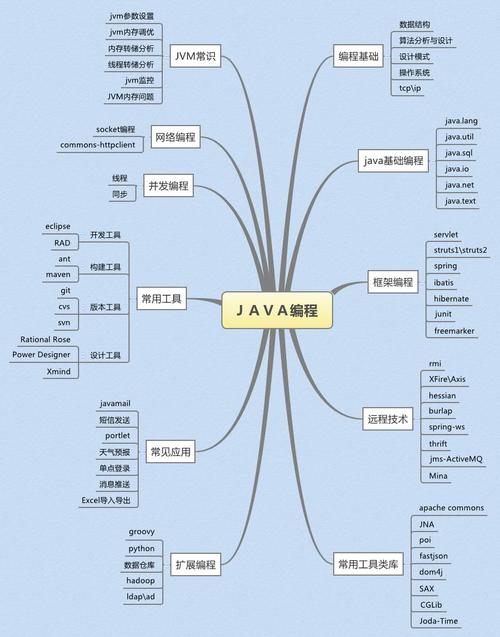 (图片来源网络,侵删)
-
How to Verify Your Setup:
- Open your terminal (Command Prompt on Windows, Terminal on macOS/Linux).
- Type the following command and press Enter:
java -version
- You should see something like this, confirming your JDK is installed:
java version "17.0.8" 2025-07-18
Java(TM) SE Runtime Environment (build 17.0.8+9-LTS-219)
Java HotSpot(TM) 64-Bit Server VM (build 17.0.8+9-LTS-219, mixed mode, sharing)
Step 2: The Absolute Basics - Your First Program ("Hello, World!")
This is the traditional first step for any new programmer. It confirms that everything is working and teaches you the basic structure of a Java file.
Create a Project in IntelliJ IDEA
- Open IntelliJ IDEA.
- Click File -> New -> Project.
- Select Java from the left panel.
- Ensure that the Project SDK is set to the JDK you just installed (e.g., JDK 17).
- Click Create.
Create a Java File
- In the
src(source) folder on the left, right-click. - Select New -> Java Class.
- Name the file
HelloWorld. IntelliJ will automatically add the.javaextension.
Write the Code
You will see some boilerplate code. Replace it with this:
// HelloWorld.java
public class HelloWorld {
    public static void main(String[] args) {
        System.out.println("Hello, World!");
    }
}
Run the Code
- Right-click anywhere inside the
HelloWorldcode window. - Select Run 'HelloWorld.main()'.
- Look at the bottom of the IntelliJ window in the "Run" tab. You will see the output:
Hello, World!
Congratulations! You've just written and run your first Java program.
Code Breakdown:
public class HelloWorld { ... }: Every Java program lives inside a "class." Think of a class as a blueprint for an object. For now, just know your code needs to be inside one. The class name (HelloWorld) must match the file name (HelloWorld.java).public static void main(String[] args) { ... }: This is the main method. It's the special entry point for any Java application. When you run your program, the Java Virtual Machine (JVM) looks for this exact method and starts executing the code inside it.System.out.println("Hello, World!");: This is a command to print text to the console.System.outis the standard output stream (your console/terminal)..println()is a method that prints the text inside the quotes and then moves to the next line.
Step 3: Core Building Blocks - Variables, Data Types, and Operators
Now let's make our program more dynamic by storing and manipulating data.
Variables
A variable is a named container for storing a piece of data.
int age = 30; // Declares an integer variable named 'age' and assigns it the value 30.
String name = "Alice"; // Declares a String variable for text.
boolean isStudent = true; // Declares a boolean for true/false values.
Data Types
Java is a strongly-typed language, meaning you must declare the type of data a variable can hold.
- Primitive Types (the basics):
int: For whole numbers (e.g., -10, 0, 25).double: For numbers with decimals (e.g., 3.14, 99.9).char: For a single character (e.g., 'A', '!').boolean: For true/false values.long: For very large whole numbers.float: For numbers with decimals (less precise thandouble).
- Reference Types:
String: For sequences of text (e.g., "Hello"). Note:Stringstarts with a capital letter.
Operators
Operators are symbols that perform operations on variables and values.
- Arithmetic: (add), (subtract), (multiply), (divide), (modulo, gives the remainder of a division).
- Assignment: (assigns a value), , , etc. (shorthand for adding/subtracting and assigning).
Example:
public class Calculator {
    public static void main(String[] args) {
        int x = 10;
        int y = 3;
        int sum = x + y;        // 13
        int difference = x - y; // 7
        int product = x * y;    // 30
        int quotient = x / y;   // 3 (integer division truncates the decimal)
        int remainder = x % y;  // 1
        System.out.println("Sum: " + sum);
        System.out.println("Difference: " + difference);
        System.out.println("Product: " + product);
        System.out.println("Quotient: " + quotient);
        System.out.println("Remainder: " + remainder);
    }
}
Step 4: Controlling the Flow - Conditionals and Loops
Real programs need to make decisions and repeat actions. This is where control structures come in.
Conditionals (if-else)
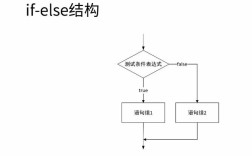
Allows your program to execute different code blocks based on a condition.
public class IfElseExample {
    public static void main(String[] args) {
        int score = 85;
        if (score >= 90) {
            System.out.println("Grade: A");
        } else if (score >= 80) {
            System.out.println("Grade: B");
        } else if (score >= 70) {
            System.out.println("Grade: C");
        } else {
            System.out.println("Grade: F");
        }
    }
}
Loops
Loops repeat a block of code as long as a condition is true.
for Loop: Use when you know exactly how many times you want to loop.
public class ForLoopExample {
    public static void main(String[] args) {
        // Count from 1 to 5
        for (int i = 1; i <= 5; i++) {
            System.out.println("Count is: " + i);
        }
    }
}
int i = 1;: Initialize a counter variablei.i <= 5;: The loop continues as long asiis less than or equal to 5.i++: Incrementiby 1 after each loop.
while Loop: Use when you want to loop as long as a condition is true, but you don't know the number of iterations beforehand.
public class WhileLoopExample {
    public static void main(String[] args) {
        int countdown = 5;
        while (countdown > 0) {
            System.out.println("T-minus " + countdown);
            countdown--; // Decrement the counter
        }
        System.out.println("Liftoff!");
    }
}
Step 5: Structuring Your Code - Methods and Classes
As programs get bigger, putting everything in the main method becomes messy. We use methods and classes to organize our code.
Methods (Functions)
A method is a block of code that performs a specific task and can be called by its name. This promotes reusability.
public class MethodExample {
    public static void main(String[] args) {
        // Call our method to print a greeting
        sayHello("Bob");
        int result = addNumbers(5, 10);
        System.out.println("The sum is: " + result);
    }
    // A method that takes a String parameter and prints a greeting
    public static void sayHello(String name) {
        System.out.println("Hello, " + name + "!");
    }
    // A method that takes two integers, adds them, and returns the result
    public static int addNumbers(int a, int b) {
        return a + b;
    }
}
public static: Modifiers we'll cover later. For now, just use them for methods in your main class.void: Means the method does not return any value.int: Means the method returns an integer value.(String name)and(int a, int b): These are the parameters (inputs) the method accepts.
Classes and Objects (The OOP Concept)
Java is an Object-Oriented Programming (OOP) language. This means we model our program using objects.
- Class: A blueprint for creating objects. It defines properties (attributes) and behaviors (methods).
- Object: An instance of a class. It's a real-world entity created from the blueprint.
Example: Modeling a Car
-
Create the
Carclass (the blueprint):// Car.java public class Car { // Attributes (properties) String color; int year; String model; // Method (behavior) void startEngine() { System.out.println("Vroom! The " + color + " " + model + "'s engine is running."); } } -
Use the
Carclass to create an object (an instance):// CarDemo.java public class CarDemo { public static void main(String[] args) { // Create a Car object Car myCar = new Car(); // Set the properties of the object myCar.color = "Red"; myCar.year = 2025; myCar.model = "Toyota Camry"; // Call the method on the object myCar.startEngine(); } }
Your Next Steps
You've covered the absolute fundamentals! Here’s how to continue your journey:
-
Practice: Try to create small programs:
- A simple calculator that takes user input.
- A number guessing game.
- A program that prints a pyramid of stars.
-
Learn Core OOP Concepts: Dive deeper into Object-Oriented Programming:
- Encapsulation: Bundling data (attributes) and methods that operate on the data into one unit (a class).
- Inheritance: Creating a new class based on an existing class.
- Polymorphism: Using a single interface to represent different underlying forms (data types).
-
Explore the Java API: Java comes with a huge library of pre-built classes (the
java.lang,java.util, etc. packages). Learn to use common ones likeArrayList(a dynamic array),Scanner(for reading user input), andMath(for mathematical functions). -
Learn About Exceptions: Understand how to handle errors gracefully using
try-catchblocks. -
Study Data Structures & Algorithms: This is crucial for writing efficient code. Learn about Arrays, Linked Lists, Stacks, Queues, and common sorting/searching algorithms.
Learning to program is a marathon, not a sprint. Be patient, practice consistently, and don't be afraid to make mistakes. Happy coding