Of course! Let's break down "Listener" in the context of a Java web application. This is a fundamental concept for understanding how web applications work and respond to events.

What is a Listener?
In Java web development, a Listener is a class that is designed to "listen" for specific events that occur within a web application's lifecycle. These events are typically related to the ServletContext, HttpSession, and ServletRequest objects.
Think of it like a security guard at a building. The guard doesn't just stand there; they react when specific things happen:
- Someone enters the building (
ServletRequestcreated). - Someone leaves (
HttpSessioninvalidated). - The building is about to close for the night (
ServletContextis being destroyed).
The guard (the Listener) takes action when these events occur.
The Big Picture: The Three Main Objects
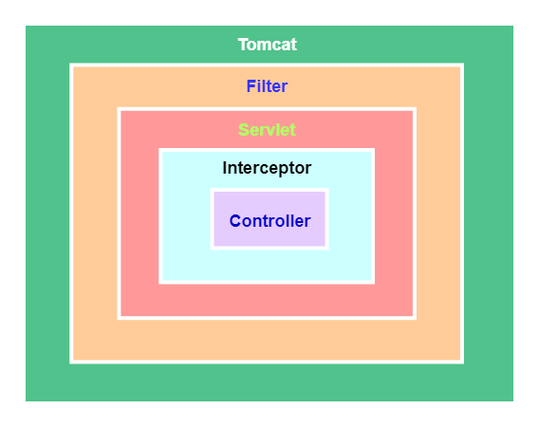
Listeners are tightly coupled with three key objects in the Servlet API. Understanding these objects is key to understanding listeners.
| Object | Scope | Lifetime | Analogy |
|---|---|---|---|
ServletContext |
Application | From when the app is deployed until it is undeployed. | The entire office building. It's shared by everyone. |
HttpSession |
Session | From when a user first visits until they timeout or explicitly log out. | A specific person's desk and locker in the building. It's unique to them. |
ServletRequest |
Request | From when a user makes a single HTTP request until the response is sent back. | A single phone call or a visitor's interaction at the front desk. It's very short-lived. |
Listeners are triggered by lifecycle events on these three objects.
Types of Listeners (Commonly Used)
The Servlet API defines several listener interfaces. You implement these interfaces in your own classes and configure them in your web.xml file (or with annotations) to make them active.
Here are the most common and useful ones:
ServletContextListener
This is arguably the most important listener. It listens for the creation and destruction of the ServletContext (the entire application).

contextInitialized(ServletContextEvent sce): This method is called once when the web application is first deployed and the container starts up. It's the perfect place for:- Initializing application-scoped resources (like database connection pools).
- Loading application configuration data from a file.
- Starting background threads.
contextDestroyed(ServletContextEvent sce): This method is called once when the web application is being shut down or undeployed. It's the perfect place for:- Closing database connections.
- Saving any final state.
- Stopping background threads.
HttpSessionListener
This listener listens for the creation and destruction of HttpSession objects (user sessions).
sessionCreated(HttpSessionEvent se): Called every time a new user visits the site and a session is created for them. Useful for:- Tracking the number of active users.
- Logging user login events.
sessionDestroyed(HttpSessionEvent se): Called when a session times out or is invalidated (e.g., user logs out). Useful for:- Cleaning up user-specific data.
- Logging user logout events.
ServletRequestListener
This listener listens for the creation and destruction of ServletRequest objects (individual HTTP requests).
requestInitialized(ServletRequestEvent sre): Called at the very beginning of every single HTTP request. This is less common but can be used for:- Logging the start of a request (e.g., IP address, timestamp).
- Wrapping the request to add custom functionality.
requestDestroyed(ServletRequestEvent sre): Called after the response has been generated and the request is about to be discarded. Useful for:- Logging the end of a request (e.g., total processing time).
- Cleaning up request-specific resources.
HttpSessionAttributeListener
This one is slightly different. It listens for when attributes are added, removed, or replaced in an HttpSession object.
attributeAdded(...),attributeRemoved(...),attributeReplaced(...): Useful for auditing or tracking what data users are storing in their sessions.
How to Create and Use a Listener (Example)
Let's create a simple ServletContextListener to count the number of times our application has started up.
Step 1: Create the Listener Class
Create a Java class that implements the ServletContextListener interface.
import javax.servlet.ServletContext;
import javax.servlet.ServletContextEvent;
import javax.servlet.ServletContextListener;
import javax.servlet.annotation.WebListener;
// The @WebListener annotation registers this class as a listener.
// This is the modern, preferred way over web.xml.
@WebListener
public class AppStartupListener implements ServletContextListener {
    @Override
    public void contextInitialized(ServletContextEvent sce) {
        // Get the ServletContext object
        ServletContext context = sce.getServletContext();
        // Get a startup counter from the context (or initialize it)
        Integer startupCount = (Integer) context.getAttribute("startupCount");
        if (startupCount == null) {
            startupCount = 0;
        }
        startupCount++;
        // Store the new count back in the ServletContext
        context.setAttribute("startupCount", startupCount);
        // Log the event
        System.out.println("Application started for the " + startupCount + " time.");
    }
    @Override
    public void contextDestroyed(ServletContextEvent sce) {
        System.out.println("Application is shutting down.");
        // Cleanup code would go here
    }
}
Step 2: Configure the Listener
There are two ways to configure a listener:
Method A: Using Annotations (Recommended for modern apps)
As you saw in the code above, simply add the @WebListener annotation to your listener class. The servlet container (like Tomcat or Jetty) will automatically find and register it. This is clean and requires no extra configuration files.
Method B: Using web.xml (The traditional way)
If you're not using annotations or have a legacy application, you can declare the listener in the WEB-INF/web.xml file.
<web-app xmlns="http://xmlns.jcp.org/xml/ns/javaee"
         xmlns:xsi="http://www.w3.org/2001/XMLSchema-instance"
         xsi:schemaLocation="http://xmlns.jcp.org/xml/ns/javaee http://xmlns.jcp.org/xml/ns/javaee/web-app_4_0.xsd"
         version="4.0">
    <listener>
        <listener-class>com.yourpackage.AppStartupListener</listener-class>
    </listener>
</web-app>
Step 3: Verify the Listener
Now, when you deploy your web application to a server (like Tomcat), you will see the following output in your server's console log on the first deployment:
Application started for the 1 time.If you stop and restart the server (or redeploy the app), you will see:
Application is shutting down.
Application started for the 2 time.
This proves that your listener is working and persisting data in the ServletContext.
Summary: When to Use Listeners
| Use Case | Recommended Listener |
|---|---|
| Application-wide initialization (DB pools, loading config) | ServletContextListener |
| Application-wide cleanup (closing connections) | ServletContextListener |
| Tracking active users | HttpSessionListener |
| Logging user login/logout | HttpSessionListener |
| Auditing session data changes | HttpSessionAttributeListener |
| Measuring request performance | ServletRequestListener |
| Custom request processing logic | ServletRequestListener |
Listeners are a powerful and clean mechanism for managing application lifecycle and state, helping you separate concerns and keep your code organized.