
Of course! The relationship between String and Calendar in Java is fundamental for handling dates and times. You'll often need to:
- Parse a
Stringinto aCalendarobject (e.g., converting"2025-10-27"into a usable date). - Format a
Calendarobject into aString(e.g., converting aCalendarobject into"Friday, October 27, 2025").
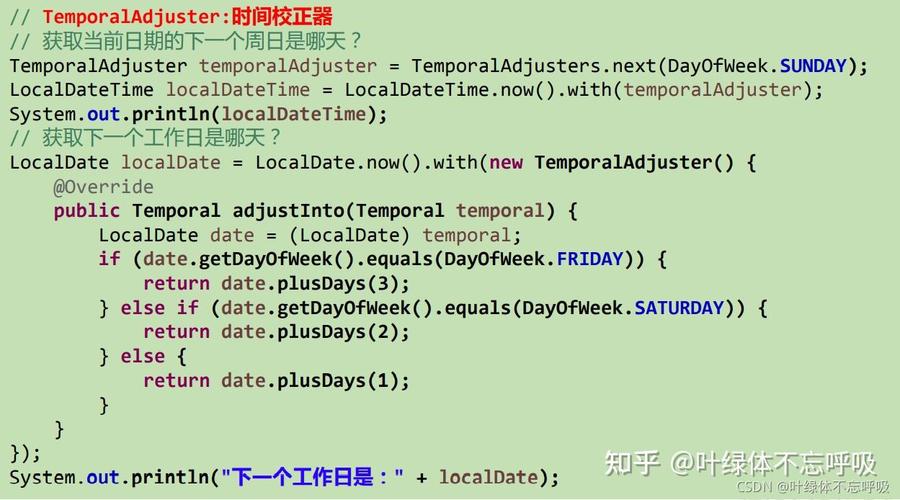
While java.util.Calendar is the classic class for this, it's important to know that it has been largely replaced by the modern java.time package (available since Java 8). I'll show you how to do it with both.
Key Concepts
java.util.Calendar: An older, mutable class for representing a specific moment in time. It's clunky and has design flaws.java.text.SimpleDateFormat: The classic class used to parseStrings intoDateobjects and formatDateobjects intoStrings. SinceCalendarhas agetTime()method that returns aDate,SimpleDateFormatis the bridge toCalendar.java.timePackage (Java 8+): The modern, recommended replacement forDate,Calendar, andSimpleDateFormat. It's immutable, thread-safe, and much easier to use.LocalDate: Represents a date (year, month, day) without time.LocalDateTime: Represents a date and time without a time zone.DateTimeFormatter: The modern equivalent ofSimpleDateFormat.
Parsing a String to a Calendar Object
This is the process of taking a string like "2025-10-27 15:30:00" and creating a Calendar object that holds that date and time.
Using the Classic java.util.Calendar and SimpleDateFormat
This is the "old way" but still necessary if you're working with legacy code.
import java.text.ParseException;
import java.text.SimpleDateFormat;
import java.util.Calendar;
public class StringToCalendarOld {
    public static void main(String[] args) {
        String dateString = "2025-10-27 15:30:00";
        String formatPattern = "yyyy-MM-dd HH:mm:ss"; // The pattern must match the string
        // 1. Create a SimpleDateFormat object with the desired pattern
        SimpleDateFormat sdf = new SimpleDateFormat(formatPattern);
        try {
            // 2. Parse the string into a java.util.Date object
            java.util.Date date = sdf.parse(dateString);
            // 3. Create a Calendar instance
            Calendar calendar = Calendar.getInstance();
            // 4. Set the Calendar's time using the Date object
            calendar.setTime(date);
            // Now you can use the Calendar object
            System.out.println("Calendar created successfully!");
            System.out.println("Year: " + calendar.get(Calendar.YEAR));
            System.out.println("Month (0-11): " + calendar.get(Calendar.MONTH)); // Note: Month is 0-indexed!
            System.out.println("Day of Month: " + calendar.get(Calendar.DAY_OF_MONTH));
            System.out.println("Hour (24-hour): " + calendar.get(Calendar.HOUR_OF_DAY));
        } catch (ParseException e) {
            System.err.println("Error parsing date string: " + e.getMessage());
        }
    }
}
Key Points:
- The
formatPatternmust exactly match the structure of yourdateString. Calendar.MONTHis zero-indexed (0 = January, 1 = February, ..., 11 = December). This is a common source of off-by-one errors.- You must handle the
ParseException, which is thrown if the string doesn't match the pattern.
Formatting a Calendar Object to a String
This is the reverse process: taking a Calendar object and converting it into a human-readable String.
Using the Classic java.util.Calendar and SimpleDateFormat
import java.text.SimpleDateFormat;
import java.util.Calendar;
public class CalendarToStringOld {
    public static void main(String[] args) {
        // 1. Get a Calendar instance (it will be initialized with the current date/time)
        Calendar calendar = Calendar.getInstance();
        // 2. Define the output format
        String formatPattern = "EEEE, MMMM d, yyyy";
        SimpleDateFormat sdf = new SimpleDateFormat(formatPattern);
        // 3. Format the Calendar object into a String
        String formattedDate = sdf.format(calendar.getTime());
        System.out.println("Original Calendar: " + calendar.getTime());
        System.out.println("Formatted String:  " + formattedDate);
        // Example with a different format
        SimpleDateFormat sdfShort = new SimpleDateFormat("MM/dd/yyyy");
        String shortDate = sdfShort.format(calendar.getTime());
        System.out.println("Short Format:      " + shortDate);
    }
}
Output (will vary based on the current date):
Original Calendar: Fri Oct 27 10:30:45 EDT 2025
Formatted String:  Friday, October 27, 2025
Short Format:      10/27/2025
The Modern Java 8+ Way: Using java.time
The java.time API is vastly superior. It's immutable, more intuitive, and less error-prone.
Parsing a String to a java.time Object (e.g., LocalDateTime)
import java.time.LocalDateTime;
import java.time.format.DateTimeFormatter;
public class StringToTimeModern {
    public static void main(String[] args) {
        String dateString = "2025-10-27 15:30:00";
        String formatPattern = "yyyy-MM-dd HH:mm:ss";
        // 1. Create a DateTimeFormatter
        DateTimeFormatter formatter = DateTimeFormatter.ofPattern(formatPattern);
        try {
            // 2. Parse the string directly into a LocalDateTime object
            LocalDateTime dateTime = LocalDateTime.parse(dateString, formatter);
            // Now you can use the LocalDateTime object
            System.out.println("LocalDateTime created successfully!");
            System.out.println("Year: " + dateTime.getYear());
            System.out.println("Month: " + dateTime.getMonth()); // Enum, much better!
            System.out.println("Day: " + dateTime.getDayOfMonth());
            System.out.println("Hour: " + dateTime.getHour());
        } catch (Exception e) { // Use a more specific exception if possible
            System.err.println("Error parsing date string: " + e.getMessage());
        }
    }
}
Key Advantages:
- No
Calendarobject needed. You work directly withLocalDateTime,LocalDate, etc. - Months are Enums:
dateTime.getMonth()returnsMonth.OCTOBER, which is type-safe and much clearer than a magic number. - Immutable: You can't change a
LocalDateTimeobject. Instead, you create new instances (e.g.,plusDays(1)).
Formatting a java.time Object to a String
import java.time.LocalDateTime;
import java.time.format.DateTimeFormatter;
public class TimeToStringModern {
    public static void main(String[] args) {
        // Get the current date and time
        LocalDateTime now = LocalDateTime.now();
        // 1. Define the output format
        DateTimeFormatter formatter = DateTimeFormatter.ofPattern("EEEE, MMMM d, yyyy 'at' h:mm a");
        // 2. Format the LocalDateTime object into a String
        String formattedDate = now.format(formatter);
        System.out.println("Original LocalDateTime: " + now);
        System.out.println("Formatted String:       " + formattedDate);
    }
}
Output (will vary):
Original LocalDateTime: 2025-10-27T10:30:45.123
Formatted String:       Friday, October 27, 2025 at 10:30 AM
Summary and Recommendation
| Feature | java.util.Calendar / SimpleDateFormat (Old) |
java.time (Modern) |
|---|---|---|
| State | Mutable | Immutable |
| Thread Safety | Not thread-safe | Thread-safe |
| API | Clunky, error-prone (e.g., 0-indexed months) | Intuitive, type-safe (e.g., Month.OCTOBER) |
| Usage | sdf.parse(str) -> Date -> cal.setTime(date) |
LocalDateTime.parse(str, formatter) |
| Recommendation | Avoid for new code. Only use for maintenance. | Strongly recommended for all new Java 8+ code. |
Final Advice: If you are using Java 8 or newer, always prefer the java.time package. It is the future of date and time handling in Java and will save you from countless headaches. If you are stuck with an older version of Java or need to interface with legacy systems that use Calendar, then the SimpleDateFormat approach is what you need.











