Of course! This is a fundamental concept in Java. Let's break down the differences between arrays and ArrayLists, when to use each, and how to work with them.
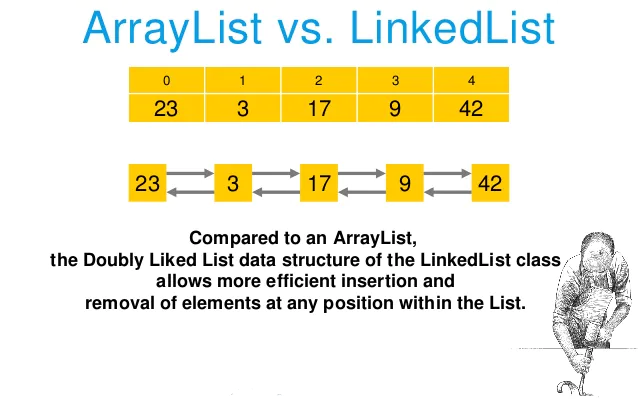
At a Glance: Array vs. ArrayList
| Feature | Array (String[]) |
ArrayList (ArrayList<String>) |
|---|---|---|
| Type | A built-in data structure in Java. | A class from the Java Collections Framework. |
| Size | Fixed. You must specify the size at creation and cannot change it. | Dynamic. It can grow and shrink in size automatically. |
| Performance | Generally faster for accessing elements by index (O(1)). Slightly faster for iteration. |
Slower for accessing elements by index (O(1) average, but with overhead). Slower for iteration due to object wrapping. |
| Methods | Has a fixed length (length attribute). Very few built-in methods (e.g., toString()). |
Rich set of built-in methods like add(), remove(), get(), size(), sort(), etc. |
| Data Types | Can hold primitive types (int, char, double) and objects. |
Can only hold objects. Primitives are "autoboxed" into their wrapper classes (Integer, Character, Double). |
| Syntax | String[] names = new String[5]; |
ArrayList<String> names = new ArrayList<>(); |
| Memory | More memory-efficient for primitive types. | More memory overhead due to storing objects and the internal array structure. |
Java Array
An array is a container object that holds a fixed number of values of a single type.
Key Characteristics:
- Fixed Size: Once you create an array, you cannot change its length.
- Type-Specific: You declare an array to hold a specific type of data.
- Index-Based: Elements are accessed using a zero-based index (
array[0],array[1], etc.).
How to Use an Array:
a. Declaration and Initialization
// 1. Declare an array of Strings
String[] names;
// 2. Create the array and specify its size (5 elements)
names = new String[5]; // All elements are initially null
// 3. Declare, create, and initialize in one line
int[] scores = {95, 88, 76, 100, 54};
// 4. Create and then initialize elements
String[] cities = new String[3];
cities[0] = "New York";
cities[1] = "London";
cities[2] = "Tokyo";
b. Accessing Elements
String firstCity = cities[0]; // Gets "New York"
System.out.println("First city: " + firstCity);
// Modifying an element
cities[1] = "Paris";
System.out.println("Second city: " + cities[1]);
c. Getting the Length
Use the length attribute (not a method!).
int numberOfCities = cities.length; // Note: no parentheses ()
System.out.println("Total cities: " + numberOfCities);
d. Iterating Over an Array
// Using a classic for loop (best when you need the index)
System.out.println("--- Using classic for loop ---");
for (int i = 0; i < cities.length; i++) {
    System.out.println("City " + i + ": " + cities[i]);
}
// Using an enhanced for-each loop (simpler, when you don't need the index)
System.out.println("\n--- Using for-each loop ---");
for (String city : cities) {
    System.out.println("City: " + city);
}
Java ArrayList
An ArrayList is part of the Java Collections Framework. It's a resizable-array implementation of the List interface. Think of it as a super-powered, flexible array.
Key Characteristics:
- Dynamic Size: You can add or remove elements, and the
ArrayListwill resize itself automatically. - Object-Only: It can only hold objects. To store primitives, you must use their wrapper classes (e.g.,
intbecomesInteger). - Rich API: Comes with many useful methods for manipulation.
How to Use an ArrayList:
a. Declaration and Initialization
You must import the ArrayList class.
import java.util.ArrayList;
// 1. Declare and create an ArrayList of Strings
ArrayList<String> names = new ArrayList<>();
// 2. You can also specify an initial capacity (optional)
ArrayList<Integer> scores = new ArrayList<>(10); // Initial capacity of 10
b. Adding Elements
Use the .add() method.
names.add("Alice");
names.add("Bob");
names.add("Charlie");
// add(index, element) inserts an element at a specific position
names.add(1, "David"); // Now the list is [Alice, David, Bob, Charlie]
c. Accessing Elements
Use the .get(index) method.
String firstPerson = names.get(0); // Gets "Alice"
System.out.println("First person: " + firstPerson);
d. Getting the Size
Use the .size() method (not an attribute!).
int numberOfPeople = names.size(); // Note: has parentheses ()
System.out.println("Total people: " + numberOfPeople);
e. Removing Elements
Use the .remove(index) or .remove(Object) method.
// Remove by index
names.remove(2); // Removes "Bob"
System.out.println("List after removing index 2: " + names);
// Remove by object value
names.remove("Alice");
System.out.println("List after removing 'Alice': " + names);
f. Iterating Over an ArrayList
// Using an enhanced for-each loop (most common)
System.out.println("--- Using for-each loop ---");
for (String name : names) {
    System.out.println("Name: " + name);
}
// Using an iterator (the standard, safest way for modification during iteration)
System.out.println("\n--- Using Iterator ---");
java.util.Iterator<String> iterator = names.iterator();
while (iterator.hasNext()) {
    String name = iterator.next();
    if (name.equals("Charlie")) {
        iterator.remove(); // Safely remove the current element
    }
}
System.out.println("List after removing 'Charlie': " + names);
Conversion Between Array and ArrayList
It's very common to need to convert between the two.
Array to ArrayList
This is a common task. The best way is to use Arrays.asList().
import java.util.Arrays;
import java.util.List;
import java.util.ArrayList;
// Create an array
String[] array = {"Apple", "Banana", "Cherry"};
// Convert to a fixed-size List (backed by the original array)
List<String> list = Arrays.asList(array);
// If you need a fully resizable ArrayList, create a new one from the List
ArrayList<String> dynamicArrayList = new ArrayList<>(list);
dynamicArrayList.add("Date"); // This works now!
System.out.println(dynamicArrayList); // [Apple, Banana, Cherry, Date]
ArrayList to Array**
Use the .toArray() method.
import java.util.ArrayList;
ArrayList<String> fruits = new ArrayList<>();
fruits.add("Apple");
fruits.add("Banana");
fruits.add("Cherry");
// Method 1: Create a new array of the same type
// The type in the diamond operator <> must match the array type
String[] fruitsArray1 = fruits.toArray(new String[0]);
System.out.println(Arrays.toString(fruitsArray1)); // [Apple, Banana, Cherry]
// Method 2: Create a new array with a specific size
String[] fruitsArray2 = fruits.toArray(new String[fruits.size()]);
System.out.println(Arrays.toString(fruitsArray2)); // [Apple, Banana, Cherry]
When to Use Which?
| Use Case | Recommendation | Why? |
|---|---|---|
| You know the exact number of elements and it will never change. | Array | It's more memory-efficient and has slightly better performance for fixed-size data. |
You need to store primitive types (int, double, etc.) and performance is critical. |
Array | ArrayList would autobox primitives into objects, creating significant overhead. |
| You need a dynamic collection that will grow or shrink. | ArrayList |
Its ability to resize automatically is its primary advantage and saves you from managing the array manually. |
| You need to perform complex operations like sorting, searching, or removing elements frequently. | ArrayList |
The built-in methods (sort(), remove(), etc.) make the code much cleaner and less error-prone. |
| You are working with other parts of the Java Collections Framework. | ArrayList |
ArrayList implements the List interface, making it compatible with almost all other collection utilities. |
Summary
- Use