Of course! This is a classic and powerful combination. Let's break down how to use Java Sockets on a Linux system, covering the core concepts, a complete client-server example, and important Linux-specific considerations.
Core Concepts: The Client-Server Model
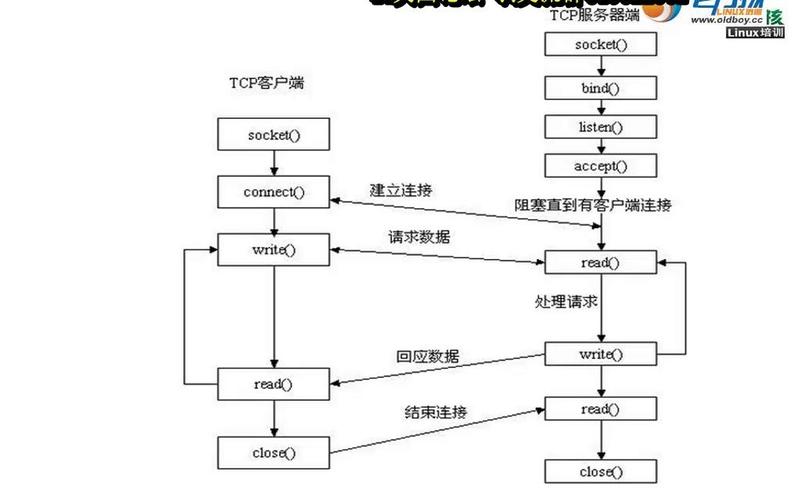
Socket communication in Java (and most networking) follows a client-server model.
-
Server (The Listener):
- A server application creates a
ServerSocketand "binds" it to a specific IP address and a port number. This makes it listen for incoming connection requests on that port. - The server calls
accept(). This method blocks (waits) until a client tries to connect. - When a client connects,
accept()returns a newSocketobject that represents the specific connection to that client. The originalServerSocketcontinues listening for new clients. - The server uses the new
Socket'sInputStreamto read data from the client and itsOutputStreamto send data back.
- A server application creates a
-
Client (The Initiator):
- A client application creates a
Socketobject, specifying the server's IP address (or hostname) and the port number it wants to connect to. - The
Socketconstructor attempts to establish a connection to the server. This call blocks until the connection is made or it fails. - Once connected, the client uses the
Socket'sOutputStreamto send data to the server and itsInputStreamto read data back.
- A client application creates a
Key Java Classes:
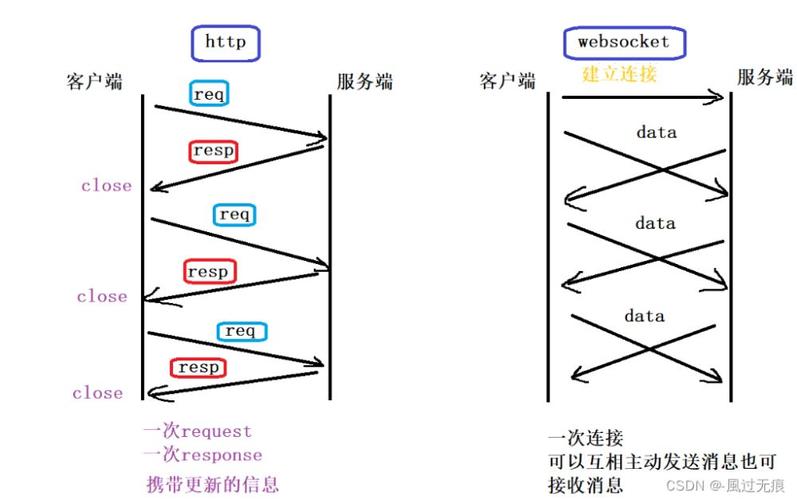
java.net.ServerSocket: For the server to listen for connections.java.net.Socket: For both client and server ends of a connection.java.io.InputStream/java.io.OutputStream: For low-level byte-based communication.java.io.BufferedReader/java.io.PrintWriter: For convenient, high-level, text-based communication (recommended for most cases).
Step-by-Step Code Example
Let's create a simple "Echo Server" that receives a message from a client and sends it back.
The Server (EchoServer.java)
This server will listen on port 6789. It will handle one client at a time.
// EchoServer.java
import java.io.BufferedReader;
import java.io.IOException;
import java.io.InputStreamReader;
import java.io.PrintWriter;
import java.net.InetAddress;
import java.net.ServerSocket;
import java.net.Socket;
public class EchoServer {
    public static void main(String[] args) {
        int port = 6789;
        // The try-with-resources statement ensures the ServerSocket is closed automatically.
        try (ServerSocket serverSocket = new ServerSocket(port)) {
            System.out.println("Server is listening on port " + port);
            // The accept() method waits until a client connects.
            // It returns a Socket object representing the connection to the client.
            Socket clientSocket = serverSocket.accept();
            System.out.println("Client connected: " + clientSocket.getInetAddress().getHostAddress());
            // Set up streams for communication with the client
            // PrintWriter for sending messages (autoFlush=true is important!)
            PrintWriter out = new PrintWriter(clientSocket.getOutputStream(), true);
            // BufferedReader for reading messages
            BufferedReader in = new BufferedReader(new InputStreamReader(clientSocket.getInputStream()));
            String inputLine;
            // Read from the client until the client closes the connection
            while ((inputLine = in.readLine()) != null) {
                System.out.println("Received from client: " + inputLine);
                out.println("Server: " + inputLine); // Echo back the message
            }
            System.out.println("Client disconnected.");
        } catch (IOException e) {
            System.out.println("Server exception: " + e.getMessage());
            e.printStackTrace();
        }
    }
}
The Client (EchoClient.java)
This client will connect to the server (which can be on the same machine or another) and send a message.
// EchoClient.java
import java.io.BufferedReader;
import java.io.IOException;
import java.io.InputStreamReader;
import java.io.PrintWriter;
import java.net.Socket;
import java.net.UnknownHostException;
public class EchoClient {
    public static void main(String[] args) {
        String hostname = "localhost"; // Use the server's IP address if it's remote
        int port = 6789;
        // The try-with-resources statement ensures the socket and streams are closed.
        try (
            Socket socket = new Socket(hostname, port);
            PrintWriter out = new PrintWriter(socket.getOutputStream(), true);
            BufferedReader in = new BufferedReader(new InputStreamReader(socket.getInputStream()));
            BufferedReader stdIn = new BufferedReader(new InputStreamReader(System.in))
        ) {
            System.out.println("Connected to the echo server.");
            System.out.println("Type a message and press Enter. Type 'exit' to quit.");
            String userInput;
            // Read from user input, send to server, and print the server's response
            while ((userInput = stdIn.readLine()) != null) {
                if ("exit".equalsIgnoreCase(userInput)) {
                    break;
                }
                out.println(userInput); // Send user input to the server
                System.out.println("Echo from server: " + in.readLine()); // Read and print the server's reply
            }
        } catch (UnknownHostException e) {
            System.err.println("Don't know about host " + hostname);
            System.exit(1);
        } catch (IOException e) {
            System.err.println("Couldn't get I/O for the connection to " +
                hostname);
            System.exit(1);
        }
    }
}
How to Run on Linux
-
Save the Files: Save the two code blocks above as
EchoServer.javaandEchoClient.javain the same directory.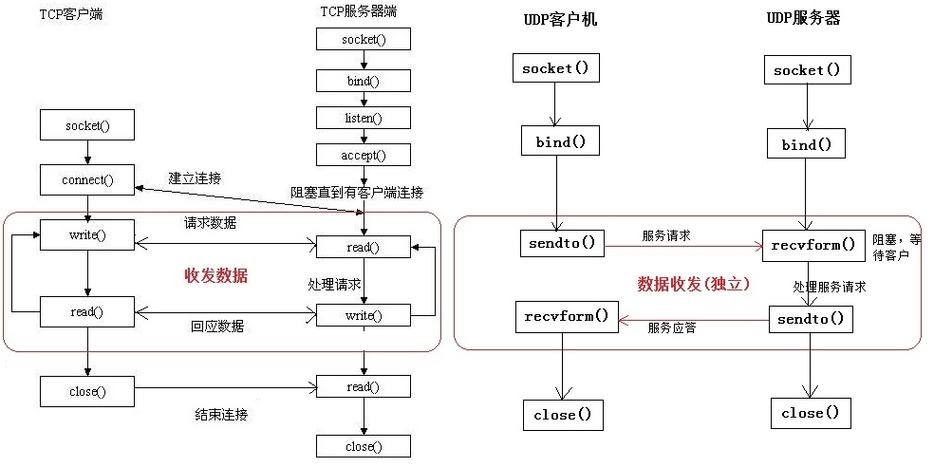 (图片来源网络,侵删)
 -
Compile the Java Code: Open a terminal and run the Java compiler:
javac EchoServer.java EchoClient.java
This will create
EchoServer.classandEchoClient.class. -
Run the Server: In your terminal, start the server. It will now be listening on port 6789.
java EchoServer
You should see the output:
Server is listening on port 6789. The terminal will now be blocked, waiting for a connection. -
Run the Client (in a new terminal): Open a new terminal window. Now, run the client application.
java EchoClient
You will see:
Connected to the echo server.and a prompt to type a message. -
Test the Communication:
- In the client's terminal, type a message and press Enter.
Hello, Server! - The client will immediately receive and display the echo:
Echo from server: Server: Hello, Server! - In the server's terminal, you will see:
Received from client: Hello, Server! - Type
exitin the client terminal to close the connection. The server will printClient disconnected.and will be ready for a new connection.
- In the client's terminal, type a message and press Enter.
Linux-Specific Considerations
A. Port Numbers and Permissions
-
Well-Known Ports (0-1023): On Linux, binding to ports below 1024 requires root privileges. This is a security measure to prevent regular users from running services on standard ports like 80 (HTTP) or 22 (SSH).
- If you try to run your server on port 80 as a regular user, you'll get a
java.net.BindException: Permission denied. - Solution: Either use a port number above 1024 (like 6789 in our example) or run your server with
sudo.
- If you try to run your server on port 80 as a regular user, you'll get a
-
Port Already in Use: If you try to run your server and another application is already using port 6789, you'll get a
java.net.BindException: Address already in use.- How to find what's using the port:
# The -t flag for TCP, -n for numeric addresses, -l for listening
sudo netstat -tulpn | grep :6789
# Or using the newer ss command
sudo ss -tulpn | grep :6789
- How to kill the process (replace
<PID>with the Process ID from the command above):sudo kill -9 <PID>
- How to find what's using the port:
B. Firewalls
Your Linux machine's firewall will block incoming connection requests on any port by default. You need to create a rule to allow traffic on your chosen port.
-
ufw(Uncomplicated Firewall - common on Ubuntu/Debian):# Allow traffic on TCP port 6789 sudo ufw allow 6789/tcp # To check the rules sudo ufw status # To delete the rule later sudo ufw delete allow 6789/tcp
-
firewalld(common on CentOS/RHEL/Fedora):# Add a permanent rule to allow traffic on port 6789 sudo firewall-cmd --permanent --add-port=6789/tcp # Reload the firewall to apply the new rule sudo firewall-cmd --reload # To check the rules sudo firewall-cmd --list-all
C. IP Address Binding
In our server example, we used new ServerSocket(port). This makes the server listen on all available network interfaces (e.g., 0.0.1, 168.1.100, etc.).
If you want your server to be accessible only from the local machine, you can bind it to 0.0.1:
// Listen only on localhost
try (ServerSocket serverSocket = new ServerSocket(port, 50, InetAddress.getByName("127.0.0.1"))) {
    // ...
}
This is more secure if you don't need external access.
Going Further: Multi-threading
The simple server above can only handle one client at a time. If a client connects, all other clients have to wait. For a real-world application, you need a multi-threaded server.
A common pattern is:
- The main thread creates a
ServerSocketand enters an infiniteaccept()loop. - For each new client connection accepted, the main thread creates a new
Thread(or aRunnabletask) to handle that specific client's communication. - The main thread immediately goes back to listening for the next client.
This way, each client gets its own thread, and the server can handle many clients concurrently.