Of course! Let's dive deep into ListIterator in Java. It's a powerful and specific interface that provides more control than a standard Iterator.
What is a ListIterator?
ListIterator is an interface in the Java Collections Framework that extends the Iterator interface. It is designed to traverse elements in a list (any class that implements the List interface, like ArrayList, LinkedList, etc.) in both forward and backward directions.
Think of it as a bidirectional cursor that can move back and forth through a list, allowing you to modify the list as you iterate.
Key Differences: Iterator vs. ListIterator
This table clearly shows why ListIterator is so useful for lists:
| Feature | Iterator |
ListIterator |
|---|---|---|
| Traverse Direction | Forward only (hasNext(), next()) |
Forward and Backward (hasNext(), next(), hasPrevious(), previous()) |
| Get Index | No | Yes (nextIndex(), previousIndex()) |
| Modification | remove() only |
remove(), set(E), add(E) |
| Scope | Works on all Collections |
Works only on Lists |
| Creation | collection.iterator() |
list.listIterator() |
How to Create and Use a ListIterator
You don't instantiate ListIterator directly. You get an instance from a List object using the listIterator() method.
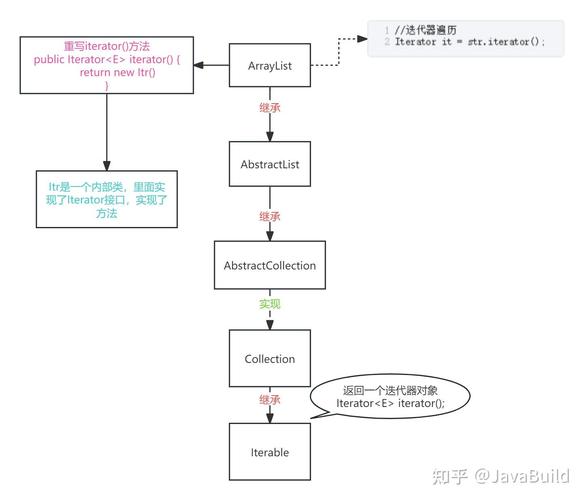
Here's a complete, runnable example demonstrating its core functionalities.
import java.util.ArrayList;
import java.util.List;
import java.util.ListIterator;
public class ListIteratorDemo {
    public static void main(String[] args) {
        // 1. Create a list and populate it
        List<String> fruits = new ArrayList<>();
        fruits.add("Apple");
        fruits.add("Banana");
        fruits.add("Cherry");
        fruits.add("Date");
        fruits.add("Elderberry");
        System.out.println("Original List: " + fruits);
        System.out.println("----------------------------------------");
        // 2. Create a ListIterator
        // It starts at position 0, just before the first element ("Apple").
        ListIterator<String> listIterator = fruits.listIterator();
        // --- FORWARD ITERATION ---
        System.out.println("--- Moving Forward ---");
        while (listIterator.hasNext()) {
            String fruit = listIterator.next();
            System.out.println("Next Element: " + fruit);
            System.out.println("  - Next Index: " + listIterator.nextIndex());
            System.out.println("  - Previous Index: " + listIterator.previousIndex());
        }
        System.out.println("----------------------------------------");
        // --- BACKWARD ITERATION ---
        System.out.println("\n--- Moving Backward ---");
        // The iterator is now at the end of the list, after "Elderberry".
        while (listIterator.hasPrevious()) {
            String fruit = listIterator.previous();
            System.out.println("Previous Element: " + fruit);
            System.out.println("  - Next Index: " + listIterator.nextIndex());
            System.out.println("  - Previous Index: " + listIterator.previousIndex());
        }
        System.out.println("----------------------------------------");
        // --- MODIFYING THE LIST USING ITERATOR ---
        System.out.println("\n--- Modifying the List ---");
        // Reset iterator to the beginning
        listIterator = fruits.listIterator();
        // Move to the second element ("Banana")
        if (listIterator.hasNext()) {
            listIterator.next(); // "Apple"
            listIterator.next(); // "Banana"
        }
        // 3. Use set() to replace the current element
        System.out.println("Replacing 'Banana' with 'Blueberry'...");
        listIterator.set("Blueberry");
        System.out.println("List after set(): " + fruits);
        // 4. Use add() to insert an element before the current one
        System.out.println("Adding 'Blackberry' before 'Blueberry'...");
        listIterator.add("Blackberry");
        System.out.println("List after add(): " + fruits);
        // 5. Use remove() to remove the last element returned by next() or previous()
        // The last operation was add(), so we need to move forward first.
        listIterator.next(); // Moves past "Blackberry", current is "Blueberry"
        System.out.println("Removing 'Blueberry'...");
        listIterator.remove(); // Removes the element last returned by next(), which is "Blueberry"
        System.out.println("List after remove(): " + fruits);
    }
}
Output of the Code:
Original List: [Apple, Banana, Cherry, Date, Elderberry]
----------------------------------------
--- Moving Forward ---
Next Element: Apple
  - Next Index: 1
  - Previous Index: -1
Next Element: Banana
  - Next Index: 2
  - Previous Index: 0
Next Element: Cherry
  - Next Index: 3
  - Previous Index: 1
Next Element: Date
  - Next Index: 4
  - Previous Index: 2
Next Element: Elderberry
  - Next Index: 5
  - Previous Index: 3
----------------------------------------
--- Moving Backward ---
Previous Element: Elderberry
  - Next Index: 4
  - Previous Index: 5
Previous Element: Date
  - Next Index: 3
  - Previous Index: 4
Previous Element: Cherry
  - Next Index: 2
  - Previous Index: 3
Previous Element: Banana
  - Next Index: 1
  - Previous Index: 2
Previous Element: Apple
  - Next Index: 0
  - Previous Index: 1
----------------------------------------
--- Modifying the List ---
Replacing 'Banana' with 'Blueberry'...
List after set(): [Apple, Blueberry, Cherry, Date, Elderberry]
Adding 'Blackberry' before 'Blueberry'...
List after add(): [Apple, Blackberry, Blueberry, Cherry, Date, Elderberry]
Removing 'Blueberry'...
List after remove(): [Apple, Blackberry, Cherry, Date, Elderberry]
Detailed Method Breakdown
| Method | Description |
|---|---|
boolean hasNext() |
Returns true if there are more elements when traversing the list in the forward direction. |
E next() |
Returns the next element in the list and advances the position of the iterator. Throws NoSuchElementException if there is no next element. |
boolean hasPrevious() |
Returns true if there are more elements when traversing the list in the reverse direction. |
E previous() |
Returns the previous element in the list and moves the position of the iterator backward. Throws NoSuchElementException if there is no previous element. |
int nextIndex() |
Returns the index of the element that would be returned by a subsequent call to next(). Returns list.size() if the iterator is at the end of the list. |
int previousIndex() |
Returns the index of the element that would be returned by a subsequent call to previous(). Returns -1 if the iterator is at the beginning of the list. |
void remove() |
Removes from the list the last element that was returned by next() or previous(). Can only be called once per call to next() or previous(). Throws IllegalStateException if called before next() or previous() or if remove() or add() has already been called since the last next() or previous(). |
void set(E e) |
Replaces the last element returned by next() or previous() with the specified element e. Throws IllegalStateException if next() or previous() has not been called, or if remove() or add() has been called since the last next() or previous(). |
void add(E e) |
Inserts the specified element e into the list. The element is inserted before the element that would be returned by next(), and after the element that would be returned by previous(). After the call, nextIndex() is increased by one. This method does not depend on next() or previous() having been called. |
Common Use Cases for ListIterator
- Bidirectional Traversal: When you need to traverse a list both forwards and backwards, which is impossible with a standard
Iterator. - Modifying a List During Iteration: This is a key use case. For example, you might want to iterate through a list of tasks and change the priority of a specific task without breaking the iteration.
- Finding an Element and Inserting/Replacing Nearby: You can iterate to a specific element and then use
add()to insert a new element right before it, orset()to replace it. - Creating a "Sliding Window" or Cursor: You can use the index methods (
nextIndex(),previousIndex()) to keep track of your position in the list and implement more complex logic based on the current index.
Important Considerations and Pitfalls
ConcurrentModificationException: Like all iterators,ListIteratorwill throw this exception if the list is modified in any way other than through the iterator's ownremove(),set(), oradd()methods. For example, if you callfruits.remove("Apple")inside the loop, you will get an exception.- Stateful Operations: The
remove()andset()methods are highly dependent on the iterator's state. You must callnext()orprevious()before callingremove()orset(), and you can only call them once pernext()/previous()call. Theadd()method is the exception and can be called at any time. - Not for General Use:
ListIteratoris specific toLists. If you are working with aSetor aQueue, you must use the standardIterator.
When to Use ListIterator vs. an Enhanced For-Loop or Iterator
| Method | When to Use |
|---|---|
| Enhanced For-Loop | The simplest choice. Use when you only need to read elements and don't need to modify the list or iterate backwards. |
Iterator |
Use when you are working with any Collection (not just a List) and you need to safely remove elements while iterating forward. |
ListIterator |
Use when you are working with a List and you need bidirectional traversal or the ability to add or replace elements at a specific position during iteration. |