Of course! In Java, List is a fundamental and widely used interface from the Java Collections Framework. It represents an ordered collection (also known as a sequence) that can contain duplicate elements.
Here's a comprehensive breakdown of List in Java, covering its core concepts, common implementations, and essential operations.
What is a List?
A List is an interface that extends the Collection interface. Its defining characteristics are:
- Ordered: Elements are stored in a specific order, which is the order in which they were inserted. This order is preserved.
- Allows Duplicates: You can add the same element multiple times to a list.
- Allows Null Elements: Most
Listimplementations allownullelements.
Think of it like a dynamic array or a numbered shopping list where the position of each item matters.
Key Interfaces and Classes
You can't directly create an instance of the List interface itself. You must use one of its concrete implementations.
| Interface/Class | Description | Key Characteristics | When to Use |
|---|---|---|---|
List<E> |
Interface | The contract for all list implementations. Defines methods like add(), get(), remove(), etc. |
When you want to write code that works with any type of list (polymorphism). |
ArrayList<E> |
Class | A resizable-array implementation of the List interface. |
Most common choice. Use when you need fast random access (by index) and are adding/removing elements mostly at the end. |
LinkedList<E> |
Class | Implements the List interface and also the Deque interface. It uses a doubly-linked list internally. |
Use when you need frequent insertions or deletions in the middle of the list. Slower for random access than ArrayList. |
Vector<E> |
Class | A legacy class, similar to ArrayList but synchronized (thread-safe). |
Generally avoided in new code due to performance overhead. Use ArrayList with Collections.synchronizedList() or CopyOnWriteArrayList for thread safety. |
Stack<E> |
Class | A legacy class that represents a Last-In-First-Out (LIFO) stack. | Generally avoided. Use Deque (implemented by LinkedList or ArrayDeque) for modern stack operations. |
Note: The <E> is a generic type parameter. It allows you to specify the type of objects the list will hold, providing compile-time type safety (e.g., List<String>, List<Integer>).
Common Operations (Methods)
Here are the most frequently used methods with examples using ArrayList.
Creating a List
import java.util.ArrayList;
import java.util.List;
// Using the List interface as the type (good practice)
List<String> fruits = new ArrayList<>();
// Or using the concrete class type
ArrayList<String> fruits2 = new ArrayList<>();
Adding Elements
List<String> fruits = new ArrayList<>();
// Add an element to the end of the list
fruits.add("Apple");
fruits.add("Banana");
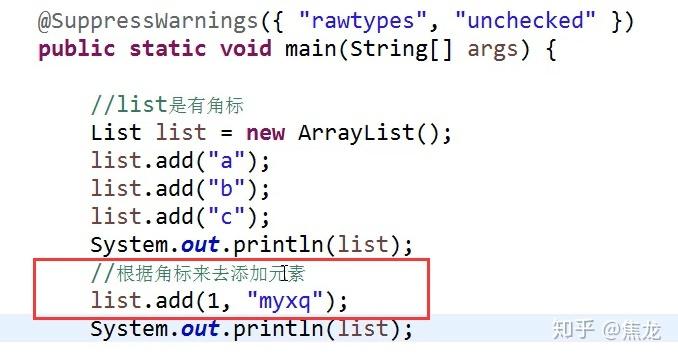
// Add an element at a specific index
fruits.add(1, "Orange"); // List is now ["Apple", "Orange", "Banana"]
// Add all elements from another collection
List<String> moreFruits = List.of("Mango", "Grape");
fruits.addAll(moreFruits); // List is now ["Apple", "Orange", "Banana", "Mango", "Grape"]
Accessing Elements
List<String> fruits = List.of("Apple", "Orange", "Banana");
// Get an element by its index (0-based)
String firstFruit = fruits.get(0); // "Apple"
String secondFruit = fruits.get(1); // "Orange"
// Get the number of elements in the list
int size = fruits.size(); // 3
Checking for Elements
List<String> fruits = List.of("Apple", "Orange", "Banana");
// Check if the list contains a specific element
boolean hasApple = fruits.contains("Apple"); // true
boolean hasKiwi = fruits.contains("Kiwi"); // false
// Check if the list is empty
boolean isEmpty = fruits.isEmpty(); // false
Removing Elements
List<String> fruits = new ArrayList<>(List.of("Apple", "Orange", "Banana", "Apple"));
// Remove the first occurrence of an element by value
fruits.remove("Apple"); // Removes the first "Apple". List is now ["Orange", "Banana", "Apple"]
// Remove an element by its index
String removedFruit = fruits.remove(0); // Removes "Orange". Returns "Orange". List is now ["Banana", "Apple"]
Iterating Over a List
There are several ways to loop through a list.
List<String> fruits = List.of("Apple", "Orange", "Banana");
// 1. Enhanced For-Loop (most common and readable)
System.out.println("--- Using For-Loop ---");
for (String fruit : fruits) {
    System.out.println(fruit);
}
// 2. Using an Iterator (allows safe removal during iteration)
System.out.println("\n--- Using Iterator ---");
for (Iterator<String> iterator = fruits.iterator(); iterator.hasNext(); ) {
    String fruit = iterator.next();
    if ("Orange".equals(fruit)) {
        // iterator.remove(); // This would safely remove "Orange"
    }
    System.out.println(fruit);
}
// 3. Using Java 8 Streams (modern, functional approach)
System.out.println("\n--- Using Streams ---");
fruits.stream().forEach(System.out::println);
Modifying a List
List<String> fruits = new ArrayList<>(List.of("Apple", "Orange", "Banana"));
// Replace an element at a specific index
fruits.set(1, "Grape"); // Replaces "Orange" with "Grape"
// List is now ["Apple", "Grape", "Banana"]
Sorting a List
import java.util.Collections;
import java.util.Comparator;
import java.util.List;
List<String> fruits = new ArrayList<>(List.of("Banana", "Apple", "Orange"));
// 1. Sort in natural order (for Strings: alphabetical)
Collections.sort(fruits);
// List is now ["Apple", "Banana", "Orange"]
// 2. Sort with a custom Comparator (e.g., by length)
fruits.sort(Comparator.comparingInt(String::length));
// List is now ["Apple", "Banana", "Orange"] (all have length 5-6, so order is not guaranteed between them)
// A better example: List.of("Cherry", "Apple", "Date")
// After sort by length: ["Date", "Apple", "Cherry"]
ArrayList vs. LinkedList: A Quick Comparison
| Feature | ArrayList |
LinkedList |
|---|---|---|
| Internal Structure | Dynamic array. | Doubly-linked list of nodes. |
Random Access (get(index)) |
Very Fast (O(1)). Directly calculates memory address. | Slow (O(n)). Must traverse from head or tail. |
Add at End (add(E e)) |
Amortized Fast (O(1)). Usually just adds to the end of the array. | Fast (O(1)). Just adds a new node to the end. |
Add in Middle (add(index, e)) |
Slow (O(n)). Must shift all subsequent elements. | Fast (O(n)). Must find the node, but then just relinks pointers. |
Remove from Middle (remove(index)) |
Slow (O(n)). Must shift all subsequent elements. | Fast (O(n)). Must find the node, but then just relinks pointers. |
| Memory Usage | Lower. Stores data in a contiguous block. | Higher. Each element has overhead for storing next and previous pointers. |
| Best For | Frequent access by index, infrequent insertions/deletions in the middle. | Frequent insertions/deletions, infrequent access by index. |
List with Custom Objects
When using List with your own custom objects, it's crucial to override equals() and hashCode() for methods like contains(), remove(), and indexOf() to work correctly.
class Person {
    private String name;
    private int age;
    public Person(String name, int age) {
        this.name = name;
        this.age = age;
    }
    // Getters, Setters, toString()...
    // Override equals() for logical comparison
    @Override
    public boolean equals(Object o) {
        if (this == o) return true;
        if (o == null || getClass() != o.getClass()) return false;
        Person person = (Person) o;
        return age == person.age && Objects.equals(name, person.name);
    }
    // Override hashCode() to be consistent with equals()
    @Override
    public int hashCode() {
        return Objects.hash(name, age);
    }
}
// Usage:
List<Person> people = new ArrayList<>();
people.add(new Person("Alice", 30));
people.add(new Person("Bob", 25));
// This will now work correctly because we overrode equals()
boolean hasAlice = people.contains(new Person("Alice", 30)); // true