Of course! Using a switch statement with a String in Java is a common and powerful feature. Here’s a comprehensive guide covering how it works, best practices, and examples.
The Basics: How to Use switch with String
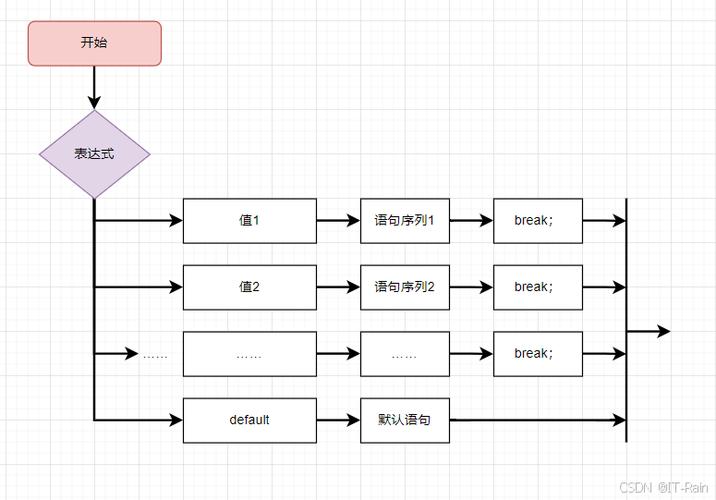
Java 7 and later versions allow you to use a String object as the expression in a switch statement. The switch compares the String in the case labels using the .equals() method behind the scenes.
Syntax
switch (stringVariable) {
    case "value1":
        // code to execute if stringVariable.equals("value1") is true
        break;
    case "value2":
        // code to execute if stringVariable.equals("value2") is true
        break;
    case "value3":
        // code to execute if stringVariable.equals("value3") is true
        break;
    default:
        // code to execute if no case matches
        break;
}
Key Points:
- No
breakneeded forString? No, this is a common misconception. Just like withintorenum, you must use abreak;statement at the end of eachcaseblock to prevent "fall-through" to the nextcase. nullCheck: Theswitchexpression will throw aNullPointerExceptionif theStringvariable isnull. It's good practice to check fornullbefore using theswitch.
Complete, Runnable Example
This example demonstrates a typical use case: processing a command.
public class StringSwitchExample {
    public static void main(String[] args) {
        String command = "start";
        // Always check for null first!
        if (command == null) {
            System.out.println("Command cannot be null.");
            return;
        }
        switch (command) {
            case "start":
                System.out.println("Starting the process...");
                // startProcess();
                break;
            case "stop":
                System.out.println("Stopping the process...");
                // stopProcess();
                break;
            case "pause":
                System.out.println("Pausing the process...");
                // pauseProcess();
                break;
            case "resume":
                System.out.println("Resuming the process...");
                // resumeProcess();
                break;
            default:
                System.out.println("Unknown command: " + command);
                break;
        }
    }
}
Output:
Starting the process...How it Works: The hashCode() and .equals() Mechanism
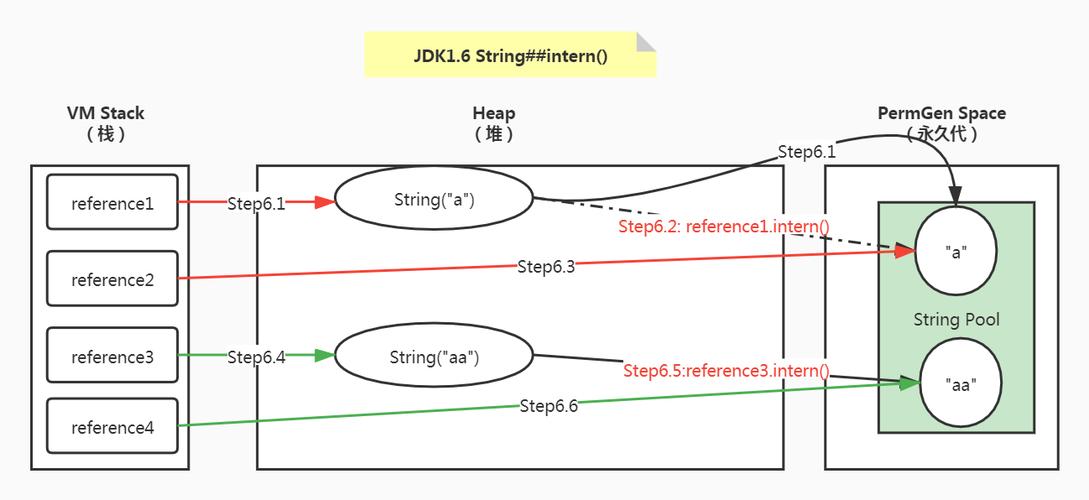
You might wonder how the JVM efficiently compares String objects, which can be long. The switch statement is optimized for performance. Here's the process it follows:
- Calculate
hashCode(): The JVM first calculates the hash code of theStringin theswitchexpression. - Use a
switchonint: It then uses a traditionalswitchstatement on thisinthash code. - Handle Collisions with
.equals(): If two different strings have the same hash code (a "hash collision"), the JVM doesn't just assume they are equal. It falls back to using the.equals()method to perform an exact string comparison to ensure correctness.
This approach gives you the readability of a String switch with the performance of an integer switch.
Best Practices and Important Considerations
a) The null Check is Crucial
As mentioned, a NullPointerException will be thrown if your String variable is null.
String status = null;
switch (status) { // This will throw NullPointerException
    case "active":
        System.out.println("User is active.");
        break;
    // ...
}
Solution: Always add a null check before the switch.
b) break Statements are Mandatory (Unless You Want Fall-Through)
Forgetting a break; is a classic mistake. The code will "fall through" and execute the code from the next case block as well.
String fruit = "apple";
switch (fruit) {
    case "apple":
        System.out.println("Selected fruit: Apple");
        // Missing break!
    case "orange":
        System.out.println("Selected fruit: Orange"); // This will also be printed!
        break;
    default:
        System.out.println("Unknown fruit");
}
Output:
Selected fruit: Apple
Selected fruit: Orange
If you intentionally want fall-through, it's a good practice to add a comment to make your intention clear.
switch (fruit) {
    case "apple":
        System.out.println("A red or green fruit.");
        // Intentional fall-through
    case "pear":
        System.out.println("A common fruit.");
        break;
    // ...
}
c) Use switch for Readability, Not for Complex Logic
A switch statement is excellent for handling discrete, mutually exclusive cases. If your logic becomes too complex or nested, it might be better to refactor it into separate methods or use polymorphism.
switch with String vs. if-else if
| Feature | switch with String |
if-else if |
|---|---|---|
| Readability | Excellent for a long list of simple, direct string comparisons. | Good for a few conditions or when conditions are complex. |
| Performance | Can be more efficient as it's often compiled to a tableswitch or lookupswitch bytecode. |
The JVM is very good at optimizing if-else if chains, so the difference is often negligible. |
| Flexibility | Limited to -like comparisons (using .equals()). |
Can use any boolean expression (>, <, &&, , method calls, etc.). |
null Safety |
Requires an explicit null check. |
Can handle null directly in the condition (if (myString == null)). |
| Data Types | Limited to String, byte, char, short, int, and their wrapper classes, plus enum. |
Can check any data type. |
Rule of Thumb:
- Use
switchwhen you are matching a variable against a set of constant string literals and the code looks cleaner. - Use
if-else ifwhen your conditions are more complex, involve ranges, or need to check fornullin a more integrated way.
Modern Alternative: switch Expression (Java 14+)
If you are using a modern version of Java (14+), you can use the switch expression, which is more concise and returns a value.
// Using a traditional switch statement
String message;
switch (command) {
    case "start":
        message = "Process started.";
        break;
    case "stop":
        message = "Process stopped.";
        break;
    default:
        message = "Unknown command.";
        break;
}
System.out.println(message);
// Using a modern switch expression (Java 14+)
String message = switch (command) {
    case "start" -> "Process started.";
    case "stop"  -> "Process stopped.";
    default      -> "Unknown command.";
};
System.out.println(message);
The switch expression is arrow-based (->) and does not require break statements, making it less error-prone.