Of course! Here is a comprehensive guide to using Python with Elasticsearch, covering everything from setup to advanced operations.

What is the elasticsearch Python Client?
The official elasticsearch Python client is a powerful library that allows you to interact with an Elasticsearch cluster from your Python applications. It handles the low-level HTTP communication with the REST API, providing a convenient, Pythonic interface for all major Elasticsearch features.
Prerequisites
Before you start, make sure you have:
- Python 3.7+ installed.
- An Elasticsearch instance running. The easiest way to get started is with Docker:
docker run -p 9200:9200 -p 9300:9300 -e "discovery.type=single-node" -e "xpack.security.enabled=false" docker.elastic.co/elasticsearch/elasticsearch:8.11.0
This command starts a single-node, insecure Elasticsearch cluster that you can access at
http://localhost:9200.
Installation
Install the official client using pip:
pip install elasticsearch
Connecting to Elasticsearch
The first step is to create a client object that connects to your cluster. For local development, this is very simple.
from elasticsearch import Elasticsearch
# Connect to the local Elasticsearch instance
es = Elasticsearch("http://localhost:9200")
# You can also pass a list of hosts for high availability
# es = Elasticsearch(["http://host1:9200", "http://host2:9200"])
# Check if the connection is successful
if es.ping():
    print("Connected to Elasticsearch!")
else:
    print("Could not connect to Elasticsearch.")
# Get cluster information
print(es.info())
Core Operations: Indexing, Searching, and Deleting
Let's perform the fundamental CRUD (Create, Read, Update, Delete) operations.
A. Indexing (Creating/Updating Documents)
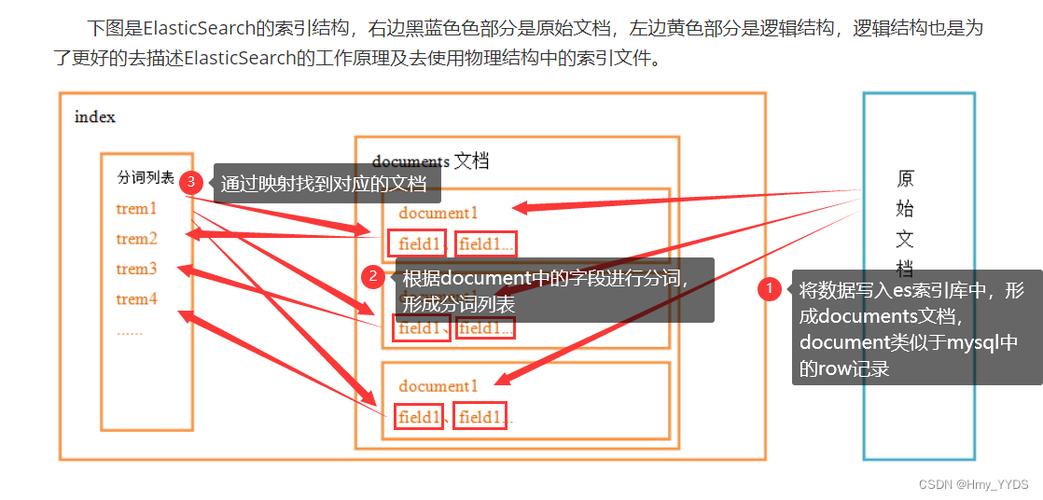
Indexing is the process of storing a JSON document in an index. An index is like a database table, and a document is like a row in that table.
# Define a document as a Python dictionary
doc = {
    "author": "Kimchy",
    "text": "Elasticsearch: cool. bonsai cool.",
    "timestamp": "2009-11-15T14:12:12"
}
# Index the document into the 'test_index' index with id=1
# The 'index' method will create the index if it doesn't exist.
# If an id is provided, it will update the document if it exists.
response = es.index(index="test_index", id=1, document=doc)
print(f"Document indexed successfully. Response: {response}")
# Index another document without specifying an ID (Elasticsearch will generate one)
doc2 = {
    "author": "John Doe",
    "text": "Python and Elasticsearch are a great combination!",
    "timestamp": "2025-10-27T10:00:00"
}
response2 = es.index(index="test_index", document=doc2)
print(f"New document indexed with ID: {response2['_id']}")
B. Searching Documents
Searching is the most powerful feature of Elasticsearch. You can use the search() method with a query written in Query DSL (Domain Specific Language).

# 1. Match All Query
# Get all documents from the 'test_index'
search_query = {
    "query": {
        "match_all": {}
    }
}
response = es.search(index="test_index", query=search_query)
print(f"\nFound {response['hits']['total']['value']} documents:")
for hit in response['hits']['hits']:
    print(f"  ID: {hit['_id']}, Document: {hit['_source']}")
# 2. Full-Text Search
# Search for documents where the 'text' field contains the word 'cool'
search_query = {
    "query": {
        "match": {
            "text": "cool"
        }
    }
}
response = es.search(index="test_index", query=search_query)
print(f"\nFound {response['hits']['total']['value']} documents matching 'cool':")
for hit in response['hits']['hits']:
    print(f"  ID: {hit['_id']}, Score: {hit['_score']}, Document: {hit['_source']}")
C. Getting a Document by ID
If you know the ID of a document, you can retrieve it directly.
# Get the document with id=1
response = es.get(index="test_index", id=1)
print(f"\nRetrieved document with ID 1: {response['_source']}")
D. Updating a Document
You can update a document using the update method. This is useful for partial updates.
# Update the 'text' field of the document with id=1
update_response = es.update(
    index="test_index",
    id=1,
    doc={
        "text": "Elasticsearch: cool. bonsai cool. And Python is awesome too!"
    }
)
print(f"\nDocument updated. Response: {update_response}")
E. Deleting a Document
To delete a document, you need its index and ID.
# Delete the document with id=1
delete_response = es.delete(index="test_index", id=1)
print(f"\nDocument deleted. Response: {delete_response}")
Advanced Features
The client also provides helper methods for more complex operations.
A. Bulk Operations
Instead of sending requests one by one, you can use the bulk API for much better performance when indexing, updating, or deleting many documents.
from elasticsearch import helpers
# Prepare a list of actions
actions = [
    {
        "_index": "test_index",
        "_id": 2,
        "_source": {
            "author": "Jane Doe",
            "text": "Bulk indexing is very efficient.",
            "timestamp": "2025-10-27T11:00:00"
        }
    },
    {
        "_index": "test_index",
        "_id": 3,
        "_source": {
            "author": "Peter Jones",
            "text": "Efficiency is key in data processing.",
            "timestamp": "2025-10-27T12:00:00"
        }
    }
]
# Execute the bulk operation
success, failed = helpers.bulk(es, actions)
print(f"\nSuccessfully indexed {success} documents in bulk.")
if failed:
    print(f"Failed to index {len(failed)} documents.")
B. Using helpers.streaming_bulk for Large Datasets
For very large datasets that don't fit in memory, streaming_bulk is the perfect tool. It's a generator that yields results as they come in.
def generate_docs():
    """A generator function that yields documents one by one."""
    for i in range(1000, 1010):
        yield {
            "_index": "test_index",
            "_id": i,
            "_source": {
                "author": f"User {i}",
                "text": f"This is document number {i}.",
                "timestamp": "2025-10-27T13:00:00"
            }
        }
# Use streaming_bulk to process documents without loading them all into memory
success_count = 0
for ok, response in helpers.streaming_bulk(es, generate_docs()):
    if ok:
        success_count += 1
    else:
        print("Failed to process document:", response)
print(f"\nSuccessfully streamed and indexed {success_count} documents.")
Best Practices
-
Reuse the Client: Creating a new client for every request is inefficient. Create a single
Elasticsearchinstance and reuse it throughout your application. -
Error Handling: Network issues or cluster problems can raise exceptions. Always wrap your Elasticsearch calls in
try...exceptblocks.from elasticsearch.exceptions import ConnectionError, RequestError try: response = es.index(...) except ConnectionError: print("Elasticsearch is not reachable.") except RequestError as e: print("A request error occurred:", e.info) -
Connection Pooling: The client uses a connection pool by default, which is crucial for performance. For production, you might want to tune its size.
# Example with a custom connection pool es = Elasticsearch( "http://localhost:9200", # maxsize is the maximum number of connections in the pool # timeout is the connection timeout in seconds connection_class=RequestsHttpConnection, pool_maxsize=20, timeout=10 ) -
Asynchronous Operations: For high-performance applications, use the
elasticsearch-asyncclient, which works withasyncio.pip install elasticsearch-async aiohttp
# Example of async usage (requires an async function)
from elasticsearch_async import AsyncElasticsearch
async def main():
    es = AsyncElasticsearch("http://localhost:9200")
    if await es.ping():
        print("Async connection successful!")
    await es.close()
# You would run this with asyncio.run(main())