Of course! The term "Java Visual Editor" can refer to a few different things, from full-fledged Integrated Development Environments (IDEs) with visual tools to specialized GUI builders.
Here’s a comprehensive breakdown of the best options, categorized by their primary use case.
The Short Answer: Top Recommendations
| Tool | Best For | Key Feature | Cost |
|---|---|---|---|
| IntelliJ IDEA | All-around Java Development | Unmatched code analysis, refactorings, and a built GUI Designer. | Free (Community), Paid (Ultimate) |
| Eclipse | Cross-Platform & Extensibility | The classic, highly customizable with a powerful GUI Designer. | Free (Open Source) |
| NetBeans | Simplicity & Beginners | Extremely easy-to-use, all-in-one IDE with a drag-and-drop GUI builder. | Free (Open Source) |
| Scene Builder | FXML-Based UIs | The industry standard for designing JavaFX UIs visually. | Free (Open Source) |
| Visual Studio Code | Lightweight & Modern | A fast, editor-first approach with extensions for Java and GUI design. | Free |
Full-Featured IDEs with Visual GUI Designers
These are complete development environments where you write code, debug, and design your user interface, often in the same window.
a) IntelliJ IDEA (The Modern Powerhouse)
IntelliJ IDEA is widely considered the best Java IDE, and its Community Edition is free and powerful enough for most projects.
- GUI Designer: It includes a modern, Swing-based GUI Designer called JFormDesigner (integrated). It's a drag-and-drop tool that generates Java code for you.
- Pros:
- Exceptional code intelligence, refactoring, and error detection.
- Excellent Git integration and other version control tools.
- The GUI Designer is clean, intuitive, and generates clean, maintainable code.
- Great for all types of Java projects (web, mobile, desktop).
- Cons:
- The Ultimate edition (with more web and framework support) is paid.
- Can be resource-intensive on older machines.
- Best for: Developers who want the best possible coding experience and a solid, integrated GUI design tool without leaving their IDE.
b) Eclipse (The Classic & Extensible)
Eclipse is a veteran in the Java world, known for its vast ecosystem of plugins.
- GUI Designer: The primary tool is the WindowBuilder plugin. It's a very powerful and mature drag-and-drop designer that supports both Swing and JavaFX. It's so good that it was acquired by Google and is the standard for Android development (using a similar concept).
- Pros:
- Completely free and open source.
- Extremely customizable and extensible with thousands of plugins.
- The WindowBuilder plugin is fantastic and can be added to any Eclipse installation.
- Excellent for large, complex projects.
- Cons:
- Can feel a bit slower or clunkier than IntelliJ.
- The initial setup with plugins can be more involved.
- Best for: Developers who love a highly customizable environment, work with many different languages, or prefer the classic Eclipse feel.
c) NetBeans (The Beginner's Friend)
NetBeans was one of the first IDEs to popularize visual GUI design and it remains one of the easiest to use.
- GUI Designer: It has a first-party, built-in drag-and-drop GUI designer for Swing. It's incredibly simple and straightforward.
- Pros:
- Very easy to learn and set up.
- The GUI designer is very intuitive for beginners.
- All-in-one package: editor, debugger, GUI builder, profiler.
- Free and open source.
- Cons:
- Lags behind IntelliJ and Eclipse in terms of advanced code analysis and modern tooling.
- The project is no longer as actively developed as it once was, but it's still very stable.
- Best for: Beginners in Java or developers who prioritize simplicity and a quick start for desktop applications.
Specialized Visual Editors for JavaFX
For modern Java desktop applications, JavaFX is the recommended successor to Swing. Its UIs are defined in a markup language called FXML, which is designed to be separate from the application logic (a concept called MVC).
a) Gluon Scene Builder (The Gold Standard for JavaFX)
This is not a full IDE, but a dedicated, standalone visual tool for designing JavaFX interfaces. It is the official and most popular choice.
- How it works: You drag and drop JavaFX components (like
Button,TextField,VBox,AnchorPane) onto a canvas. The tool automatically generates the corresponding FXML file. You then write your Java application logic to connect to this FXML layout. - Pros:
- Separation of Concerns: Designers can work on the FXML file while developers work on the Java code, without stepping on each other's toes.
- Professional Quality: The interface is polished and the output is clean.
- Live Preview: You can see your UI change in real-time as you build it.
- Free and open source.
- Cons:
It's not an IDE. You will use it alongside IntelliJ, Eclipse, or VS Code.
- Best for: Any serious JavaFX development. It's the industry standard and the recommended way to build modern Java desktop UIs.
Code Editor + Extensions (The Modern Approach)
These are lightweight code editors that rely on extensions to provide Java development and GUI design capabilities.
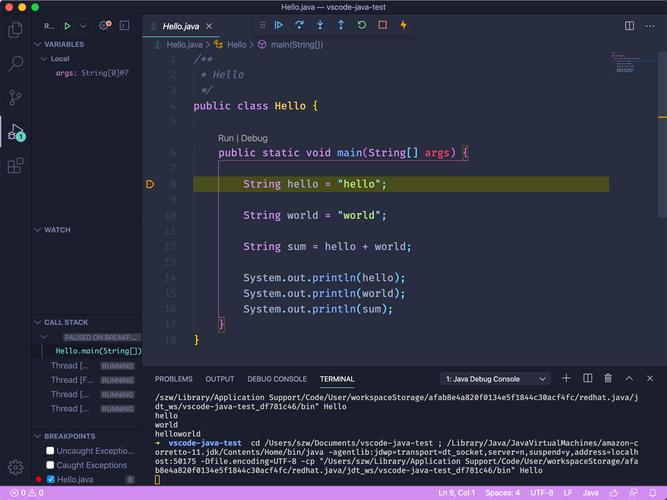
a) Visual Studio Code (VS Code)
VS Code is a hugely popular, free, and open-source editor that is incredibly fast and customizable.
- Java Support: Provided by the Extension Pack for Java by Microsoft. This pack includes extensions for language support, debugging, testing, and running applications.
- GUI Design Support: This is where it gets interesting. There isn't a single, dominant GUI designer plugin for VS Code like there is for IDEs. However, you can:
- Use Scene Builder externally and just open the FXML files in VS Code for editing.
- Use third-party plugins like VJDE (Visual Java Development Environment), but they are generally less mature than the IDE-based tools.
- Pros:
- Extremely fast and lightweight.
- Huge marketplace for extensions.
- Excellent Git integration and terminal.
- Cons:
- The visual GUI design experience is not as integrated or powerful as in IntelliJ or Eclipse.
- It's more of an editor than an IDE, so some project management features are weaker.
- Best for: Developers who prefer a minimal, fast editor and are comfortable using a mix of tools (e.g., VS Code for code + Scene Builder for UI).
Summary and How to Choose
| If you are... | You should choose... | Why? |
|---|---|---|
| A beginner or want the simplest experience | NetBeans | The easiest setup and the most straightforward drag-and-drop designer. |
| A professional developer wanting the best all-in-one tool | IntelliJ IDEA (Community) | The best code intelligence and a great, integrated GUI designer. |
| You work on many different languages or love customization | Eclipse with WindowBuilder | Ultimate flexibility and a powerful, mature GUI design plugin. |
| You are building a modern JavaFX application | IntelliJ/Eclipse + Gluon Scene Builder | This is the standard, professional workflow for separating UI design from logic. |
| You love lightweight editors and modern tooling | Visual Studio Code | A fast, editor-centric approach where you'll use external tools for UI design. |