Java读取.properties文件的方法
在Java中,读取.properties文件有几种常用方法,下面我将介绍最常用的几种方式,包括使用java.util.Properties类和ResourceBundle类。
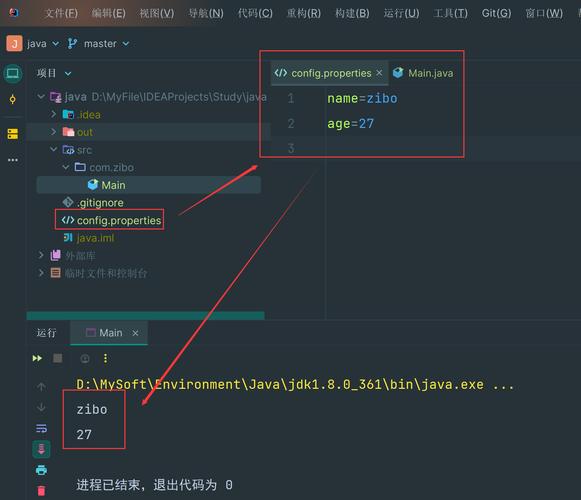
(图片来源网络,侵删)
使用java.util.Properties类
这是最直接和常用的方法,适用于从文件系统或类路径中读取属性文件。
从文件系统读取
import java.io.FileInputStream;
import java.io.IOException;
import java.util.Properties;
public class PropertiesFileReader {
    public static void main(String[] args) {
        Properties prop = new Properties();
        try (FileInputStream fis = new FileInputStream("config.properties")) {
            prop.load(fis);
            // 获取属性值
            String dbUrl = prop.getProperty("db.url");
            String dbUser = prop.getProperty("db.username");
            String dbPassword = prop.getProperty("db.password");
            System.out.println("DB URL: " + dbUrl);
            System.out.println("DB User: " + dbUser);
            System.out.println("DB Password: " + dbPassword);
        } catch (IOException e) {
            e.printStackTrace();
        }
    }
}
从类路径读取(推荐)
import java.io.IOException;
import java.io.InputStream;
import java.util.Properties;
public class ClasspathPropertiesReader {
    public static void main(String[] args) {
        Properties prop = new Properties();
        try (InputStream input = ClasspathPropertiesReader.class.getClassLoader()
                .getResourceAsStream("config.properties")) {
            if (input == null) {
                System.out.println("Sorry, unable to find config.properties");
                return;
            }
            prop.load(input);
            // 获取属性值,可以设置默认值
            String dbUrl = prop.getProperty("db.url", "default.db.url");
            String dbUser = prop.getProperty("db.username");
            String dbPassword = prop.getProperty("db.password");
            System.out.println("DB URL: " + dbUrl);
            System.out.println("DB User: " + dbUser);
            System.out.println("DB Password: " + dbPassword);
        } catch (IOException ex) {
            ex.printStackTrace();
        }
    }
}
使用ResourceBundle类
ResourceBundle是专门用于本地化资源包的类,也常用于读取属性文件。
import java.util.ResourceBundle;
public ResourceBundlePropertiesReader {
    public static void main(String[] args) {
        // 假设config.properties在类路径的根目录下
        // 文件名不包含扩展名
        ResourceBundle rb = ResourceBundle.getBundle("config");
        // 获取属性值
        String dbUrl = rb.getString("db.url");
        String dbUser = rb.getString("db.username");
        String dbPassword = rb.getString("db.password");
        System.out.println("DB URL: " + dbUrl);
        System.out.println("DB User: " + dbUser);
        System.out.println("DB Password: " + dbPassword);
    }
}
使用Spring框架的@Value注解(如果使用Spring)
如果你使用的是Spring框架,可以通过@Value注解直接注入属性值:
import org.springframework.beans.factory.annotation.Value;
import org.springframework.stereotype.Component;
@Component
public class SpringPropertiesReader {
    @Value("${db.url}")
    private String dbUrl;
    @Value("${db.username}")
    private String dbUsername;
    @Value("${db.password}")
    private String dbPassword;
    public void printProperties() {
        System.out.println("DB URL: " + dbUrl);
        System.out.println("DB User: " + dbUsername);
        System.out.println("DB Password: " + dbPassword);
    }
}
最佳实践建议
-
将属性文件放在类路径中:通常放在
src/main/resources目录下,这样打包后会在类路径根目录中。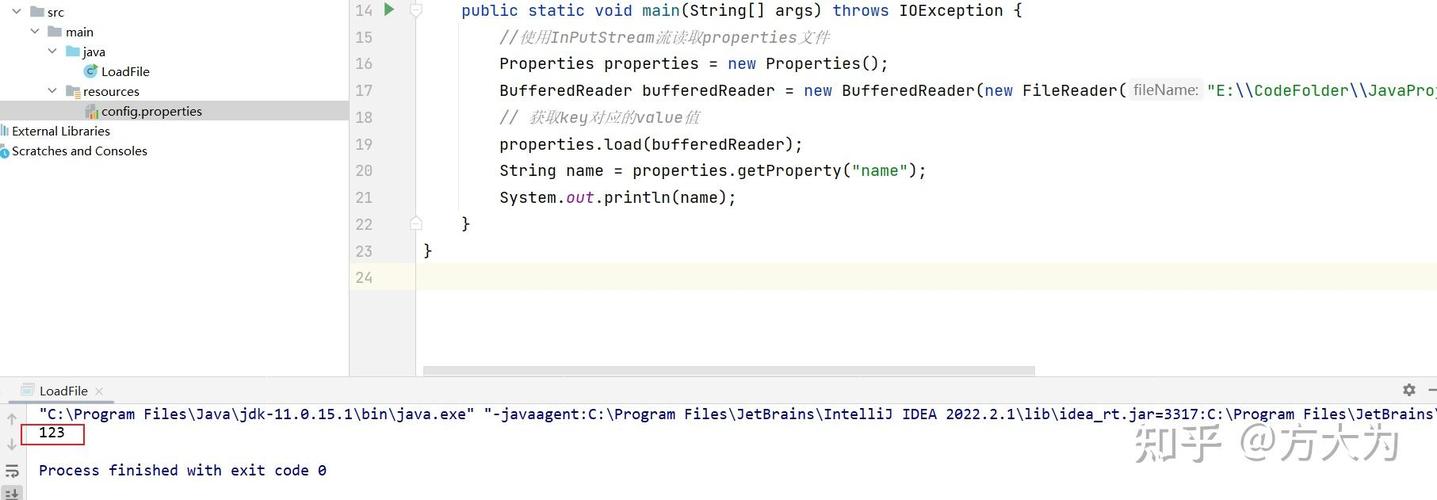 (图片来源网络,侵删)
 -
使用try-with-resources:确保流被正确关闭,避免资源泄漏。
-
处理异常:妥善处理可能出现的
IOException。 -
提供默认值:使用
getProperty(key, defaultValue)方法提供默认值,避免NPE。 -
考虑使用日志框架:如SLF4J记录属性加载过程中的问题。
 (图片来源网络,侵删)
 -
对于大型项目:考虑使用专门的配置管理工具如Apache Commons Configuration或Spring的
@ConfigurationProperties。
希望这些方法能帮助你有效地在Java中读取.properties文件!