Of course! Let's break down continue and break in Java. These are both jump statements that change the normal flow of a program's execution.
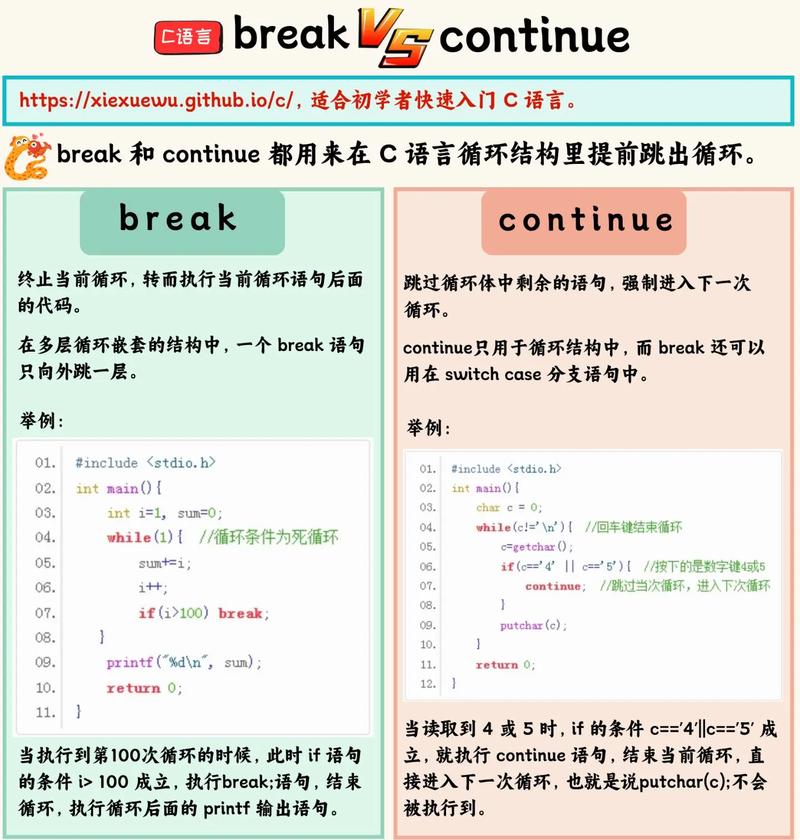
The Big Picture: break vs. continue
Think of them as tools for controlling loops:
break: The "Emergency Exit". It immediately terminates the innermost loop (for,while,do-while) or aswitchstatement. The program jumps to the first line of code after the loop or switch.continue: The "Skip this Round" button. It immediately skips the rest of the current iteration of the loop and jumps to the loop's update statement (forforloops) or the loop's condition check (forwhileanddo-whileloops).
The break Statement
The break statement has two primary uses:
a) Exiting a Loop
When break is used inside a loop, it stops the loop from executing any further iterations.
How it works:
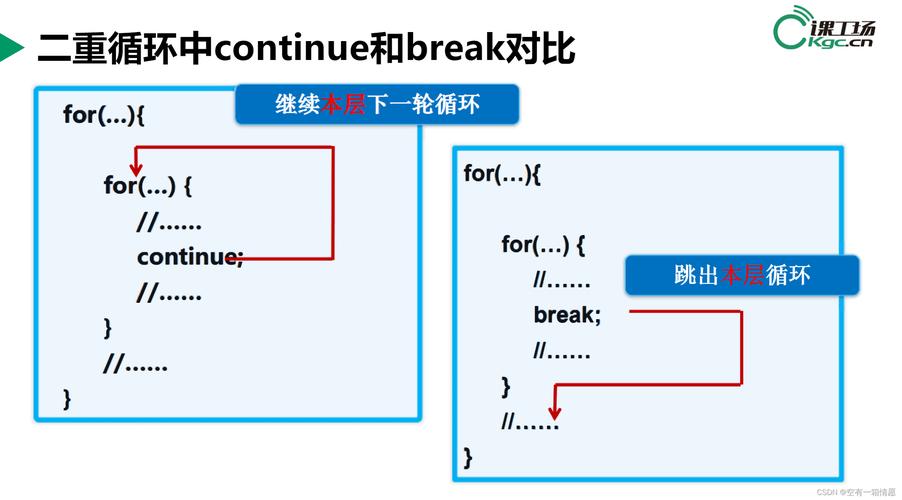
- The
breakstatement is executed. - The loop is terminated immediately.
- Execution continues with the statement immediately following the loop.
Example: Finding a Specific Number
Let's say we want to search for the number 5 in an array and stop searching as soon as we find it.
public class BreakExample {
    public static void main(String[] args) {
        int[] numbers = {1, 4, 5, 7, 9, 2};
        int target = 5;
        boolean found = false;
        System.out.println("Searching for " + target + "...");
        for (int i = 0; i < numbers.length; i++) {
            System.out.println("Checking element at index " + i + ": " + numbers[i]);
            if (numbers[i] == target) {
                found = true;
                break; // Exit the loop immediately
            }
        }
        if (found) {
            System.out.println("Target " + target + " was found!");
        } else {
            System.out.println("Target " + target + " was not found.");
        }
    }
}
Output:
Searching for 5...
Checking element at index 0: 1
Checking element at index 1: 4
Checking element at index 2: 5
Target 5 was found!
Notice how the loop stopped after finding 5 and didn't check 7, 9, or 2.
b) Exiting a switch Statement
This is the other very common use of break. It's essential to prevent "fall-through" in a switch block, where code execution continues from one case label to the next.
Example:
public class SwitchBreakExample {
    public static void main(String[] args) {
        int day = 3;
        String dayName;
        switch (day) {
            case 1:
                dayName = "Monday";
                break; // Exits the switch block
            case 2:
                dayName = "Tuesday";
                break; // Exits the switch block
            case 3:
                dayName = "Wednesday";
                break; // Exits the switch block
            default:
                dayName = "Unknown Day";
                break; // Good practice, even in default
        }
        System.out.println("The day is: " + dayName);
    }
}
Output:
The day is: WednesdayWithout the break; statements, after case 3: was matched, the code would continue executing default: as well, printing "WednesdayUnknown Day".
The continue Statement
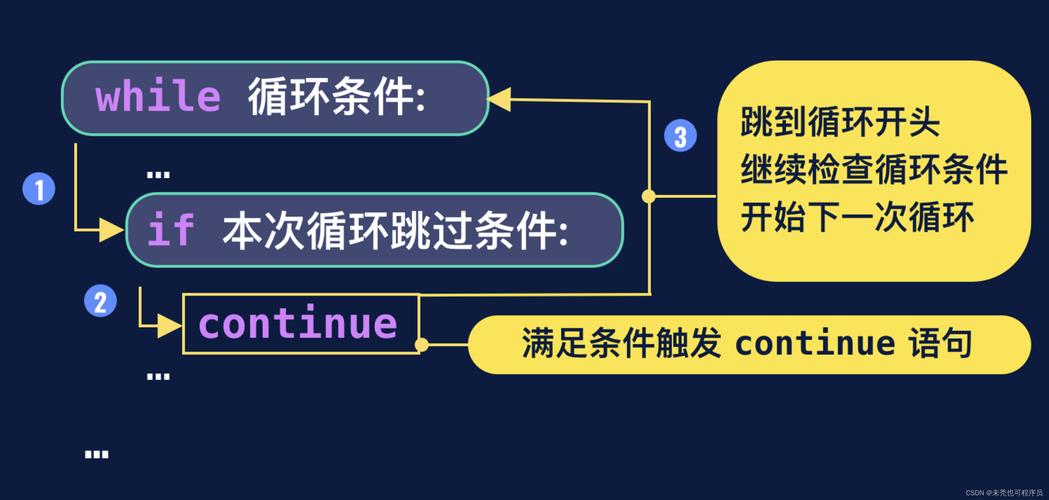
The continue statement is used only inside loops. It doesn't terminate the loop; it just skips the rest of the code for the current iteration.
How it works:
- In a
forloop:continuejumps to the increment/decrement (i++) part and then to the condition check. - In a
whileloop:continuejumps directly to the condition check.
Example: Printing Only Odd Numbers
Let's print numbers from 1 to 10, but skip all the even numbers.
public class ContinueExample {
    public static void main(String[] args) {
        System.out.println("Printing odd numbers from 1 to 10:");
        for (int i = 1; i <= 10; i++) {
            // Check if the number is even
            if (i % 2 == 0) {
                continue; // Skip the rest of this loop iteration
            }
            // This line will only be reached for odd numbers
            System.out.println("Odd Number: " + i);
        }
    }
}
Output:
Printing odd numbers from 1 to 10:
Odd Number: 1
Odd Number: 3
Odd Number: 5
Odd Number: 7
Odd Number: 9
When i is 2, the if condition is true, continue is executed, and the System.out.println line is skipped. The loop then increments i to 3 and continues.
Key Differences & Summary Table
| Feature | break Statement |
continue Statement |
|---|---|---|
| Purpose | Terminates a loop or switch statement. |
Skips the current iteration of a loop. |
| Effect | Exits the loop/switch entirely. | Jumps to the next iteration of the loop. |
| Can be used in | Loops (for, while, do-while) and switch. |
Only Loops (for, while, do-while). |
| Analogy | Emergency Exit. You're done with the whole thing. | Skip this Round. You're taking a break from this one task but will come back for the next. |
| Example Use Case | Stop searching after finding an item. | Process a list of items but skip the ones that are invalid. |
Labeled break and continue (Advanced)
For more complex scenarios, like nested loops, you can use labels to specify which loop to break or continue.
Labeled break: Exits a specific, outer loop.
Labeled continue: Skips to the next iteration of a specific, outer loop.
Example: Labeled break
public class LabeledBreak {
    public static void main(String[] args) {
        outerLoop: // This is a label
        for (int i = 1; i <= 3; i++) {
            for (int j = 1; j <= 3; j++) {
                System.out.println("i: " + i + ", j: " + j);
                if (i == 2 && j == 2) {
                    break outerLoop; // Breaks out of the outerLoop, not just the inner one
                }
            }
        }
        System.out.println("Exited the outer loop.");
    }
}
Output:
i: 1, j: 1
i: 1, j: 2
i: 1, j: 3
i: 2, j: 1
i: 2, j: 2
Exited the outer loop.
Without the label, break; would have only exited the inner j loop. The label outerLoop: allows us to break out of the i loop from within the j loop.
While powerful, labeled break and continue can make code harder to read. It's often better to refactor your code to avoid deep nesting if possible.