Of course! Using Google APIs with Java is a very common task, primarily done through their Client Libraries for Java. This guide will walk you through the core concepts, how to set up a project, and provide a practical example.
The Key Concept: Google API Client Library for Java
The main library you'll use is the Google API Client Library for Java. It's a powerful and flexible framework that allows you to access many different Google services (like Gmail, Google Drive, Google Calendar, etc.) using a common, unified approach.
This library handles the complexities for you:
- Authentication: Securely getting user permission to access their data.
- HTTP Communication: Building and sending requests to Google's servers.
- JSON Parsing: Converting the JSON responses from Google into Java objects (POJOs).
Step 1: Set Up a Google Cloud Project
Before you can write any Java code, you need to register your application with Google.
- Go to the Google Cloud Console: https://console.cloud.google.com/
- Create a New Project: Click the project selector at the top of the page and click "NEW PROJECT". Give it a name (e.g., "Java API Demo") and click "CREATE".
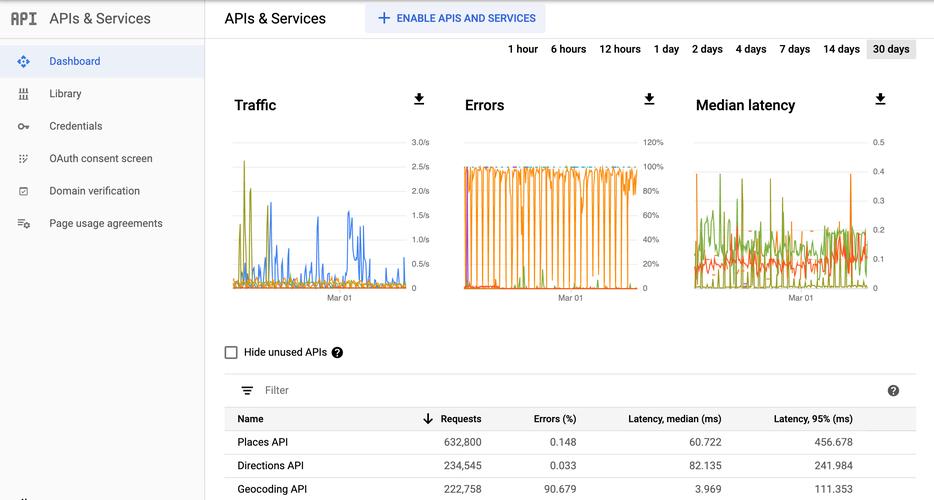
- Enable the API: In the navigation menu (☰), go to "APIs & Services" > "Library". Search for the API you want to use (e.g., "Gmail API", "Drive API", "YouTube Data API") and click on it. Then, click the "ENABLE" button.
- Configure the OAuth Consent Screen: This is crucial for user authentication.
- In the "APIs & Services" menu, go to "OAuth consent screen".
- Choose "External" (for testing with your own Google account) or "Internal".
- Fill in the required app information (App name, User support email, Developer contact information).
- On the "Scopes" page, click "+ ADD OR REMOVE SCOPES". Search for and add the scopes required by the API you enabled. A "scope" defines the level of access the user is granting your app (e.g.,
.../auth/gmail.readonly). - On the "Test users" page, click "+ ADD USERS" and add the Google account you will use for testing.
- Create Credentials: You need credentials to prove your app's identity to Google.
- In the "APIs & Services" menu, go to "Credentials".
- Click "+ CREATE CREDENTIALS" and choose "OAuth client ID".
- For "Application type", select "Desktop app".
- Give it a name (e.g., "Java Desktop Client") and click "CREATE".
- A pop-up will appear. Click the "DOWNLOAD JSON" button. Rename this file to
credentials.jsonand save it in the root directory of your Java project. This file is sensitive—do not commit it to a public Git repository!
Step 2: Set Up Your Java Project (Maven)
The easiest way to manage dependencies is with a build tool like Maven or Gradle. Here's how to set it up with Maven.
- Create a new Maven project in your favorite IDE (IntelliJ, Eclipse, VS Code).
- Add Dependencies: Open your
pom.xmlfile and add the necessary dependencies.
Core Dependencies
You'll always need the core client library and the JSON library for data parsing.
<dependencies>
    <!-- Google API Client Library for Java -->
    <dependency>
        <groupId>com.google.api-client</groupId>
        <artifactId>google-api-client</artifactId>
        <version>2.6.0</version> <!-- Use the latest version -->
    </dependency>
    <!-- Google OAuth Client Library for Java -->
    <dependency>
        <groupId>com.google.oauth-client</groupId>
        <artifactId>google-oauth-client-jetty</artifactId>
        <version>1.34.1</version> <!-- Use the latest version -->
    </dependency>
    <!-- Google API Services Library for the specific API you want to use -->
    <!-- Example for Gmail API -->
    <dependency>
        <groupId>com.google.apis</groupId>
        <artifactId>google-api-services-gmail</artifactId>
        <version>v1-rev20250315-2.0.0</version> <!-- Use the latest version -->
    </dependency>
    <!-- Google HTTP Client Library for JSON -->
    <dependency>
        <groupId>com.google.http-client</groupId>
        <artifactId>google-http-client-jackson2</artifactId>
        <version>1.44.1</version> <!-- Use the latest version -->
    </dependency>
</dependencies>
Note: The version for the specific API service (like google-api-services-gmail) is important. You can find the latest version on the Maven Central Repository.
Step 3: Write the Java Code (Example: Listing Gmail Labels)
This example demonstrates how to use the Gmail API to list all labels in a user's Gmail inbox. It uses the Authorization Code Flow, which is the standard for web and desktop apps.
import com.google.api.client.auth.oauth2.Credential;
import com.google.api.client.extensions.java6.auth.oauth2.AuthorizationCodeInstalledApp;
import com.google.api.client.extensions.jetty.auth.oauth2.LocalServerReceiver;
import com.google.api.client.googleapis.auth.oauth2.GoogleAuthorizationCodeFlow;
import com.google.api.client.googleapis.auth.oauth2.GoogleClientSecrets;
import com.google.api.client.googleapis.javanet.GoogleNetHttpTransport;
import com.google.api.client.http.javanet.NetHttpTransport;
import com.google.api.client.json.JsonFactory;
import com.google.api.client.json.jackson2.JacksonFactory;
import com.google.api.client.util.store.FileDataStoreFactory;
import com.google.api.services.gmail.Gmail;
import com.google.api.services.gmail.GmailScopes;
import com.google.api.services.gmail.model.ListLabelsResponse;
import com.google.api.services.gmail.model.Label;
import java.io.IOException;
import java.io.InputStream;
import java.io.InputStreamReader;
import java.security.GeneralSecurityException;
import java.util.Collections;
import java.util.List;
public class GmailApiExample {
    // Global instance of the JSON factory.
    private static final JsonFactory JSON_FACTORY = JacksonFactory.getDefaultInstance();
    // Path to the credentials file.
    private static final String CREDENTIALS_FILE_PATH = "/credentials.json";
    // Directory to store user credentials.
    private static final String TOKENS_DIRECTORY_PATH = "tokens";
    /**
     * Global instance of the scopes required by this quickstart.
     * If modifying these scopes, delete your previously saved tokens/ folder.
     */
    private static final List<String> SCOPES = Collections.singletonList(GmailScopes.GMAIL_LABELS);
    private static final String APPLICATION_NAME = "Gmail API Java Quickstart";
    /**
     * Creates an authorized Credential object.
     * @param HTTP_TRANSPORT The network HTTP Transport.
     * @return An authorized Credential object.
     * @throws IOException If the credentials.json file cannot be found.
     */
    private static Credential getCredentials(final NetHttpTransport HTTP_TRANSPORT) throws IOException {
        // Load client secrets.
        InputStream in = GmailApiExample.class.getResourceAsStream(CREDENTIALS_FILE_PATH);
        if (in == null) {
            throw new IOException("Resource not found: " + CREDENTIALS_FILE_PATH);
        }
        GoogleClientSecrets clientSecrets = GoogleClientSecrets.load(JSON_FACTORY, new InputStreamReader(in));
        // Build flow and trigger user authorization request.
        GoogleAuthorizationCodeFlow flow = new GoogleAuthorizationCodeFlow.Builder(
                HTTP_TRANSPORT, JSON_FACTORY, clientSecrets, SCOPES)
                .setDataStoreFactory(new FileDataStoreFactory(new java.io.File(TOKENS_DIRECTORY_PATH)))
                .setAccessType("offline")
                .build();
        LocalServerReceiver receiver = new LocalServerReceiver.Builder().setPort(8888).build();
        return new AuthorizationCodeInstalledApp(flow, receiver).authorize("user");
    }
    public static void main(String[] args) throws IOException, GeneralSecurityException {
        // Build a new authorized API client service.
        final NetHttpTransport HTTP_TRANSPORT = GoogleNetHttpTransport.newTrustedTransport();
        Gmail service = new Gmail.Builder(HTTP_TRANSPORT, JSON_FACTORY, getCredentials(HTTP_TRANSPORT))
                .setApplicationName(APPLICATION_NAME)
                .build();
        // Print the labels in the user's account.
        String user = "me"; // The special value 'me' refers to the authenticated user
        ListLabelsResponse listResponse = service.users().labels().list(user).execute();
        List<Label> labels = listResponse.getLabels();
        if (labels.isEmpty()) {
            System.out.println("No labels found.");
        } else {
            System.out.println("Labels:");
            for (Label label : labels) {
                System.out.printf("- %s\n", label.getName());
            }
        }
    }
}
How to Run the Example:
- Place
credentials.json: Make sure you have your downloadedcredentials.jsonfile in thesrc/main/resourcesdirectory of your Maven project. The code usesgetResourceAsStreamto find it there. - Run the Main Method: Execute the
mainmethod in your IDE. 3