Of course! In Java, the String class is a fundamental and widely used part of the language. It's not just a simple array of characters; it's a full-featured object.
Here’s a comprehensive guide covering everything from the basics to more advanced topics.
What is a String in Java?
A String in Java is an immutable sequence of characters. "Immutable" means that once a String object is created, its content cannot be changed.
- Immutability is Key: This is the most important concept to understand. When you perform an operation that looks like it modifies a string (like converting it to uppercase), you are actually creating a new
Stringobject. The original string remains unchanged.
Creating a String
There are two primary ways to create a string: using the new keyword and using string literals.
a) Using String Literals (Recommended)
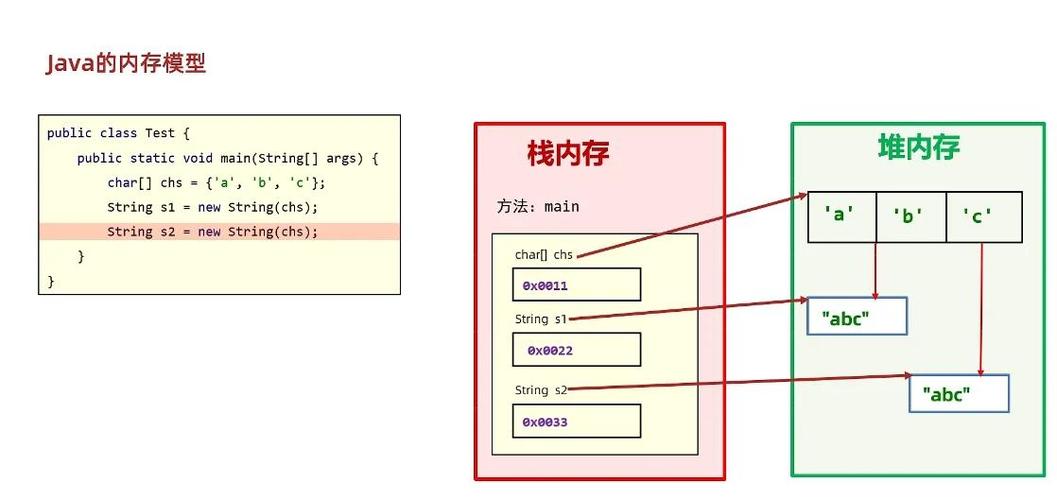
This is the most common and efficient way. Java optimizes string literals by storing them in a special memory area called the String Constant Pool (SCP).
// Using a string literal
String greeting = "Hello, World!";
When you create a string this way, Java first checks the SCP. If the string already exists, it reuses the reference. If not, it creates a new one in the SCP.
b) Using the new Keyword
This explicitly creates a new String object in the heap memory, regardless of whether an identical string already exists in the pool.
// Using the 'new' keyword
String anotherGreeting = new String("Hello, World!");
Example of Immutability:
String original = "Java";
System.out.println("Original: " + original); // Output: Original: Java
// toUpperCase() does not change the original string.
// It returns a new string.
String modified = original.toUpperCase();
System.out.println("Original after modification: " + original); // Output: Original after modification: Java
System.out.println("New modified string: " + modified);         // Output: New modified string: JAVA
Common String Methods
The String class has a rich set of methods for manipulation.
| Method | Description | Example |
|---|---|---|
length() |
Returns the length of the string. | "Java".length() returns 4. |
charAt(int index) |
Returns the character at the specified index. | "Java".charAt(0) returns 'J'. |
substring(int beginIndex) |
Returns a substring from the specified index to the end. | "Java".substring(1) returns "ava". |
substring(int begin, int end) |
Returns a substring from beginIndex to endIndex (exclusive). |
"Java".substring(1, 3) returns "av". |
toUpperCase() / toLowerCase() |
Returns a new string with all letters converted to upper/lower case. | "Java".toUpperCase() returns "JAVA". |
trim() |
Returns a new string with leading and trailing whitespace removed. | " Java ".trim() returns "Java". |
replace(char old, char new) |
Returns a new string with all occurrences of old replaced with new. |
"Java".replace('a', 'o') returns "Jovo". |
contains(CharSequence s) |
Checks if the string contains the specified sequence of characters. | "Java".contains("av") returns true. |
startsWith(String prefix) / endsWith(String suffix) |
Checks if the string starts/ends with the specified prefix/suffix. | "Java".startsWith("Jav") returns true. |
equals(Object anObject) |
Compares the content of two strings for equality (case-sensitive). | "Java".equals("java") returns false. |
equalsIgnoreCase(String anotherString) |
Compares two strings for equality, ignoring case differences. | "Java".equalsIgnoreCase("java") returns true. |
compareTo(String anotherString) |
Compares two strings lexicographically. Returns 0 if equal, a negative value if less, and a positive value if greater. | "apple".compareTo("banana") returns a negative value. |
split(String regex) |
Splits the string around matches of the given regular expression. | "a,b,c".split(",") returns ["a", "b", "c"]. |
String vs. StringBuilder vs. StringBuffer
Because String is immutable, it's inefficient for situations where you need to modify a string repeatedly (e.g., in a loop). For that, Java provides StringBuilder and StringBuffer.
| Feature | String |
StringBuilder |
StringBuffer |
|---|---|---|---|
| Mutability | Immutable | Mutable | Mutable |
| Performance | Slower for modifications (creates new objects). | Faster. Not synchronized. | Slower than StringBuilder. Synchronized. |
| Thread Safety | Thread-safe (immutable objects are always thread-safe). | Not thread-safe. | Thread-safe. |
| When to Use | When the string content does not change. | For general-purpose string building in single-threaded environments. | When you need to build strings in a multi-threaded environment. |
Example: StringBuilder in Action
// Using a loop to build a string is inefficient with String literals.
// String result = "";
// for (int i = 1; i <= 5; i++) {
//     result = result + i; // Creates a new String object in each iteration!
// }
// Efficient way using StringBuilder
StringBuilder efficientBuilder = new StringBuilder();
for (int i = 1; i <= 5; i++) {
    efficientBuilder.append(i); // Modifies the same object
}
String result = efficientBuilder.toString();
System.out.println(result); // Output: 12345
Important: String Pool and intern()
The String Pool is a special memory area in the heap that stores unique string literals. This helps to save memory.
// Both 's1' and 's2' point to the same object in the String Pool.
String s1 = "hello";
String s2 = "hello";
System.out.println(s1 == s2); // Output: true (they have the same memory address)
If you create a string with new, it's not automatically added to the pool.
String s3 = new String("hello");
System.out.println(s1 == s3); // Output: false (s1 is in the pool, s3 is in the heap)
You can manually add a string to the pool using the intern() method.
String s4 = new String("hello").intern();
System.out.println(s1 == s4); // Output: true (s4 is now a reference to the pooled "hello")
Best Practices
- Use Literals for Constant Strings: Always use for strings that won't change. It's cleaner and more memory-efficient.
- Prefer
StringBuilderfor Dynamic Strings: If you are concatenating strings in a loop or building a string dynamically, useStringBuilder(orStringBufferif thread safety is required). - Use
equals()for Content Comparison: To check if two strings have the same content, always use.equals(). Using checks for object identity (i.e., if they are the exact same object in memory), which is usually not what you want.String a = new String("test"); String b = new String("test"); System.out.println(a == b); // false System.out.println(a.equals(b)); // true - Use
equalsIgnoreCase()for Case-Insensitive Comparison: When you need to compare strings without worrying about case.