Of course! Let's dive deep into Python's DataFrame. It's one of the most fundamental and powerful tools for data analysis, and it's at the heart of the Pandas library.
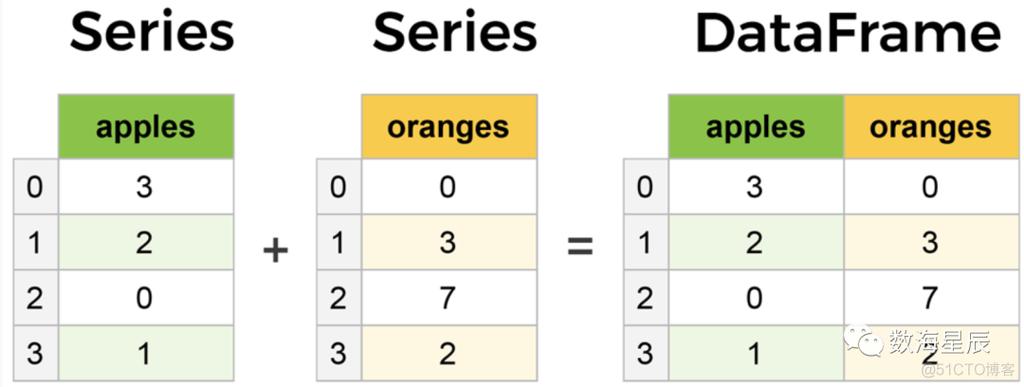
What is a DataFrame?
Think of a DataFrame as a spreadsheet or a SQL table in Python. It's a two-dimensional, labeled data structure with columns of potentially different types.
You can visualize it like this:
| Name | Age | City | Country |
|---|---|---|---|
| Alice | 24 | New York | USA |
| Bob | 27 | London | UK |
| Charlie | 22 | Paris | France |
Key features of a DataFrame:
- 2D Structure: It has rows and columns.
- Labeled Axes: Both rows and columns have labels (an index for rows, and column names).
- Heterogeneous Data: Columns can contain different data types (e.g., integers, floats, strings, dates).
- Size-Mutable: You can add or remove columns and rows.
- Rich in Functionality: It comes with a massive set of built-in functions for data manipulation, filtering, grouping, and analysis.
Getting Started: Installation and Import
First, you need to have the Pandas library installed. If you don't, open your terminal or command prompt and run:
pip install pandas
Now, in your Python script or Jupyter Notebook, you can import it. The standard convention is to import it with the alias pd.
import pandas as pd
import numpy as np # Often used alongside Pandas
Creating a DataFrame
You can create a DataFrame in several ways. The most common is from a dictionary.
From a Dictionary of Lists
Each key in the dictionary becomes a column name, and the corresponding list becomes the column's data.
data = {
    'Name': ['Alice', 'Bob', 'Charlie', 'David'],
    'Age': [24, 27, 22, 32],
    'City': ['New York', 'London', 'Paris', 'Tokyo'],
    'Country': ['USA', 'UK', 'France', 'Japan']
}
df = pd.DataFrame(data)
print(df)
Output:
      Name  Age     City Country
0    Alice   24  New York     USA
1      Bob   27   London      UK
2  Charlie   22    Paris  France
3    David   32     Tokyo   Japan
From a List of Dictionaries
This is useful when your data is structured as a collection of records.
data_list = [
    {'Name': 'Alice', 'Age': 24, 'City': 'New York'},
    {'Name': 'Bob', 'Age': 27, 'City': 'London'},
    {'Name': 'Charlie', 'Age': 22, 'City': 'Paris'}
]
df_from_list = pd.DataFrame(data_list)
print(df_from_list)
From a CSV File (Most Common in Practice)
This is how you'll usually load data. Pandas makes it incredibly easy.
# Assume you have a file 'data.csv' with the same data
# df = pd.read_csv('data.csv')
Exploring and Inspecting a DataFrame
Once you have a DataFrame, the first thing you want to do is understand its contents.
# View the first 5 rows (default)
print(df.head())
# View the last 3 rows
print(df.tail(3))
# Get a concise summary of the DataFrame
# Shows column names, non-null counts, and data types
print(df.info())
# Get descriptive statistics for numerical columns
print(df.describe())
# Get the dimensions (rows, columns) of the DataFrame
print(df.shape) # Output: (4, 4)
# Get the column names
print(df.columns)
# Get the row index labels
print(df.index)
Selecting Data (Indexing and Slicing)
This is a core operation. Pandas offers several ways to select data.
Selecting a Single Column
This returns a Pandas Series (a 1D labeled array).
ages = df['Age']
print(ages)
print(type(ages)) # <class 'pandas.core.series.Series'>
Selecting Multiple Columns
Pass a list of column names. This returns a new DataFrame.
subset = df[['Name', 'City']]
print(subset)
Selecting Rows by Label (.loc)
.loc is label-based indexing. You use it to select data using row and column labels.
# Select the row with index label 1
print(df.loc[1])
# Select a specific cell: row '1', column 'City'
print(df.loc[1, 'City'])
# Select a slice of rows and columns
print(df.loc[0:2, ['Name', 'City']])
Note: The slice 0:2 with .loc is inclusive of the stop index (2).
Selecting Rows by Integer Position (.iloc)
.iloc is position-based indexing. It works like standard Python list indexing (0-based, and the stop index is exclusive).
# Select the row at integer position 1
print(df.iloc[1])
# Select a specific cell by position: row 1, column 2
print(df.iloc[1, 2])
# Select a slice of rows and columns by position
print(df.iloc[0:2, 0:2])
Note: The slice 0:2 with .iloc is exclusive of the stop index (it gets rows 0 and 1).
Filtering Data (Boolean Indexing)
This is how you select rows based on a condition. It's one of the most powerful features.
# Get all people older than 25
older_than_25 = df[df['Age'] > 25]
print(older_than_25)
# Combine multiple conditions using & (and) or | (or)
# IMPORTANT: Use parentheses () around each condition!
adults_in_london = df[(df['Age'] >= 25) & (df['City'] == 'London')]
print(adults_in_london)
Adding and Modifying Columns
It's very easy to add new columns or modify existing ones.
# Add a new column based on an existing one
df['Age_in_5_Years'] = df['Age'] + 5
# Add a new column with a constant value
df['Status'] = 'Active'
# Modify a column using a function (e.g., make city names uppercase)
df['City'] = df['City'].str.upper()
print(df)
Handling Missing Data
In real-world data, you'll often encounter missing values, represented as NaN (Not a Number).
# Create a DataFrame with missing values
data_with_nan = {'A': [1, 2, np.nan], 'B': [5, np.nan, np.nan], 'C': [1, 2, 3]}
df_nan = pd.DataFrame(data_with_nan)
# Check for missing values
print(df_nan.isnull())
# Drop rows with any missing values
df_dropped = df_nan.dropna()
print("\nDropped rows with NaN:")
print(df_dropped)
# Fill missing values with a specific number (e.g., 0)
df_filled = df_nan.fillna(0)
print("\nFilled NaN with 0:")
print(df_filled)
# Fill missing values with the mean of the column
df_filled_mean = df_nan.fillna(df_nan.mean())
print("\nFilled NaN with column mean:")
print(df_filled_mean)
Grouping and Aggregating Data (.groupby)
This is equivalent to SQL's GROUP BY. It allows you to split your data into groups based on some criteria, apply a function to each group, and then combine the results.
Let's add a 'Department' column to our original DataFrame to demonstrate.
df['Department'] = ['HR', 'Engineering', 'Engineering', 'Marketing']
# Group by 'Department' and calculate the mean age for each department
avg_age_by_dept = df.groupby('Department')['Age'].mean()
print("\nAverage age by department:")
print(avg_age_by_dept)
# You can also use the .agg() method for multiple aggregations
dept_stats = df.groupby('Department').agg(
    Avg_Age=('Age', 'mean'),
    Max_Age=('Age', 'max'),
    Employee_Count=('Name', 'count')
)
print("\nDepartment statistics:")
print(dept_stats)
Combining DataFrames
You can combine DataFrames using concat (for stacking) or merge (for joining, like SQL).
pd.concat() - Stacking
df1 = pd.DataFrame({'A': ['A0', 'A1'], 'B': ['B0', 'B1']})
df2 = pd.DataFrame({'A': ['A2', 'A3'], 'B': ['B2', 'B3']})
# Concatenate along rows (axis=0)
concatenated_rows = pd.concat([df1, df2])
print(concatenated_rows)
# Concatenate along columns (axis=1)
df3 = pd.DataFrame({'C': ['C0', 'C1'], 'D': ['D0', 'D1']})
concatenated_cols = pd.concat([df1, df3], axis=1)
print(concatenated_cols)
pd.merge() - Joining
This is for combining DataFrames based on a common key or keys.
# Left DataFrame
left_df = pd.DataFrame({'key': ['K0', 'K1', 'K2'],
                        'A': ['A0', 'A1', 'A2']})
# Right DataFrame
right_df = pd.DataFrame({'key': ['K0', 'K1', 'K3'],
                         'B': ['B0', 'B1', 'B3']})
# Inner join (only keeps keys that exist in BOTH DataFrames)
inner_merged = pd.merge(left_df, right_df, on='key', how='inner')
print("\nInner Merge:")
print(inner_merged)
# Left join (keeps all keys from the LEFT DataFrame)
left_merged = pd.merge(left_df, right_df, on='key', how='left')
print("\nLeft Merge:")
print(left_merged)
Summary of Key Concepts
| Concept | Common Method(s) | Description |
|---|---|---|
| Creation | pd.DataFrame(), pd.read_csv() |
Create from dictionaries, lists, or load from files. |
| Inspection | .head(), .tail(), .info(), .describe() |
Understand the data's structure and content. |
| Selection | df['col'], df[['col1', 'col2']], .loc, .iloc |
Select columns and rows. |
| Filtering | df[df['col'] > value] |
Select rows based on conditions. |
| Modification | df['new_col'] = ... |
Add or change columns. |
| Missing Data | .isnull(), .dropna(), .fillna() |
Handle NaN values. |
| Grouping | .groupby().agg() |
Split data into groups and apply aggregate functions. |
| Combining | pd.concat(), pd.merge() |
Join or stack DataFrames together. |
This covers the absolute essentials of working with Pandas DataFrames. Mastering these operations will allow you to perform a vast range of data analysis tasks efficiently.