Of course! Let's dive deep into abstract classes in Java, from the basic concept to practical examples and best practices.
What is an Abstract Class?
An abstract class in Java is a class that is declared with the abstract keyword. It's designed to be a blueprint for other classes. You cannot create an instance (an object) of an abstract class directly.
Think of it like a "Vehicle" class. You wouldn't just create a "Vehicle" object; you'd create a "Car", "Motorcycle", or "Truck" object. The "Vehicle" class defines common properties and behaviors that all vehicles share, but it's too general to exist on its own.
Key Characteristics of an Abstract Class
Here are the core features that define an abstract class:
a) Cannot be Instantiated
This is the most fundamental rule. You cannot use the new keyword to create an object of an abstract class.
abstract class Animal {
    // ...
}
// This will cause a COMPILE ERROR!
// Animal myAnimal = new Animal();
b) Can Have Abstract and Concrete Methods
This is the heart of its power.
-
Abstract Method: A method declared with the
abstractkeyword. It has no implementation (no body). It's just a signature that promises any non-abstract subclass must provide an implementation for it.- Syntax:
public abstract void makeSound(); - It cannot be
privateorfinal.
- Syntax:
-
Concrete Method: A regular method with a full implementation. An abstract class can have these to provide common functionality that all its subclasses can inherit and use.
c) Can Have Constructors
Even though you can't create an instance of an abstract class, it can have a constructor. This constructor is called when a subclass is instantiated, using the super() keyword. It's used to initialize the fields of the abstract class.
d) Can Have Instance and Static Variables
An abstract class can have both instance variables (non-static) and static variables, just like a regular class.
e) Can Have Final Methods
You can declare a method in an abstract class as final. This means the subclass cannot override that method. This is useful for providing a core, unchangeable piece of functionality.
Syntax and Example
Let's build a classic example: a Shape hierarchy.
Step 1: Create the Abstract Class Shape
This class defines what it means to be a "Shape" in general. It has a common property (color) and a common behavior (calculateArea), but it leaves the specific details of drawing the shape to its subclasses.
// File: Shape.java
public abstract class Shape {
    // 1. Instance variable (common to all shapes)
    protected String color;
    // 2. Constructor (used by subclasses)
    public Shape(String color) {
        this.color = color;
    }
    // 3. Abstract method (no implementation)
    // Every shape must be able to draw itself, but how it's drawn is specific.
    public abstract void draw();
    // 4. Concrete method (has implementation)
    // All shapes can calculate their area, but the formula is different.
    // So, we provide a default implementation that subclasses can override.
    public double calculateArea() {
        System.out.println("Calculating area using a generic formula...");
        return 0.0; // Default, not very useful, but shows it's possible.
    }
    // 5. Concrete final method (cannot be overridden)
    // The color of the shape is set once and cannot be changed by subclasses.
    public final String getColor() {
        return this.color;
    }
}
Step 2: Create Subclasses that Extend the Abstract Class
Now, we create concrete classes like Circle and Rectangle. They must provide an implementation for the draw() method.
// File: Circle.java
public class Circle extends Shape {
    private double radius;
    // The Circle constructor calls the superclass (Shape) constructor
    public Circle(String color, double radius) {
        super(color); // Calls Shape's constructor
        this.radius = radius;
    }
    // MUST implement the abstract method from Shape
    @Override
    public void draw() {
        System.out.println("Drawing a " + color + " circle with radius " + radius);
    }
    // CAN override the concrete method from Shape
    @Override
    public double calculateArea() {
        return Math.PI * radius * radius;
    }
}
// File: Rectangle.java
public class Rectangle extends Shape {
    private double width;
    private double height;
    public Rectangle(String color, double width, double height) {
        super(color);
        this.width = width;
        this.height = height;
    }
    // MUST implement the abstract method from Shape
    @Override
    public void draw() {
        System.out.println("Drawing a " + color + " rectangle with width " + width + " and height " + height);
    }
    // CAN override the concrete method from Shape
    @Override
    public double calculateArea() {
        return width * height;
    }
}
Step 3: Putting It All Together in a Main Class
// File: Main.java
public class Main {
    public static void main(String[] args) {
        // We can create objects of the concrete subclasses
        Shape circle = new Circle("Red", 5.0);
        Shape rectangle = new Rectangle("Blue", 4.0, 6.0);
        // We can treat them as Shape objects (polymorphism)
        displayShapeDetails(circle);
        System.out.println("--------------------");
        displayShapeDetails(rectangle);
    }
    public static void displayShapeDetails(Shape shape) {
        shape.draw(); // Calls the specific draw() method based on the object's type (Circle or Rectangle)
        double area = shape.calculateArea(); // Calls the overridden calculateArea()
        System.out.println("Area: " + area);
        String color = shape.getColor(); // Calls the final method from Shape
        System.out.println("Color: " + color);
    }
}
Output of the Example:
Drawing a Red circle with radius 5.0
Area: 78.53981633974483
Color: Red
--------------------
Drawing a Blue rectangle with width 4.0 and height 6.0
Area: 24.0
Color: Blue
Abstract Class vs. Interface
This is a very common point of confusion. Here’s a comparison to clarify when to use which.
| Feature | Abstract Class | Interface |
|---|---|---|
| Purpose | To provide a base class with shared code and state. Defines an "is-a" relationship (e.g., a Circle is a Shape). |
To define a contract of behavior. Defines a "can-do" relationship (e.g., a Bird can Fly). |
| Methods | Can have abstract and concrete methods. | Can have abstract, default, and static methods. All methods are public and abstract by default (before Java 8). |
| Variables | Can have any type of instance variables (private, protected, public). | Can only have public static final constants (implicitly). |
| Constructor | Can have a constructor. | Cannot have a constructor. |
| Inheritance | A class can extend only one abstract class (single inheritance). | A class can implement multiple interfaces (multiple inheritance of type). |
default Methods |
No default methods. |
Can have default methods with an implementation (since Java 8). |
static Methods |
Can have static methods. |
Can have static methods. |
When to Use an Abstract Class?
- You want to share code among several closely related classes. If multiple subclasses need the same method implementation, put it in the abstract class.
- You need to declare non-static or non-final fields. If your base class needs to hold state (like
colorin ourShapeexample), an abstract class is the right choice. - You want to define a common base class with a partial implementation. The abstract class provides some core functionality but leaves other parts for subclasses to complete.
When to Use an Interface?
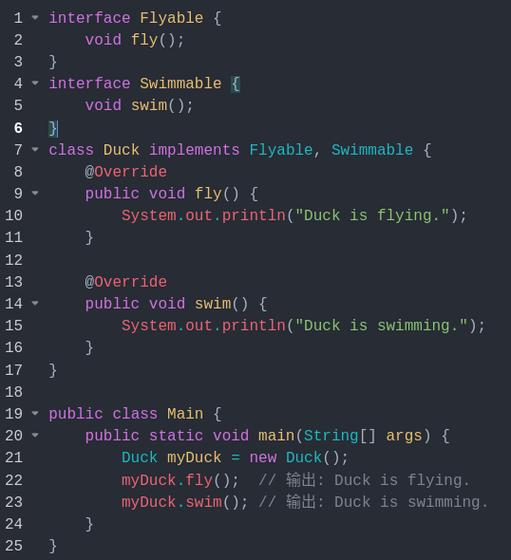
- You want to define a capability or contract that unrelated classes can share. For example, both a
Duckand anAirplanecan implement aFlyableinterface, even though they are completely unrelated otherwise. - You need to specify a behavior that a class must have, without providing any default implementation.
- You need to take advantage of multiple inheritance of type. A class can implement many interfaces but can only extend one class.
Summary
| Abstract Class | Interface | |
|---|---|---|
| Instantiation | No | No |
| Methods | Abstract & Concrete | Abstract, Default, Static |
| Fields | Any type | Only public static final |
| Inheritance | extends ( |