
unittest 是 Python 标准库中自带的一个单元测试框架,它深受 Java 的 JUnit 影响,它为编写和运行测试提供了一整套结构化的工具,使得测试代码更加规范、可维护和可扩展。
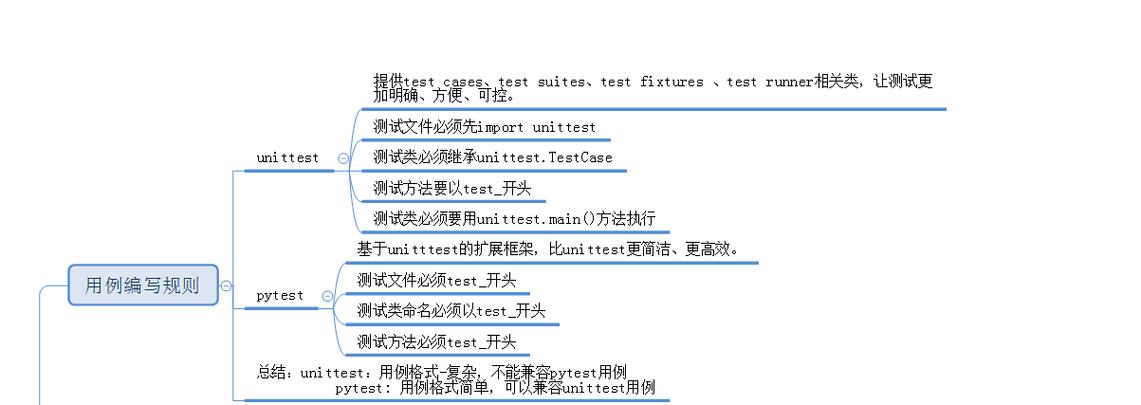
核心概念:测试的“三板斧”
理解 unittest 的关键在于掌握其核心的三个部分,我们可以称之为“测试的三板斧”:
-
TestCase(测试用例):这是测试的最小单位,一个TestCase类代表一个或多个相关测试的组合,它通常包含:- 测试方法:以
test_开头的方法,test_addition、test_login。unittest的测试运行器会自动发现并执行这些方法。 setUp()方法:在每个测试方法执行之前运行,用于准备测试环境,比如创建对象、初始化变量、连接数据库等。tearDown()方法:在每个测试方法执行之后运行,用于清理测试环境,比如关闭文件、断开数据库连接、删除临时文件等。
- 测试方法:以
-
TestSuite(测试套件):当你有多个TestCase时,TestSuite用于将它们组合在一起,形成一个更大的测试集合,你可以把TestSuite想象成一个“测试容器”,可以包含单个测试用例、多个测试用例,甚至是其他的测试套件。 -
TestRunner(测试运行器):负责执行TestSuite或TestCase中的测试,并输出测试结果。unittest提供了多种运行器: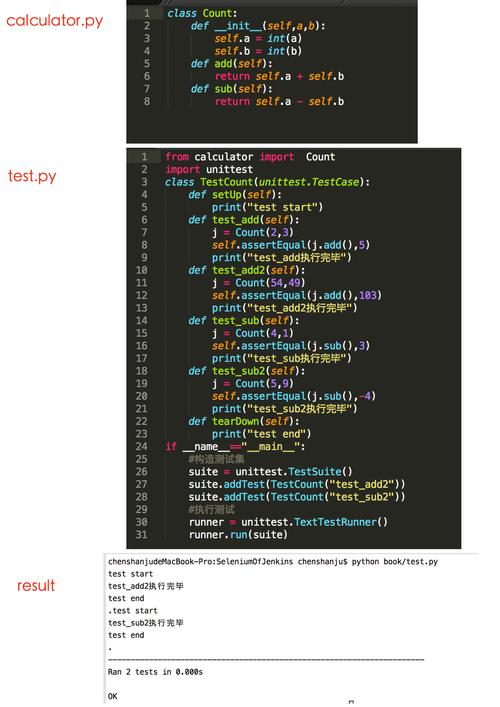 (图片来源网络,侵删)
- TextTestRunner:最常用的运行器,在命令行中以文本形式输出结果(
OK,FAIL,ERROR)。 - HTMLTestRunner:第三方库,可以生成美观的 HTML 格式测试报告。
unittest.main():这是一个便捷的入口函数,它会自动发现当前文件中的所有TestCase,将它们打包成一个TestSuite,并用TextTestRunner来运行。
- TextTestRunner:最常用的运行器,在命令行中以文本形式输出结果(
一个简单的完整示例
让我们通过一个具体的例子来感受一下 unittest 的结构。
假设我们有一个简单的 calculator.py 文件,我们要测试它的功能。
calculator.py (待测试的代码)
class Calculator:
    def add(self, a, b):
        return a + b
    def subtract(self, a, b):
        return a - b
    def multiply(self, a, b):
        return a * b
    def divide(self, a, b):
        if b == 0:
            raise ValueError("Cannot divide by zero")
        return a / b
test_calculator.py (测试代码)
import unittest
from calculator import Calculator # 导入要测试的类
class TestCalculator(unittest.TestCase):
    """测试 Calculator 类"""
    def setUp(self):
        """在每个测试方法前执行"""
        print("\nSetting up a new Calculator instance...")
        self.calc = Calculator()
    def tearDown(self):
        """在每个测试方法后执行"""
        print("Tearing down the Calculator instance.")
    def test_add(self):
        """测试加法功能"""
        self.assertEqual(self.calc.add(1, 2), 3)
        self.assertEqual(self.calc.add(-1, 5), 4)
        self.assertEqual(self.calc.add(0, 0), 0)
        print("test_add passed.")
    def test_subtract(self):
        """测试减法功能"""
        self.assertEqual(self.calc.subtract(5, 3), 2)
        self.assertEqual(self.calc.subtract(2, 5), -3)
        print("test_subtract passed.")
    def test_divide(self):
        """测试除法功能"""
        self.assertEqual(self.calc.divide(10, 2), 5)
        # 测试除以零的情况
        with self.assertRaises(ValueError):
            self.calc.divide(10, 0)
        print("test_divide passed.")
if __name__ == '__main__':
    # 这行代码会自动发现所有以 test_ 开头的方法并执行它们
    unittest.main()
如何运行测试?
在终端中,进入 test_calculator.py 所在的目录,然后运行:
python test_calculator.py
预期输出:
Setting up a new Calculator instance...
test_add passed.
Tearing down the Calculator instance.
Setting up a new Calculator instance...
test_subtract passed.
Tearing down the Calculator instance.
Setting up a new Calculator instance...
test_divide passed.
Tearing down the Calculator instance.
----------------------------------------------------------------------
Ran 3 tests in 0.001s
OK
输出解读:
OK:表示所有测试都通过了。- 如果有测试失败,你会看到
FAIL和具体的错误信息。 - 如果有代码抛出了未预期的异常,你会看到
ERROR和异常的堆栈跟踪。
核心断言方法
TestCase 类提供了大量以 assert 开头的方法,称为断言方法,它们用于验证测试结果是否符合预期,如果断言失败,测试就会终止并报告失败。
| 断言方法 | 描述 |
|---|---|
assertEqual(a, b) |
a == b |
assertNotEqual(a, b) |
a != b |
assertTrue(x) |
bool(x) is True |
assertFalse(x) |
bool(x) is False |
assertIs(a, b) |
a is b |
assertIsNot(a, b) |
a is not b |
assertIsNone(x) |
x is None |
assertIsNotNone(x) |
x is not None |
assertIn(a, b) |
a in b |
assertNotIn(a, b) |
a not in b |
assertIsInstance(a, b) |
isinstance(a, b) |
assertNotIsInstance(a, b) |
not isinstance(a, b) |
assertRaises(Exception, callable, *args, **kwargs) |
验证 callable 在调用 *args 和 **kwargs 时是否会抛出指定的 Exception。 |
assertAlmostEqual(a, b, places=7) |
round(a-b, places) == 0,用于浮点数比较 |
assertGreater(a, b) |
a > b |
assertLess(a, b) |
a < b |
高级特性
测试夹
当多个测试用例需要相同的 setUp 和 tearDown 逻辑时,可以使用测试夹来避免代码重复。
setUpModule / tearDownModule
在整个模块的所有测试开始/结束时执行一次。
setUpClass / tearDownClass
在 TestCase 类的所有测试方法开始/结束时执行一次,必须使用 @classmethod 装饰器。
示例:
import unittest
class MyTest(unittest.TestCase):
    @classmethod
    def setUpClass(cls):
        print("Setting up the test class...")
        cls.shared_resource = "This is a shared resource"
    @classmethod
    def tearDownClass(cls):
        print("Tearing down the test class...")
    def test_shared_resource_1(self):
        print("Running test 1...")
        self.assertEqual(self.shared_resource, "This is a shared resource")
    def test_shared_resource_2(self):
        print("Running test 2...")
        self.assertIsNotNone(self.shared_resource)
# 输出顺序会是:
# Setting up the test class...
# Running test 1...
# .
# Running test 2...
# .
# Tearing down the test class...
# ----------------------------------------------------------------------
# Ran 2 tests in 0.000s
#
# OK
跳过测试
有时你可能想暂时跳过某个测试,或者在某些条件下才运行它。
@unittest.skip(reason):无条件跳过。@unittest.skipIf(condition, reason):condition为True,则跳过。@unittest.skipUnless(condition, reason):除非condition为True,否则跳过。
示例:
import unittest
import sys
class TestSkipping(unittest.TestCase):
    @unittest.skip("Skipping this test for demonstration")
    def test_skipped_always(self):
        self.fail("This should not be executed")
    @unittest.skipIf(sys.version_info < (3, 7), "Requires Python 3.7 or higher")
    def test_skipped_on_old_python(self):
        self.assertEqual("hello".upper(), "HELLO")
    def test_not_skipped(self):
        self.assertEqual(1 + 1, 2)
# 运行结果会显示 "s" (skipped) 和 "." (ok)
测试套件 的手动构建
虽然 unittest.main() 会自动发现所有测试,但有时你需要更精细地控制测试的执行顺序和组合。
test_suite_manual.py
import unittest
from test_calculator import TestCalculator # 假设 test_calculator.py 在同一目录
# 1. 创建一个测试套件
suite = unittest.TestSuite()
# 2. 添加特定的测试方法
# 注意:这里需要传入测试类和测试方法的元组
suite.addTest(TestCalculator('test_add'))
suite.addTest(TestCalculator('test_divide'))
# 3. 创建一个测试运行器
runner = unittest.TextTestRunner(verbosity=2) # verbosity=2 提供更详细的输出
# 4. 运行测试套件
print("Running a custom test suite...")
runner.run(suite)
unittest vs. pytest
unittest 是标准库,而 pytest 是一个更现代、更流行的第三方测试框架,了解它们的区别有助于你选择合适的工具。
| 特性 | unittest |
pytest |
|---|---|---|
| 来源 | Python 标准库 | 第三方库 (pip install pytest) |
| 测试发现 | 必须继承 unittest.TestCase,测试方法以 test_ 开头。 |
更灵活:任何以 test_ 开头的函数或文件都会被自动发现,无需继承。 |
| 断言 | 使用专门的断言方法,如 self.assertEqual()。 |
使用 Python 原生的 assert 语句,失败信息更详细、可读性更高。 |
| Fixture (夹具) | 通过 setUp, tearDown, setUpClass 等方法实现。 |
使用 @pytest.fixture 装饰器,功能更强大、灵活,可以跨模块共享。 |
| 参数化测试 | 实现起来比较繁琐,通常需要子类化 TestCase 或使用第三方库。 |
内置 @pytest.mark.parametrize 装饰器,非常方便。 |
| 插件生态 | 内置功能,插件较少。 | 拥有丰富的插件生态,可以轻松扩展功能(如覆盖率报告、HTML报告等)。 |
| 学习曲线 | 对于有 Java/JUnit 背景的开发者来说比较熟悉。 | 非常简洁,易于上手,特别是对于 Python 开发者。 |
unittest:如果你只需要一个轻量级的、不需要额外依赖的测试框架,或者你的项目已经深度使用了它,unittest是一个可靠的选择。pytest:如果你追求更简洁的代码、更强大的功能和更友好的开发体验,pytest是目前 Python 社区的主流选择,强烈推荐。
最佳实践
- 测试代码和生产代码分离:将测试文件放在一个单独的目录(如
tests)中。 - 命名清晰:测试文件名以
test_开头(如test_user.py),测试方法名也以test_开头。 - 一个测试只测试一件事:保持测试用例的单一职责。
- 测试应该是独立的:一个测试的运行不应该依赖于另一个测试的执行顺序或结果。
setUp和tearDown是保证独立性的关键。 - 测试要快:单元测试应该非常快,以便频繁运行,避免在单元测试中进行网络请求或数据库操作(可以使用 Mock 对象)。
- 优先使用
assertEqual而不是assertTrue:assertEqual(a, b)在失败时能显示a和b的具体值,而assertTrue(a == b)只会显示False,调试起来更困难。
希望这份详细的指南能帮助你全面掌握 Python 的 unittest 框架!


